Portal interface with the application of chapter 6 mcs-51 unit
Click here to add text details
Name of speaker
**ickheretoaddattle
Contents
Contents
Overview of the mcs-51 single-formula human interface
Input equipment for mcs-51 units
Mcs-51 unit output equipment
Communications interface for mcs-51 units
Human interfacing design for mcs-51 units
Click here to add text details
Content
Click here to add text details
Overview of the mcs-51 single-formula human interface
Chapter i
Definition and importance of human interfaces
An interface between a person and a computer is an interface for information exchange and an important bridge between a person and a computer。
Human interfaces are an important component of the computer system, which determines the efficiency and experience of user-computer interaction and has a critical impact on the availability and accessibility of the system。
Importance
Definitions
Characteristics and advantages of the mcs-51 unit
Characteristics
The mcs-51 unit is a commonly used embedded system chip with the advantages of low-capacity, high performance, easy programming and development。
Advantages
In terms of human interfaces, mcs-51 units have a wealth of external interfaces, such as parallel i/o portals, serial communication portals, timers/calculators, etc., which can easily perform various functions of human interaction。
Application of mcs-51 units in human interfaces
Show interface
A parallel i/o portal of the mcs-51 single machine can be connected to the led display screen, the lcd crystal display screen, etc., so as to enable the display function in human interaction。
Keyboard interface
The input function of an interactive human machine is achieved through the parallel i/o vent of the mcs-51 unit, which connects the matrix keyboard, independent keys, etc。
Audio interface
Audio output functions in human interaction can be achieved through the output of dac (digital converter) or pwm (pulse width) of the mcs-51 unit。
Communications interface
Data transmission and communication with other equipment or computers can be achieved through the serial portal of the mcs-51 single machine, further expanding the scope of human interaction。
Input equipment for mcs-51 units
Chapter ii
Keyboard interface
Keyboard interface overview
Keyboard interface classification
Keyboard interface works
Keyboard interface application
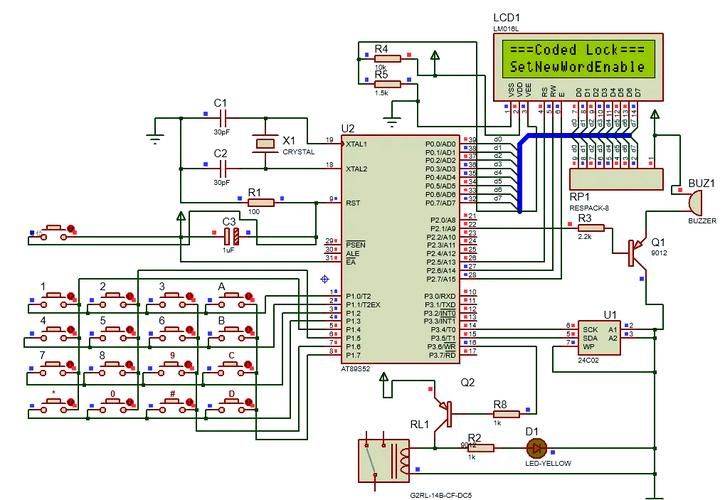
Keyboard is a common input device that triggers the corresponding signal by pressing the key and transmits it to a single machine for processing。
Depending on how you connect, the keyboard interface can be divided into separate keyboards and matrix keyboards。
When a key is pressed, the corresponding rows and columns are connected and the single machine detects the signal and processes it accordingly。
Keyboard interfaces are widely used in various settings that require input of information such as numbers, letters, symbols, etc。
Mouse interface
The mouse is an input device for positioning and selection that interacts with a human machine by moving and clicking。
Overview of mouse interface
In accordance with the working principles, the mouse interface can be divided into mechanical, optical and orbital globes。
Mouse interface classification
When the mouse moves, the internal wheel or optical sensor transmits the detected port transfer signal to a single machine, which calculates the coordinates based on the received signal。
Mouse interface working principles
The mouse interface is widely used in a variety of settings that require accurate control of cursor positions, such as drawings, games, etc。
Mouse interface application
Touch screen interface
Touch screen interface overview
Touch screens are a new type of human interface that combines input and display functions, and users use touch screens to input information。
The working principles of the touchscreen interface
When the user touches the screen, the touch screen sensor detects the signal and transmits it to the single machine, which calculates the coordinates based on the received signal and achieves human interaction。
Touch screen interface classification
The touch screen interface can be divided into resistance, capacitive, infrared and ultrasound types, depending on the sensor mode。
Touch screen interface application
Touch screen interfaces are widely used in a variety of settings requiring visual, fast input, such as smart terminal devices such as mobile phones, tablets, etc。
Mcs-51 unit output equipment
Chapter iii
Led show interface
Led shows interface principles
01
Led (lightemittingdiode) shows the interface displaying numbers or characters by controlling the led light. In mcs-51 units, a seven-part led monitor is usually used to control the brightness of each led segment by code to display different numbers or characters。
Led shows interface circuits
02
Led shows that interface circuits include components such as led monitors, restricted current and upper or lower pull resistance. The current-restrictive resistance is used to limit currents and to protect led lamps from burning due to excessive currents. Upper or lower drag is used to determine the initial state of led lamps。
Led shows interface programming
03
When programming, the number or character will need to be encoded as binary data and then output to the led monitor via a single machine. Common coding methods include bcd codes, 7 decodes, etc。
Lcd display interface
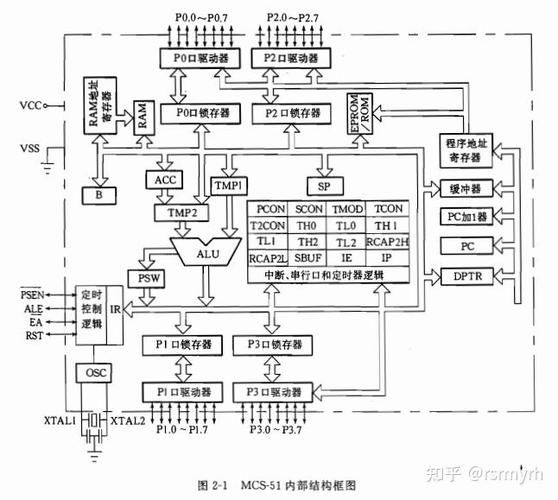
The lcd (liquidcrystaldisplay) displays the physical properties of the liquid crystal using the interface and changes the organization of the liquid crystal by applying voltage or currents to display different images or characters。
Lcd display interface principles
The lcd displays interface circuits that include elements such as the lcd screen, the driving ic and the associated connection lines. The driver is responsible for controlling the display of the lcd screen, and the connection lines are used to transmit signals。
Lcd shows interface circuits
Programming requires the image or character code that will need to be displayed in a format supported by lcd-driven ic and then output to the lcd screen via a single machine. The commonly used ccd drivers are st7920, hd44780, etc。
Lcd shows interface programming
Printer interface
Printer interface circuits
Printer interface circuits include elements such as printers, data lines, power lines and associated connectors. Data lines are used to transmit data, power lines are used to provide electrical power, and connectors are used to connect single-piece machines and printers。
Printer interface rationale
Printer interfaces transfer data to printers in a serial or parallel manner to enable printers to print text or images as required。
Printer interface programming
When programmed, the data that will need to be printed will be organized in the format required by the printer and then exported to the printer via a single machine. Common print languages are esc/pos, epl, etc。
Communications interface for mcs-51 units
Chapter iv
Rs-232 interface
Overview
Rs-232 is a standard serial communication interface often used for communications between computers and external equipment。
Apply scene
Communication between computers and low-speed devices such as modems, printers, etc。
Characteristics
One-end communication, supporting point-to-point communication, slower transmission rate, higher signal level and low demand for transmission lines。
Rs-485 interface
01
Overview
Rs-485 is an improved serial communication interface that overcomes the shortcomings of the rs-232。
Characteristics
Differential signal transmissions are used to support multi-point communications, with a distance and a lower signal level。
02
03
Apply scene
Often used for communications between computers and medium-speed equipment such as smart equipment, sensors, etc。
Usb interface
The usb is a common serial communication interface with interpolation, high-speed transmission, etc。
Overview
Thermal extraction and automatic detection are supported by differential signal transmission, with higher transmission rates and lower signal level。
Characteristics
It is often used for communications between computers and high-speed externals, mobile devices, etc。
Apply scene
Human interfacing design for mcs-51 units
Chapter v
Principles and elements of interactive design of human aircraft
Design should be easy to understand and operate and reduce user learning costs and difficulty of use。
The design should be stable and reliable so as to avoid problems arising from operational errors or anomalies。
Design should be tailored to the needs and habits of different users and provide personalized interactive experience。
Design should increase the efficiency and speed of human interaction and reduce the waiting and operating time of users。
User-friendly
Reliability
Adaptation
Efficiency
Methods and techniques of interactive design of human machines
Use of a simple interface layout to highlight core content and improve the readability of information。
Interface layout
Rational use of colour matching and matching to enhance visual impact and direct attention to users。
Colour match
Use simple, precise language to avoid ambiguity and misunderstanding and to enhance the effectiveness of information delivery。
Text expression
Use natural, visual interactions, such as clicks, drags, voice, etc., to enhance user experience。
Interactive
An example of an mcs-51 single machine human interaction
Use a digital tube for simple human interaction, such as displaying numbers, letters, etc。
Digital tube display
Use lcd screens to achieve greater information display and interactivity。
Show lcd
The interactive input function of the human machine is achieved by typing data and controlling commands by key。
Keyboard input
The sensor is used to capture environmental data and to display and alert in real time through human interfaces。
Sensor data acquisition
Thank you for watching
Tanks