The hp 1136 printer-driven official version is an official driver specifically designed for 1136 mfp printers. The latest version of the hp 1136 printer drive will address the problem of an anomaly in the connection between printers and computers and help users to enable printers to perform normal work. Printing, photocopying, scanning, etc. Can be done through the hp 1136 printer-driven users to meet day-to-day job requirements. Come down to china's software garden and download your favorite friends
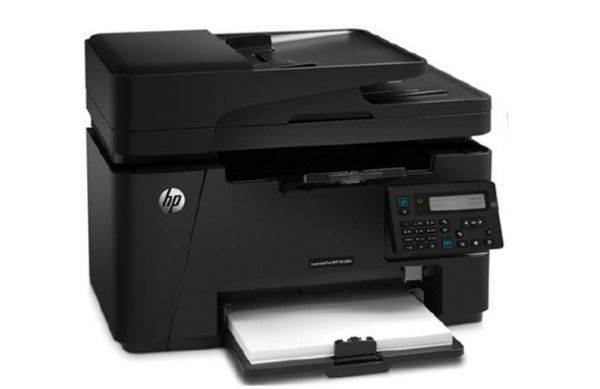
Hp 1136 printer driver profile
Hewlett-packard 1136 printers are compatible with various computer types to enable printers and systems to identify rapid installation drivers. Up-to-date hp 1136 users, once installed, can perform printing, photocopying, scanning, etc., easily meeting a range of requirements such as daily printing for small working groups and individual users。
The printer is a black and white laser unit with scanning, printing and fax functions. The driver, which is a multi-function one engine driver for hp laserjet pro m1136, version 5. 0, is recommended for installation by users using this one. Hp 1136mfp perfectly supports the 32-bit and 64-bit systems of winxp, win7/8 and win10. Hewlett-packard m1136 printing, photocopying and scanning are fully designed to meet the day-to-day document processing needs of small working groups and individual users. With regard to printing, the first page output time for m1136 has been reduced to 8. 5 seconds with the application of the hewlett-packard zero-second pre-heat technique, and the a4 output speed has been raised to 18 pages/minute, and the advantage of responding to a small number of multiple printing tasks is clear. In print quality, the application of the hewlett-packard fastres 1200 image enhancement technology allows m1136 to achieve an effective resolution of 1200*1200dpi, with clear and sharp output documents and fine and smooth images。
Hp 1136 printer driver installation description
1. Depression, get hpm 1136 printer driver
2. Connect printers and computers and turn on printer power
3 and setup. Exe files installed as hint
Reboot computer to print normal
Software features
Official authority
Launched officially by hewlett-packard to ensure compatibility and stability and to continuously update the latest operating systems in support of it。
Driver updates are regularly issued to repair known problems and optimize performance, and users can apply automatic testing for updates through the hewlett-packard network or hp smart。
Smart drive installation
Using the hp 's original smart drive ' technology, the user connects to the usb, the system automatically recognizes the printer model and completes the driver installation, without manual operation, similar to a disk plug-in。
Simplify the installation process and fit the computer quickly。
Triple function
Three core functions, printing, photocopying and scanning, are supported to meet the diverse needs of families and small offices。
Pool printing, photocopying, scanning in one size, small size, suitable for a limited space environment。
Efficient printing
Black and white laser printing speeds as high as 18 pages/minute (a4) and the first page output takes only 8. 5 seconds to process the volume document。
Support 600x600dpi resolution to ensure clarity of text and image。
Design for low energy consumption
Energy standards are met, with low availability and long-term use of energy saving。
Using the “hp auto-open/off” technology, non-working energy consumption is close to zero, significantly reducing energy consumption。
Drum-poly design
Replacement of consumables is simple, waste is reduced and usage costs are reduced。
Depletion model cc388a with a capacity of 1,500 pages to reduce the frequency of replacement。
Visual settings options
Provides a fast-tracking interface for parameters such as print quality, paper type, resolution, etc., and users can easily customize printing effects。
A double-line digital lcd screen displays the print status in real time。
Integrating diagnostic tools
Internal fail-checking allows detection of connection problems, printing queue anomalies, etc., and gives solutions。
Supports print queue management, removes stuck tasks, and resolves common problems such as " offline printer " 。
Software functionality
Basic printing function
Print speed: print speed as high as 18 pages/minutes in black and white (a4) and output time on the first page is only 8. 5 seconds。
Print resolution: supports 600x600dpi resolution to ensure clarity of text and image。
Paper handling: supports various paper types (common paper, envelopes, labels, etc.) and dimensions (a4, a5, b5, etc.), media mass range 60-163g/m2。
Manual double-sided printing: double-sided printing by adjusting settings saves paper。
Copy function
Photocopier speed: 18 cpm (black and white), supporting 1-99 consecutive pages。
Scale: 30 per cent to 400 per cent, with the possibility of setting the number of copies, scaling up and supporting the rapid reproduction of documents such as identity cards。
Photocopier resolution: black and white copy resolution 600 x 400dpi, colour and graphic copy resolution 600 x 400dpi。
Scan function
Scan type: tablet scan to support conversion of paper documents to digital formats such as PDF, jpeg, bmp, gif, jpg。
Scan speed: black and white scanning speed 6 ppm, optical resolution 1200 dpi。
Scan dimensions: maximum scanning size 216 x 297 mm to meet the requirements of a4 and below。
Network & sharing
Usb connections are the main: the official drive default supports usb 2. 0 connections to ensure that basic printing functions are stable。
Wi-fi (ieee802. 11b/g/n) and hewlett-packard, airprint, parts of the model, can be printed directly from iphone/ipad or ipod。
Advanced settings
Print queue management: allows to clear stuck jobs and solves common problems such as “offline printers”。
Waste material monitoring: provision of carbon-pumping tips to facilitate the timely replacement of materials。
Autodiagnosis: test the printhead status, the remaining ink cartridges, and suggest the replacement of consumables。
Hewlett-packard 1136 printer driven common problems
What if the hp m1136 printer is not installed?
Right-click settings - equipment - printers and scanners at the beginning of the win10 menu。
Click add printer to select " printers i need are not on the list " 。
The add printer window that pops up chooses "to add local or network printers through manual settings"。
Select the "usb virtual printer port " , click the next step。
The pop-out driver window selects " install from disk " and click " next " 。
Click the browsing button in the popup dialogue box, find the path position of the driver or cd drive that is downloaded, select the "autorun " file, click open。
Automatically return to the driver window to select the printer type "hp m1136". Click next。
Enter the name of the printer. You can also default. Click next。
Choose sharing or click " next step " after not sharing. Installation complete, test printing。
Hp 1136 printer driver update log
1. Partial optimization of functions
2. A lot of unbearable bugs
The chinese lieutenant recommends:
The hp 1136 printer drive software feels good! It's really good to be tested for this, and it's really good to use it, and benap 2506 printer driver, canon imageclass mf 4752 driver, fuji xerox workcentre 7835 driver, cobp 2900 printer driver, p355d printer driver, etc., are all very good software for you