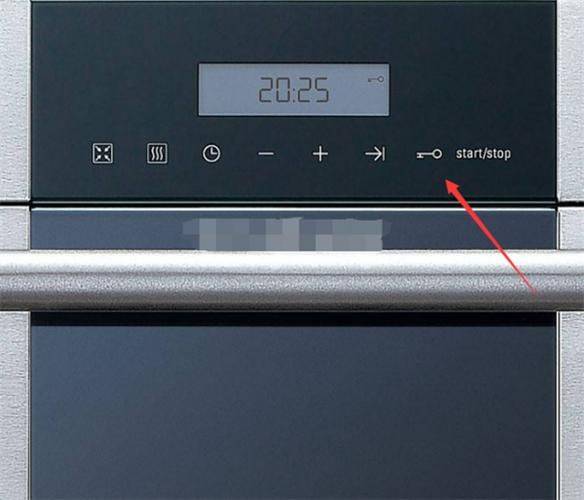
Paper size: open (x centimetres) 16 18. 4 26 siemens embedded venom cabinet built-in tableware sterilzercn use and installation instructions peration and installation instractionhs 244,500 whs 244600w paper size: open (x centimetres) 16 18. 4 26 preface read the instructions before using this product. The failure to comply with the precautions specified in the instructions for the use and installation did not result in any malfunction or loss falling within the scope of the plant's warranty and the manufacturer was not liable. Please take care of all documents. In case of doubt, contact the local siemens telecentre or distributor. If you need a brochure in english, click siemens for download. Or you can send an e-mail or call the helpline for free at siemens' home. Thanks for your choosing siemens cooking applicationsNo, no, no, noPlease keep all dIf you have any doubt, please coFor the purpose of this report, the secretariat shall: paper size: all packaging materials for new appliances are environmentally friendly and recoverable. Please dispose of these packagings in an environmentally sound manner to maintain a sound environment. Please do not allow children to play with plastic film and boxes, which may cause asphyxiation, so keep the packaging away from children, which is not a toy. Old appliances should be disposed of when the old disinfectant cabinet is no longer usable. Pull the power line plug and cut it. The old disinfectant cabinet contains useful materials for reuse. Please contribute to environmental protection by assisting in the correct treatment or recycling. Prior to the use of the new disinfectant cabinet, it was designed for the use of the family kitchen, so it can only be used in the family kitchen and not for other purposes. The sterilization cabinet was installed by embedding. Please read carefully the random attached documents, which include important machine installation, usage and safety statements. At the same time, please keep all documents in safe custody for future reference or transfer to the next machine user. The plant is not liable for any problems arising from non-compliance with these statements. The instructions for this use and installation apply to different types of disinfectant cabinets, so you may find different characterizations than yours. Read the instructions for the use of the stoves you have purchased. If there is any apparent damage to the disinfection cabinet, do not get electricity. Please contact the local siemens family electric client service centre or distributor immediately. It can only be repaired by professionally trained maintenance staff with maintenance qualifications. Other persons are not permitted to unsealed the disinfectant cabinet for maintenance without serious consequences. As a user, you are responsible for the maintenance and proper use of the disinfectant cabinet used at home. 2 paper size: open (x cm) 16 18. 4 26 product description technical parameters product type ztd90a-01ztd90a-02 product no. Hs244,500whs244600w product appearance 220v ~ 50hz rated power 520w sterilization method ozone + ultraviolet combination disinfectant/photically drying ultraviolet light main wavelength 253. 7nm ultraviolet light power 20w drying temperature < 75°c ozone concentration <40 mg/m3 safety device overheat protection, emp locking, child locking facility 90l quantified loading layer: 7kg product standard is in compliance with the following national standards: gb47061-2005 safety of household and similar appliances: general requirements please do not force the door to the disinfectant before the work process is completed in order to avoid an ozone leak. M burning hazard. Do not force the door to the disinfectant until the work process is completed, so as not to burn your hands. M fire risk. Please do not place flammable items in the disinfectant cabinet. 3 paper size: open (x cm) 1618. 4 26 use instructions before security precautions are first used: make sure that the four installed bolts in the disinfectant cabinet are in place and reliable. Open the door and remove all fixed plasters on the baskets, sliders and docks. If you have found damage to the sterilisation cabinet's lights, ultraviolet light tubes, and light wave tubes, contact siemens client service centre to replace them. For first use (or re-use after a long period of unused use), all bowls and reservoirs shall be removed and cleaned with fresh water. When used: it is necessary to ensure that the power outlets are physically effective. Close the cabinet before working the disinfectant cabinet, otherwise there is an ozone leak or ultraviolet radiation. Do not let a child or a weak person operate a sterilization cabinet, otherwise it is prone to burns, electrocution or other accidents. Do not insert or remove power plugs with wet hands. Please do not pull the wire to pull out the power plug. Do not place small objects outside the chopstick basket to prevent falling down. Please do not place plastics on the lower floor of the disinfection cabinet to prevent damage to foods by lightwave radiation. Owing to the complexity of the plastic composition, only high-temperature plastic foods suitable for microwaves can be sterilised in the upper part of the disinfection cabinet. If an ozone leak is detected during the course of use, it should be discontinued immediately and professionals informed to perform maintenance. If, during the course of use, it is found that the light from the uv luminescence is not seen directly by any perceiving object (e. G. Glass), the use should cease immediately and professionals should be informed for maintenance. 4 paper size: open (x centimetres) 1618. 4 26 use instructions when safety precautions are used: the water on the diet should be washed before being placed in the cabinet and the door opened 20 minutes after the disinfection cabinet has been completed to avoid ozone leakage or burns. There should be a gap between the dishes, which would make their disinfection and drying more effective. No towels, shoes, etc. May be placed in the disinfection cabinet. The disinfection effect of this disinfection cabinet meets the requirements of the national standard two star level. After use: if you do not use a disinfectant for a long time, remove the power plug. 5 paper size: open (x cm) 1618. 4 26 use instructions hs244500whs244600w 1. Ldc display screen familiar with you "bread" keys are used to set drying functions。the clock key is used to set the current time. Reconciliation is performed when the " reconciliation- " key, " reconciliation-+ " key sets the clock and appointment functions. “appointment” keys are used to set the appointment function. The “child lock” key is used to set the child lock function. “start/stop” keys are used to start and terminate functions. Six paper sizes: open (x cm) 16 18. 4 26 top-level latency map of the utensils placement area: area 1: job placement area; area 2: bonedisk placement area; area 3: chopsticks, knife and fork placement area; area 4: tablet placement area; area 5: long-stamped pan placement area: area 6: medium pan placement area; area 7: large panting area; area 8: long-tip placement area: 9 water catchment area; small food sets should be placed in area 3, not at a gap, in order to avoid damage when moving a basket. 7 paper size: open (x centimetres) 16 18. 4 26 use instructions set all functions of the clock sterilization cabinet to be set only after setting the clock! The screen displays the blinking '88' when you first connect to the disinfectant 's power or again after the blackout. The blinking will stop only after you have reconciled. Example: sets the current time at 20:251. The touch " clock " button displays the symbol " , and the number of hours starts to blink. If there is no reconciliation within 15 seconds of releasing the " clock " key, then you return automatically to the unchanged front clock display interface. Touch " adjustment+ " or " reconciliation- " keys until the correct number of hours is shown. Touch "clock" buttons, displaying the "clock" symbol on the screen, and the minutes start to blink. Touching " adjustment+ " or " reconciliation- " keys until the correct number of minutes is shown. Press the clock again, save the set and return automatically to the set clock interface. 87 paper size: open (x cm) 16 18. 4 26 use instructions functionally set this disinfection cabinet to have six disinfection drying work programs: b60min50minc20min25a070min drying program b050minc020min, depending on the quantity of food items and the extent of contamination that may occur. The disinfection and drying program sets 1. The first touch " disinfection " button shows the screen as shown in the left graph, and the two " symbols begin to blink. If there is no adjustment within 15 seconds of the release of the " disinfection " key, the clock display interface will be returned automatically. When the “sterilized” key is touched again or continuously, the disinfection mode will be circulated: a→b→c→a... If you touch the "start/stop" button within 15 seconds, the work program will start immediately and the electromagnetic safety door will be locked. The first touch " drying " button, showing the screen as shown in the left chart, and a " sign starts to blink. If there is no adjustment within 15 seconds of the release of the drying key, the clock display interface will be returned automatically. When the drying key is touched again or continuously, the drying mode will be changed: a→b →c →a... If touch "start/stop" in 15 seconds, work program