There are currently two different sets of seoquake and moz bar that are required for the english-language seo, but today we are talking about the installation and use of seo quake。
Seo quake was developed by semrush, and you can understand it as a browser version of semrush, so its data and semrush data are exactly the same, and if you have a semrush account number and log in, you can get more data。
I. Seo quake installation presentations
The browser plugins are supposed to be very familiar, taking care of white, and briefly, the seo quake supports google and fire fox browsers, for example:
First step, open the google browser and directly access:
Https://chrome. Google. Com/webstore/detail/seoquake/akdgnmcogleenbclghlkkddkjjc? Hl=en
Step 2: click on add to chrome, come out of the box, click on the extension. And when it's over in two minutes, we can see the small icon of seo quake at the top right corner of the browser:
The fire fox browser is then simpler: firefox is activated, and the tool----------------------------------------------------------------------------------------------------------------------------------------------------------------------------------------------------------------------------------------------。
Ii. Seo quake use presentations
After the seo quake role was divided into two blocks, the first, and the installation of seo quake, when we used google to search, we can see two rows of important website information under each search:
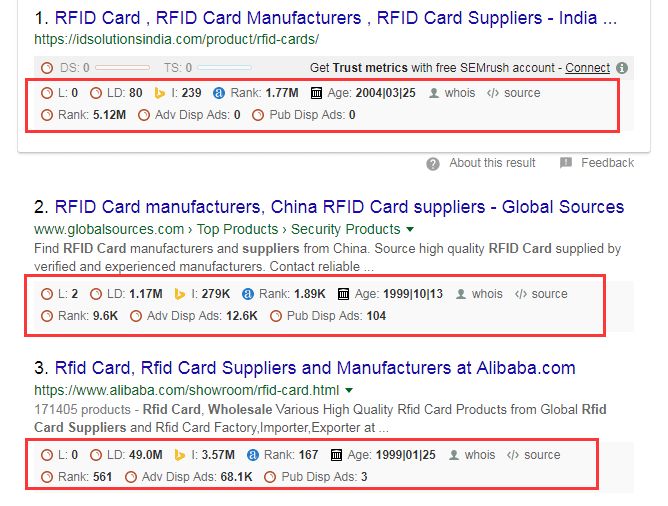
And then we'll show you what these two rows of icons and data mean:
L:lInks short, meaning the number of extra chains on this page. Note this page, not this site. This site may have a w link, but this page may not have any
Ld:lInks domain in short, meaning the number of extra-chains on the entire site, which corresponds to l above。
Yellow little triangle (actually bing logo: lowercase b): this data shows bing's intake, and that's how many pages of the site are recorded at bing。
@rank: this is the ranking of the lexa website, which ranks the global website according to traffic, which reflects the traffic。
Age: the history of the website, when it existed。
Whois: information on the owner of the website。
Source: click to view the web source code。
Rank: semrush rank。
Adv disp ads: number of adwords adverts posted on website detected by semrush. (these numbers can be detected by semrush, and the actual website advertising should be much higher than this data)
The number of ads on websites detected by pub disp ads: semrush. (ibid.)
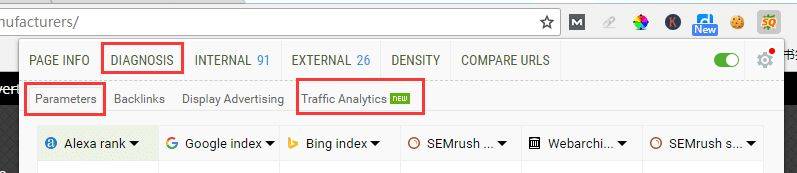
The second function: to open a page and click on the top right corner of the browser, a small icon for seo quake, we can view this page and the details of seo on this site, which are more important for parameters, traffic analytics and diagnosis:
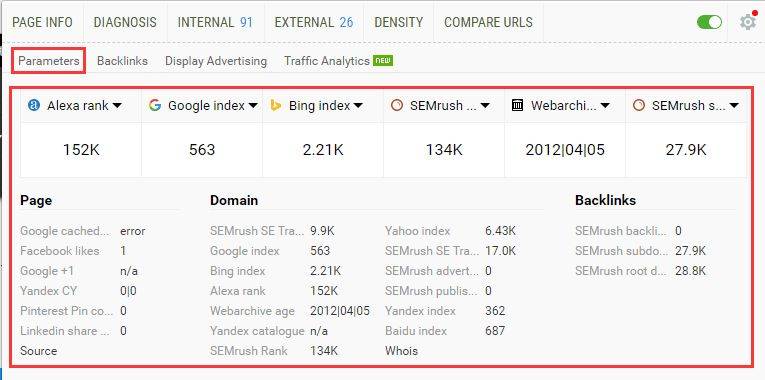
In parameters, we can find some of the most basic information on the website, such as entries in major search engines, the heat of this page in social networks (whether it is shared or not), and the rankings of various authoritative websites obtained, as well as the external links measured by semrush:
And in traffic analytics, we can see the estimated traffic on the web site:
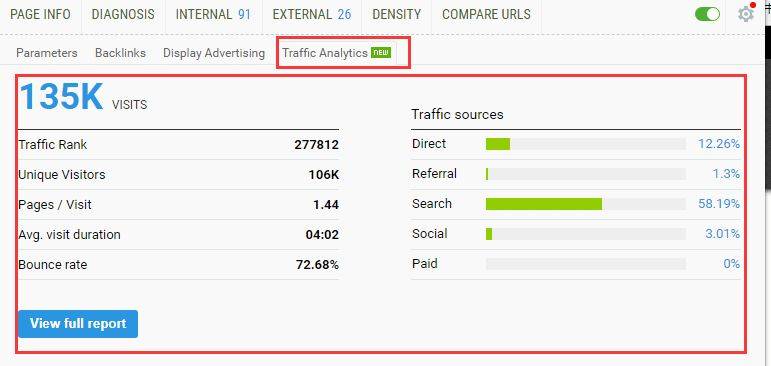
They include websites pvs, uvs, stop times and drop-out rates, and traffic sources. (note that use of traffic analysis requires access to semrush, free account only)
Then, by clicking on diagnosis, seo quake can give the seo results of this page, which include a lot of important information, such as the website tdk, photoalt tags, schema, mobile ease, robots, etc.:
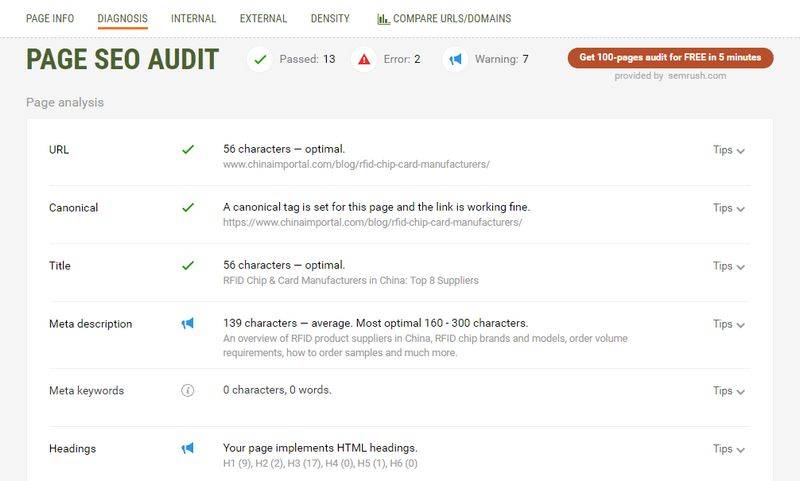
Of course, we can click on backlInks look at the details of the external links on the website, click on internal, click on external to export links to the page, click on density to view the web keyword density, click on page info to view the comprehensive information on the web page, and so on。