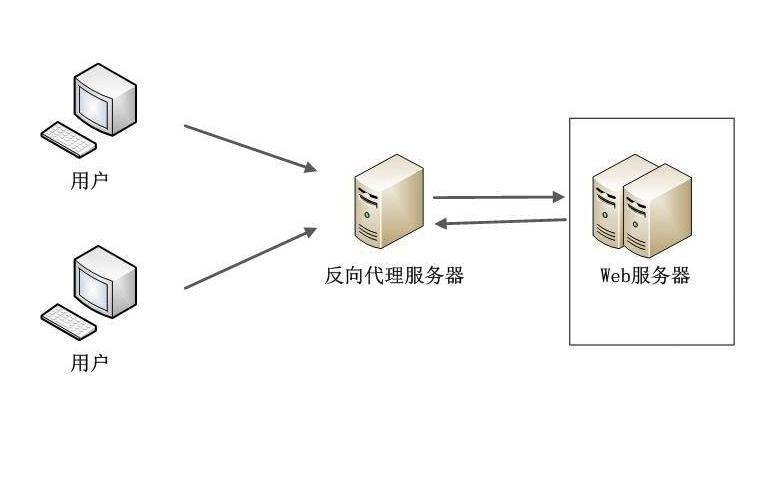
In addition, in order to increase the high reliability of applications and their horizontal expansion, internet sites typically deploy reverse agent (load equilibrium) hardware or software such as f5, lvs, haproxy or nginx in front of web servers to achieve a four- and seven-storey load equilibrium。
I
In cases where there are multiple sites, it is usually distinguished by a secondary domain name, for example, that you have two sites, and you can do two dnss to two different public internet ips. For example:
Site 1: http://news. Aaaa. Com/192. 1685. 123
Site 2: http://ports. Aaaa. Com/192. 168. 50. 124
This way, when users request http://news. Aaa. Com and http://reports. Aaa. Com, they can access the corresponding pages, but this will consume two public internet ips, and if you have a n site, you will need a n-ip address。
Ii
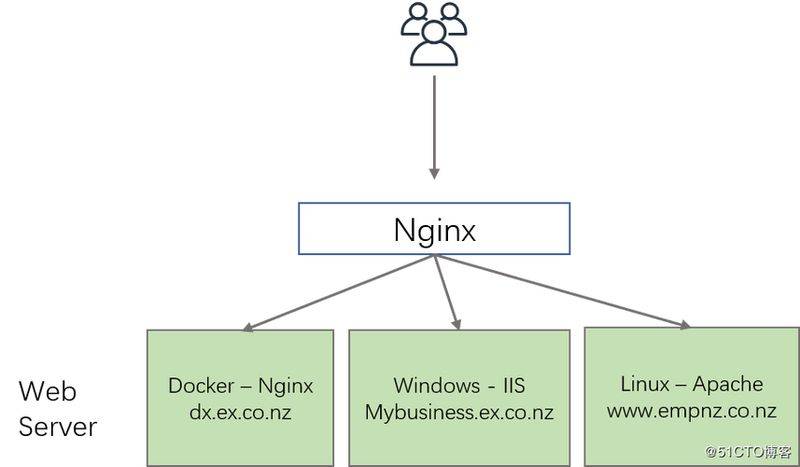
A friend would say that i can distinguish my site by using the ip+ port number, deciphering the two different domain names of dns to the same public network ip, so that i can re-enter my public network ip, e. G. Map 192. 168. 50. 123. 80 (default port) to http://news. Aaa. Com, map 192. 168. 50. 8023. 80 to http://ports. Aaa. Com, which users need to enter when accessing
Http://sports. Aaa. Com:8080, which also enables the reuse of a public internet ip to meet the need to access two different domain name sites. But the problem is that domain names are very unfriendly to users with port numbers, and 8080 port numbers may still be wrong for small white users. It is good for internal users, but it is not realistic for external users to access the site with more port numbers。
Re-advocacy of public internet ip above, using port numbers to distinguish websites, interprets two domain names as dns to the same public internet ip。
Site 1: http://news. Aaaa. Com/192. 1685. 123
Site 2: http://ports. Aaaa. Com/192. 168. 123
Iii
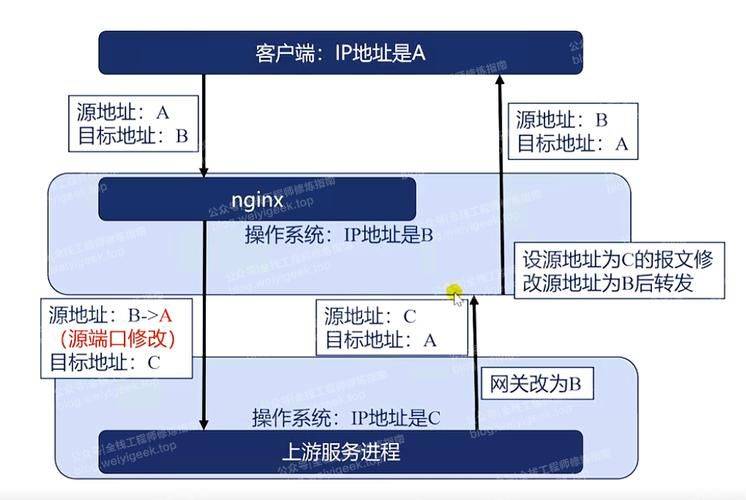
Is there any way to access it through the same ip+80 port in the case of multiple domain names? There is a way, for example, to use nginx as a reverse agent (load balance), and other hardware or software is the same. This is mainly used as a “virtual mainframe” to achieve public internet ip consolidation。
For starters, nginx is required as a reverse agent to use the seven-layer proxy mode (nginx is a seven-layer agent by default). It is known that the request from http has been forwarded to the corresponding web cluster server by judging that this domain is being forwarded to the corresponding web cluster server, and that the corresponding page from restone is sent to the browser when we enter a domain name to access a site, and that the corresponding host domain name is inserted in the nginx reverse agent's message, so that the public network ip will be saved by accessing this < http request > 。
The following is the specific configuration in nginx and the request process, which is very simple, as long as different configurations are given according to servername to proxy pass (the meaning of the specific configuration parameters is not repeated because there is already a great deal of detail about nginx's reverse agent and load balance on the web)。
Edit nginx profile, vim / etc/nginx/nginx. Conf
1. Creation of two upstreams, namely, a pol for the real backstage server, one for the web server, 192. 168. 50. 201, and the other for the web server, 192. 168. 50. 202
2 create 2 servers and listen to 80 ports, one set servername to http://news. Aaaa. Com, proxy pass tonews thisupstream and the other set to http://sports. Aaa. Com, proxy pass to reports thisupstream
3, nginx counter-agent published the ip 192. 168. 50. 123
{upstream news ip hash; server 192/168. 50. 201:80;}upstream reports{ip hash; server 192/168. 50. 202:80;}server {liten 80; server name news. Aaa. Com; local/ {proxy pass http://news; proxy set host$http host;} server {liten 80; server names reports. Aaaa. Com; location/ {proxy pass http://sports;proxy set head east$http host;}
Now let's test my own computer simulation as a client and modify the system hosts file simulation of dns resolution at http://news. Aaaa. Com and http://sports. Aaa. Com to the ip address of 192. 168. 50. 123
Access via browser http://news. Aaa. Com
Access via browser http://sports. Aaa. Com
The above results in the use of the host of the header of the http site to select the appropriate nodes for forwarding and the virtual mainframe functionality. There are, of course, many rules that can be used by the headers of the http site for seven layers of forwarding。
Keywords: agent, achieved, adopted