Computer-based wifi hotspot settings
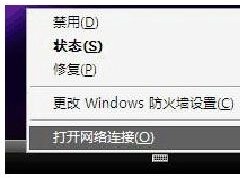
4. Set sharing, or in the attribute of this link, click " advanced " . Check "permissive"... Local connection is complete, if shared successfullyWireless connectionAttribute, wireless connection automatically acquires data such as ip address。

Computer-based wifi hotspot settings
If there is no change in wireless connection, manual modification is sufficient。
Wifi hotspot wireless connection settings: 1, properties to open wireless connection, select wireless network configuration
Click on the add button, as shown in the figure below, the name of the network is named itself, and whether it needs a password to set it itself (must be in english). However, it is safer to set the password for network security. Note: the next one, "this is a temporary computer-to-computer network," has to be selected. I've already checked, it's gray。

Settings for wifi hotspot wireless connection
If you can't find your wifi signal, look at the following settings:
In network connection, file-network installation wizard. If there's a graph below, we'll check out the oversight. Click next

This is where you're going to choose which network you're connected to, depending on your circumstances!

Here's your wireless card, click on the next one, and the next one will be called setting the computer description and name. Fill in the point next and set the working group name to the next step and select the next step for the "close files and printers" point

Press the chart and select the next step。

To this computer, the wifi hot-wire connection is complete! Open the wifi on the phone that supports the wifi without accident, and we can find the new wifi hot-wire!
If you connect to wifi but can't access the internet, configure your ip address manually!
The ip address is the same ip address as your computer. The ip address is 192. 168. 80. 1 so my phone can be 192. 168. 80. X.
Sub-cover: 255. 255. 255. 0
Three, dns, and routers fill out the ip address of your wireless network, for example, i should fill in 192. 168. 80. 1