Three, all operations, especially when you're sure to wait. The computer set up for a while.
Four, there's no "to connect even without broadcast sid."
Xp notebooks with little knowledge of wireless hot spots:
RightWireless networkConnect and select the attribute window opened without wirelessNetwork configurationTab。
Solutions: click start/run, enter " servicees. Msc " and return to the car, find the " wireless zero construction " service in the open list, and right click to start the service. . The corresponding tab is displayed when the attribute window for wireless network connections is opened again. The phoneConnection methodLet's not talk about it. We all should。
Xp notebook wireless hotspots are set in such an environment:
The notebook has two webcards, one wired, one wireless, one wired router, one notebook and one wired lined through the network。
It is clear that the set-up will be 100 per cent successful。
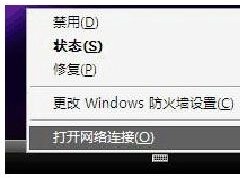
Right click on online neighbour, select properties
Right click on wireless network, select properties
The following window appears to select the wireless network configuration:
Option "add"
6. Set up the name of the network (ssid), which can be taken up by name. Data encryption must select " disabled " , otherwise you will be prompted to enter the password and switch to the connection window
7. Check for automatic connection, then click ok, and pop up a hint
Click to continue
Click on advanced
The choice is between computers only and computers only。
Internet connection sharing is optional. Just make sure
Wireless network configuration, location determination。
13. Return to the network connection window again, select wireless network, right-key bridge
14. Bridge complete
Right click " wireless connect " to view available wireless networks
16. It worked. We'll just have to search the hotspot on our cell phone
Xp notebook wireless hotspot course