- what is bread crumbs
Generally speaking, bread crumbs are complementary and complementary forms of navigation that enable users to know where they are on the website or in applications and to easily return to their original sites。
The vast majority of them look like this: level i pages > level ii pages > level iii pages or level i/ level ii pages / level iii pages。
What are the types of bread crumbs
Typically, bread crumbs are divided into three categories: location-based bread crumbs, attribute-based bread crumbs, and road-based bread crumbs。
1. Location-based bread crumbs
This type of breadcrumb navigation is the most common in the breadcrumb navigation, which gives a good indication of the hierarchy between the current page and the site as a whole; it can be that the user knows where he or she is and that he or she can find the page he or she wants to reach more quickly, and such breadcrumb navigation is mainly used on a website with multiple classes of navigation (usually more than secondary navigation)。

2. Property-based bread crumbs
An attribute-based breadcrumb navigation lists the categories of a given page。
This kind of breadcrumb navigation is a good way of pointing out other attributes or categories of current products on the page. It helps users understand the links between products and filters the results through a variety of attributes; this type of breadcrumb is often found on websites with a wide variety of products and services, such as our common e-commerce website, web-based teaching services and so on, as is the case in amazon, the telecommunication classroom。
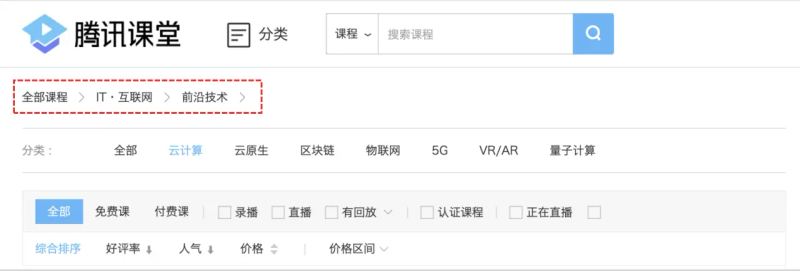
For a product, there is often more than one attribute, large and small; a route such as this subordination can give users a more intuitive view through this breadcrumb navigation。
3. Path-based bread crumbs
Such bread crumb navigation is the least common, and the type of bread crumb navigation and fairy tales described above are eager to display links to the web pages visited by visitors in front of arriving pages。
There is no clear hierarchy between bread crumbs and their functions are somewhat similar to those of the forward, back buttons。

Iii. Under what circumstances would bread crumbs be appropriate
Let's look at the impact of the bread crumbs in terms of:
So under what circumstances is it appropriate to use breadcrumbs to navigate
Let's look at the typical effect of bread crumbs: information positioning and user path display。
On the basis of these two typical characteristics, bread crumbs are well suited for use in two scenarios:
1. Strict linear structure
As the navigator route for breadcrumbs is linear, the content of the site must be clearly divided and independent。
Otherwise, the path of the breadcrumb navigation is not the only one, and the same classification may appear in different paths, confusing users and thus reducing their experience。

Deeper hierarchical structures
The breadcrumb navigation is suitable for a deeper web site, which can be quickly located through the main navigation only if it is classified at one level; for example, the electrician web site is structured as a hierarchy and contains a hierarchy of groups, with a large number of product pages grouped by category。
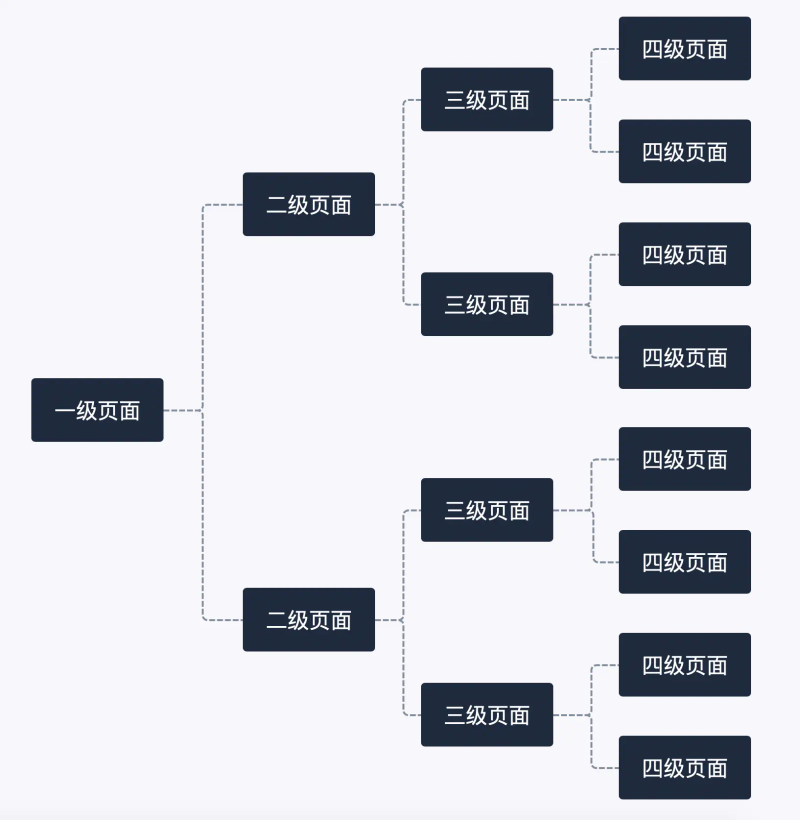
The best way to determine whether the site is suitable for the use of breadcrumb navigation is to draw out the structure of the site or to present it as a chart, and then to analyse whether using breadcrumb navigation will help users to switch more easily to different types of web pages. Did you learn
Iv. What should be noted when using bread crumbs
Having discussed the definition of bread crumbs, their type and the circumstances in which they are suitable for their use, let's look at the attention given to their use:
1. Do not replace top-level navigation with breadcrumb navigation
Bread crumbs generally complement the main navigator and should not have a dominant role on the page. Bread crumbs are smaller or less visible than the main navigator's vision, and page space is relatively small; it is mainly black and grey in colour, and it is mostly in the form of linked text and usually in only one line。
Usually present horizontally at the top of the page, usually at the bottom of the title/page header or above the content area。

2. Do not add links to current page navigation text
The last level of the breadcrumb navigation can indicate that the current page also represents the upper level of the current page。
However, if it means the current page, remember not to add a link, since the user is already on this page, and adding a link to the current page would be equivalent to two plates containing a fish — redundant。
3. Use of separator
Separator: the most concise separator in the breadcrumb navigation is greater than the number ">". Usually larger than a number is used for position-based breadcrumb navigation, which represents the hierarchy between navigation projects in the form of a “patern” subcategory。
In addition to the larger than the number, right-hand arrows can be used to "push " , doubles greater than the number ">" and an oblique "/" , depending on the type of navigation and visual effects。
Summary
The purpose of the breadcrumb navigation is to make your website more accessible to users。
A “important little role” in terms of user experience, which is not visible to the user; it appears simple, but it optimizes user experience and increases user viscosity。
Author: wowdesign, research design value maximizes, involving user experience, brand experience, spatial experience。