Have you ever had some bad scenes as a network worker, a weak electrician, or someone who understands the network
The office is heavily staffed with internet access to cardon, and videoconferencing is frequent
The staff member's remote office was not connected to the intranet and the file failed to pass in half
The surveillance footage is delayed, iot equipment is frequently offline; there is even a risk of internal leaking, intrusion..
The boss or the head always says you know the network
A lot of companies may think that the internet is just a wire and a router. It's nothing。
We can't do this anymore。
Today we'll talk about the planning and design of the network。
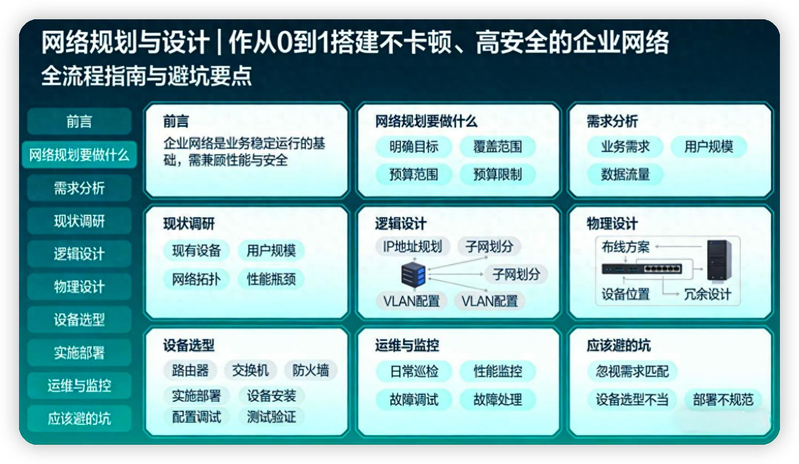
1. What are network planning for
First of all, we need to understand that network planning is not about buying equipment, but about setting up structures。
In fact, many people are wrong about this, and feel that it's all right to buy a core switch, a router and a wire。
In fact, network planning translates the business needs of enterprises into a landable, scalable and manageable network structure。
It's like building a house first by drawing drawing drawings, laying foundations, building walls, not just working。
A complete set of network designs, the core of which should contain the following six main modules:
How to evaluate a good network
We need to establish a seven-word truth。
Steady, fast, secure, extended, administrative, provincial, easy。
(1) steady: the network is required to be available for 7 x 24 hours without single point failure。
(2) quick: networks are required to have low-delayed, high-intensity capacity rather than cardon。
(3) ann: of course it's safe, the network is required to have a boundary + innernet + three layers of terminal protection。
(4) expansion: networks are required to be scalable and can be achieved in a smooth manner with additional people, additional operations and bandwidth。
(5) pipeline: requires centralized surveillance of the network, and problems can be resolved quickly。
(6) province: the network is required to be economic and not to waste resources so that it is reasonably appropriate。
(7) easy: networks are required to be simple to operate, to have easy access, and to keep their daily maintenance low。
2. Needs analysis
Demand analysis is the most critical link in the design of network planning, and he directly determines the success of the planning programme。
These four questions need to be clear before planning the design:
(1) what are the business needs? Is it not, for example, to support oa, erp, videoconferencing, surveillance, cloud desktops or material networking
(2) what are the user needs? For example, how many employees, in several departments, do you have mobile office, remote access needs, isolation needs, etc.
(3) what are terminal needs? How many computers, how many printers, how many aps, how many cameras, how many iot devices
(4) what are future needs? For example, in three years, whether it's going to be larger, more bandwidth, new products, etc。
3. Current research
Once the needs have been analysed, a study of the current situation on the ground will begin。
It would be useful to know what the current network was and what equipment was still available. We need to prioritize the use of existing assets and reduce unnecessary inputs。
We need to find out what equipment is available at the enterprise (switchers, routers, aps), bandwidth size, wiring, room environment, etc
And to figure out what the pain is. For example, there's a security risk where there's a cut-off, a cut-off or a drop-off。
4. Logical design 4. 1 what is the main concern of logical design
This is the central part of the overall planning design for which the knowledge and steps ahead are made, which has a direct impact on the stability and management of the network。
At the logical design stage, we need to focus on the following:
(1) top-up structures
The company's pedestal structure is the “core layer - congregate layer - access layer”, which is preferred。
In the case of small enterprises, it would be easier to simplify the use of two layers of “core + access”, which would be low-cost and easy to maintain。
(2) vlan planning
Vlan is divided by department, function or required security level according to the user needs we have investigated。
For example, administration, finance, research and development of one vlan each, to avoid network confusion。
You need to know more about vlan planning. Please read my article "web security" in vlan: what is it
(3) ip address planning
Ip address planning is intended to be non-confrontational and well managed. For example, the network uses 192. 168. 10. 0/24 and the wireless network uses 192. 168. 2. 0. 0/24。
Wifi's been stuck all afternoon? You might have lost the ip planned start-up line. This planning guide gives your network access
(4) routes and strategies
Select a static route or an ospf route according to business needs and configure qos (guarantee videoconferencing, core business priorities), acl (control of access to the intranet)。
4. 2 network architecture design
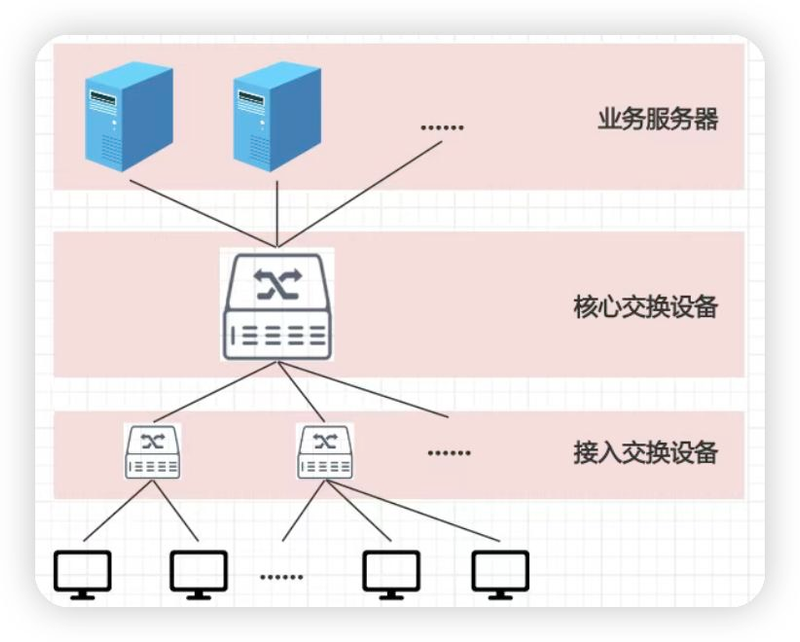
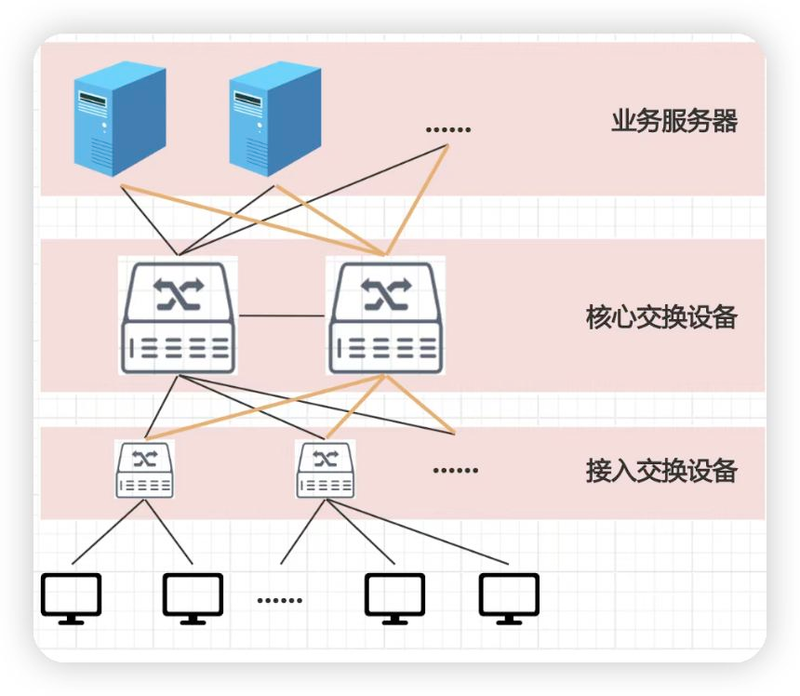
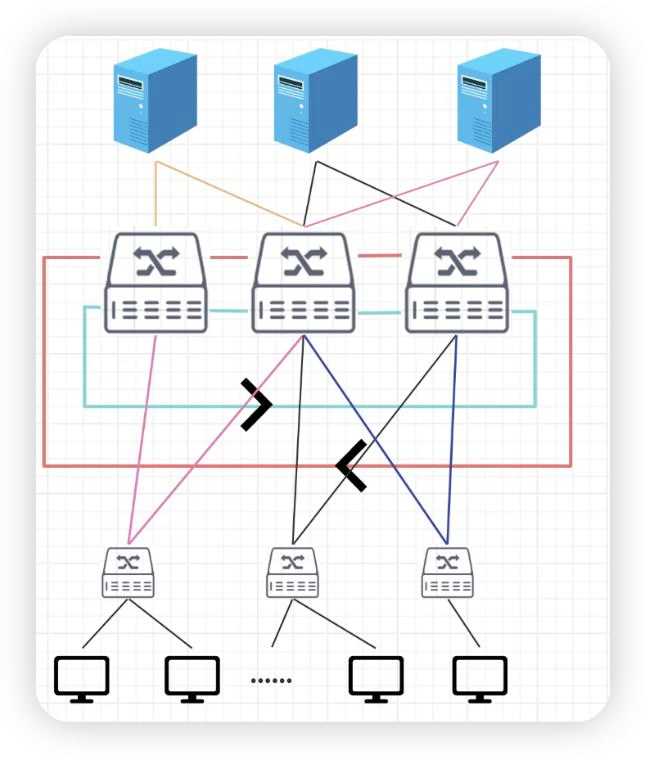
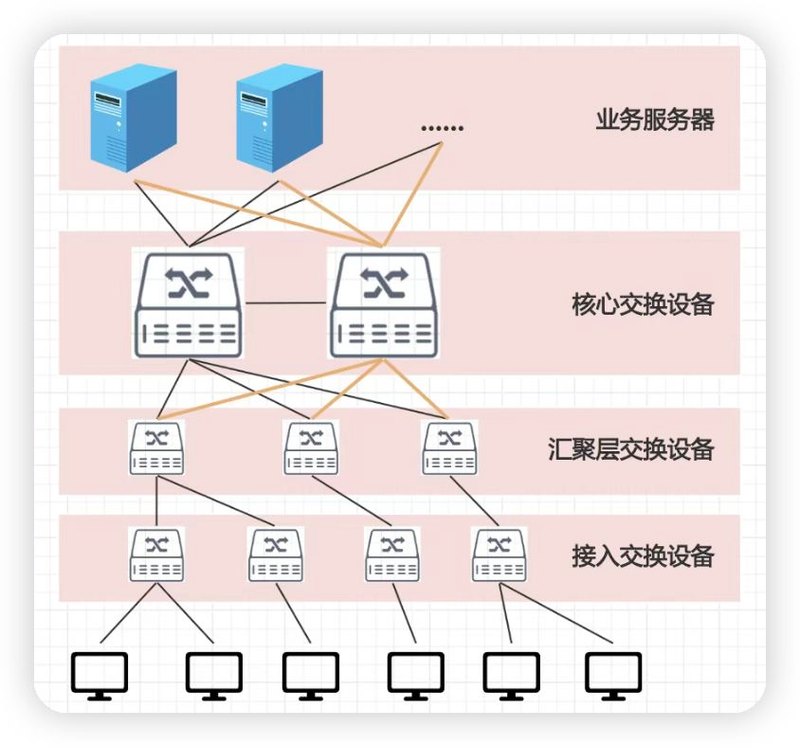
There are four types of network architecture in general: a single core structure, a two-core structure, a ring structure and a hierarchical structure。
Single core structure
There are generally only core and access layers。
Two core structures
It's just the access and the core. But one more core exchange。
Ring structure
Multiple core exchanges are linked at the end of the line and form a closed ring link。
Level structure
The hierarchy is generally divided into three layers, with additional condensation layers, mainly to alleviate the pressure on the core layer。
5. Physical design 5. 1 what is the main concern of physical design
Physical design is the skeleton of the network and is deployed to determine the stability of the network directly if it is not in place。
The deployment will focus on several aspects:
(1) wiring, the main need being to select the grid first, e. G. Six/over six-category grids, the main line being fibre-optic, and the power and power must be separated to avoid signal interference。
(2) node, equipment ap, cameras, network panels, etc., are reasonable for children, ensuring that the wireless network is fully covered and that no dead ends are monitored。
(3) the rooms, which are subject to a wide range of attention, such as the installation of cabinets, power supply, heat dispersion and location, are regulated and equipment must be avoided because of overheating and power failure。
(4) marking, which is an important point, does not follow up on maintenance and goes crazy. Networks, ports, panels are standardized and later maintenance is more economical。
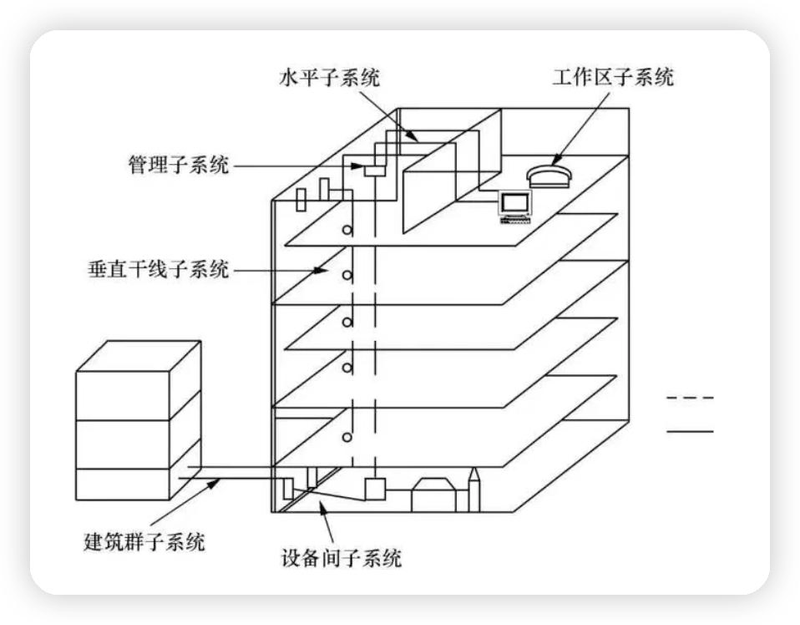
5. 2 integrated wiring system
Integrated wiring systems are a core component of the physical design of the enterprise network。
Simply put, it is a standardized, modular “network wiring infrastructure” that provides a stable physical connection to all network equipment of the enterprise (switches, aps, cameras, pcs, etc.)。
(1) workspace subsystems: network panels, jump lines (connection to pc, printers, etc.) in the office
(2) horizontal subsystems: cables from panels to weak inter-storey cables (six categories mentioned in the article / over six types of grid)
(3) vertical subsystems: main trunk cables between floors (fibre fibre referred to in the article, equipment used to connect different floors)
(4) management subsystems: weak electrical units, distribution frames, switches, etc., for the sorting and management of cables
(5) inter-equipment subsystems: core equipment in the machine room is connected to the wiring and contains the wiring inside the cabinet
(6) architectural cluster systems: connectivity between multiple buildings (e. G. Fibre optics between different office buildings within the enterprise campus)
6. Equipment selection
The equipment selection is a test of both experience and needs and research。
The right equipment is the economy that saves time。
The core option for the equipment selection is “enough to use and to reserve an expanded space”。
The following is a selection of equipment:
(1) core level equipment, mainly focused on high performance and redundant. For example, double cores to avoid single-point failures and support stacking。
If there is a core layer in the planning, the money cannot be saved. This is the core of the entire network。
(2) combination layer equipment, which focuses mainly on strategic control, three layers of relay capacity, and which is primarily capable of absorbing the flow of the core layer and the access layer。
(3) access layer equipment, which focuses mainly on the density of the port, is the number of ports and whether poe is supported in providing electricity to ap and cameras。
That's a price for money。
(4) for the export of equipment, firewalls generally select the next generation of firewalls (ngfw), which support intrusion defence, vpn, behaviour management。
(5) wifi cardon is not replaced by wireless devices, which select the ac+scrawlyap model and are managed centrally and seamlessly。
In accordance with the above-mentioned requirements, requests for quotations from the equipment supplier will be sufficient for procurement。
7. Implementation of deployment
There's a golden principle here, and there's no big problem with it. It is “back-up, pilot, full after”。
The main steps can be followed:
(1) backup existing network configurations to avoid failure of cutting。
(2) full deployment after confirmation of no problem
(3) must do test collections
(4) compilation of documents, including equipment lists, configuration scripts, topography
8. Transport and monitoring
A lot of people will think that by six steps, it's over。
But it must be stressed here that post-opportunity is crucial
The following recommendations were made with respect to the later stages of operation:
(1) building a monitoring platform: to achieve visualization, flow analysis, failure alerts, and rapid positioning in case of problems。
(2) regular maintenance: inspection equipment, backup configuration, reinforcement of loopholes to prevent minor problems from becoming troublesome。
9. The pits to be avoided