


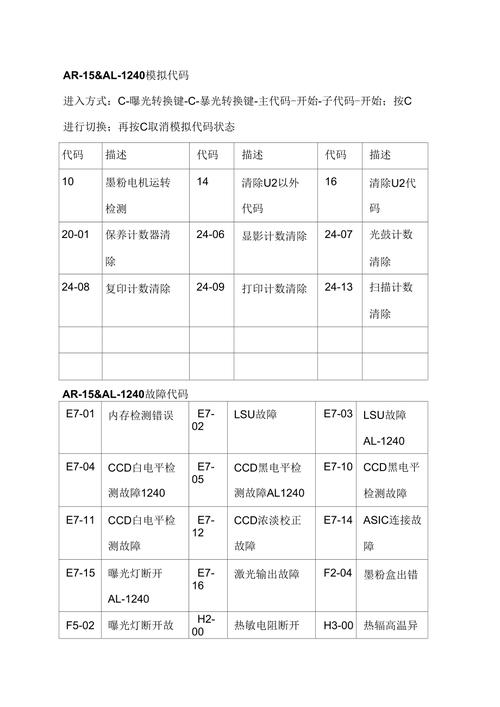
Common photocopying machine failure maintenance and code interpretation are largely in modern office scenes, and the stable operation of photocopiers as the core equipment for paper and print flow directly affects the efficiency of work. The equipment is prone to defects in cardboard, image distortion, code error, etc., as a result of long-term high frequency use or environmental disturbance. This paper combines first-line maintenance experience, the breakdown cause and maintenance path of the system, the in-depth interpretation of the mainstream brand error codes, and provides a practical reference for office equipment maintenance. First, the diagnosis and maintenance strategy for hardware failure (i) cardpaper failure: “intestine infarction” cardpaper in the feeder channel is the most frequent failure of photocopying machines, essentially paper stagnates on the transmission path due to resistance imbalance or sensor error. The causes of failure are divided into three categories: mechanical retardation: the ageing of the pentray rubber (reduced friction); the dissociation of the claws (unable to separate the paper from the selenium drums); and the flow of paper wheel dust (shrunk passages). Sensor anomalies: paper detection sensors (e. G., pv switches) are shielded by paper chips and the penthouse spring of the paper sensor is loose (sign error). Paper issues: use of damp paper (fibrous swelling card), paper-specific super-equipment compatibility (e. G., too thick copper paper). Maintenance steps: 1. Unlock the hood and pull out the cardboard lightly in the direction of the walking paper (avoid shredding residues); 2. Clean entry of alcohol cotton (cleaning of oily dust) and examination of separated claws (replacement); 3. Remove sensor surface paper chips and test the signal in the form of a matrix (which should trigger low electrical flats); 4. Replace damp paper, giving priority to the weight and type of paper recommended in the manual. (ii) image quality failure: the problem of the "fault password" image of the output effect needs to be checked from the "optic-simulation-predictation" system, with the following common failures and countermeasures: 1. Images have black edges/black strips as a result of the ageing of the acreage plate (carb powder residuals are not clean), the lack of sealing of the graphics warehouse (carbon powder contaminated lenses), and the wear of the accelerator (carrying out of sticky powder). Repairs: selenium drums to check blades (replaced for wear and tear); cleaning of the silo seals and silicium coating; overall replacement of components with scratches on the tablet. 2. Image faded/decoloured causes: ink inner inner inner inner cartridges, visual bias abnormalities (high pressure plate failure), optical lens dusting (scan light distortion). Maintenance: implementation of “carrying initialization” after ink supplements (different brand operations, e. G., energy needs to go into maintenance mode); universal meter detection of visual bias (unusuals for high pressure plates); specialized lens paper cleaning optical components (avoiding alcohol exposure to membranes). 3. Image fuzzy/replicating cause: inadequate scanning temperature (heater/temperature control failure), uncomfort of trans-print belts (paper mixed with selenium drums), optical bias (scan head synchronised with selenium drums). Maintenance: thermometer tests the temperature of the spectrometer (below 180°c for heating/temperature controllers); regulates the trans-print band tension (side-covered screws tighten); calibrates optical logarithmic parameters (e. G., optic adjustment “adf-to-place compensation”). (iii) numerical system malfunctions: the root causes of “scalding” and “crawling paper” are defined as the key components of carbon powder thermal smelting, and the failure is concentrated on temperature and pressure control: the accumulation (colouration of carbon powder): the breakdown of heat-heated threads, damage to temperature-controlled sensors, damage to the fixed film. (b) zero meter detection of heat-enhancement during maintenance hours (normally tens of om, with break-off swaps) and replacement of temperature-controlled sensors or stationary film. Paper wrinkles/rolling: unequal pressure of the acetogram (axis wear and tear), excessive temperature of the acetogram (excessive evaporation of paper water), mismatch of paper/square speed. Replacement of the lower bearings during maintenance, adjustment of the fixed temperature (reference manual, a4 paper, usually °c), calibration of electrical parameters in maintenance mode. (iv) powder system malfunctions: “back ink” and “spill” games directly affect the printing concentration, the core problem being the synergy between the powder box and the graphic warehouse: powder leaks: the powder box seal is ageing and the visible chamber gears are worn out. Replacement of powder case seals for maintenance and inspection of the visible silo gear group (severe wear and replacement of the visible component). Powder break: powder case mixer stuck to death (carbon powder block), powder generator damaged. The solution is to loose the carbon powder in the shaking powder box and replace the malfunctioning power (note the matching model). Ii. The deep interpretation of the wrong copying machine code by the mainstream brand code is the language of the equipment “self-diagnostic” and the logic of different brand codes varies slightly, with the following typical codes being interpreted and disposed of: (i) canon: e series code fail-magnification e000 (facing of the acetography system): an anomaly in the temperature of the acetogram (disrupting heat/temperators). Disposal: inspection of detergent components, replacement of damaged components, implementation of "preliminary initialization" of malfunctioning records under maintenance mode. E020 (facilities of simulator components): the simulator recognition sensor is abnormal or not installed. Disposal: re-installation of selenium drums (ensure that buttons are loaded) and cleaning of sensors, and replacement of simulets for misreporting. E051 (facilitation of the feeder system): no paper or feeder failure detected. Disposal: inspection of paper-input alien, testing of electrical voltage (normal 24v) and replacement of malfunctioning power. (ii) xerox: 092-xx-series code response (laser failure): laser head is not synchronized or plate damage. Disposition: inspection of laser headwires (disturbed and tight), replacement of laser drive plates (observation of static protection). (unusual ink powder concentration): low carbon powder concentration in the visible chamber or sensor failure. Disposal: "bullet concentration calibration" is implemented after the ink is replenished, and the calibration failure is replaced by a concentration sensor. (situation tape failure): a fracture or sensor not detected. Disposal: replacement of determinate tape (or alignment of position points at installation), cleaning of sensors. (iii) light (ricoh): sc series code fail-positioning sc320 (not ready for selenium drum): selenium-charging anomaly or electrical failure. Disposal: inspection of aluminum peptide (one-time metering of tens of thousands of om normal) and replacement of a simulator (compatible equipment model). Sc490 (stimulant temperature error): super-threshold temperature (temperature control failure). Disposal: replacement of thermostats to check if the heater is short-circuited (short-circuit surge). Sc542 (predict temperature abnormal): the acetogram temperature is below standard (heat/sensor damage). Disposal: detection of heat-heat electrical resistance (disconnection); replacement of sensors; implementation of "sensor temperature calibration". Precautionary maintenance: 80 per cent of the failure of the functional guidance equipment that causes the failure to “mortem” stems from a lack of maintenance and the following strategies can prolong the lifetime of the photocopying machine: 1. Environmental control: keeping the environment dry (60 per cent wetness), ventilation (avoiding impurity to block the heat vents) and avoidance of light (high-light acceleration of the ageing of optical components). 2. Cleaning cycle: weekly compressed air cleaning of paper passages and dust from visible silos, monthly alcohol cotton cleaning of paper penthouses and separated claws, quarterly deep cleaning of optical components (operated by professionals). 3. Waste materials management: priority is given to the original plant/certificated consumption material (compatible materials are subject to visible bias abnormalities), which is supplemented by 1/4 of the remaining powder cartridges, with the mandatory replacement of the acetal drum printing up to the life threshold (e. G., 50,000 copies of a4 paper). Software calibration: implementation of the "imaging concentration calibration" and "pile-to-pile calibration" monthly to ensure output effects and paper accuracy. The terminal photocopying machine failure maintenance is a combination of technology and experience, mastering the failure logic (mechanical/wire/software) and code language, and fast positioning。in day-to-day maintenance, “prevention is better than maintenance



