


Reason why the laptop battery is not charged
Why can't laptop batteries be charged
Check software problems
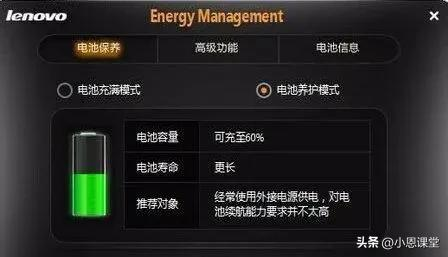
In general, many computer brands, such as dale, conner and sony, are equipped with power management software for their own laptops, and if some kind of “battery protection model” is activated, power management software will prohibit battery charging once users are detected using the exchange power。
This is an extension of the battery's operational life, so if you find your laptop uncharged, you can first enter the relevant power management software, close the battery protection mode or remove the prohibition option, and if the hardware is clean, the battery can charge。

Reason why the laptop battery is not charged
The hardware itself has problems
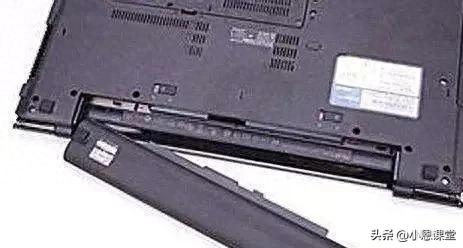
The battery itself has hardware problems. Normally, we can judge by restarting the computer and re-plugging the battery that, if the battery is still uncharged, it may be useful to install some hardware to detect use and obtain approximate reference information on battery losses。
If battery hardware is identified, relevant specialized technicians can be approached for testing replacement。
How to fix it safely
The option "start battery calibration" is usually found in the power project when entering the bios when the laptop is activated, that is, "start battery repair"。
Usually, this will first alert the user to the power adapter to fully charge, then show a text alert to the user to disconnect the power exchange, and the system will charge the notebook continuously until it is completely depleted。
After that, the notebook will automatically shut down, and we can connect the power adapter to charge it, but do not turn it on until the recharge light is out。
It is important to note that the battery repair process in bios may take several hours, so it must be performed when it is not necessary to use the notebook itself. If this still fails to improve the battery's state, then it can only be said that the battery has been destroyed and that it can be repaired or purchased for a new original battery, laptop battery recharge and some maintenance experience shared for information。
1. Check the batteries to see if the circuits are loose and the connection is weak。
2. If the circuit is normal or unfilled, it is possible to see if the circuit board of the battery charger is broken。
3. If the circuit is normal and the charger is good, there may be a problem with the circuit board inside the computer。
4. Batteries are old and possible. General batteries are used for about three years and are largely ageing, even lithium batteries. Check the maintenance shop。
5 the usual requirement is to wait until about 20% of the battery is recharged, not until 0, which is too damaging。
Particular attention is paid to:
Sometimes it is a power adapter problem, and there are fewer bad cases, and if there are one-size-fits-all tables, you can test the output voltage。
The laptop batteries are not operational and are plugged in to communicate, indicating that 0% of the available power is connected to uncharged, i. E. They remain uncharged. What about the laptop, where 0% of available power is connected to uncharged?
In one case, the laptop battery was inoperable and plugged into the exchange, showing that 0 per cent of the available power had been connected to uncharged, i. E. It had been uncharged. What happens to notebooks where 0% of available power is connected to uncharged? This is a problem that many laptop users may face。
Reasons for non-charged connection to 0% available power
The generation of laptop batteries has resulted in zero per cent of available power being connected to uncharged, i. E., uncharged, mostly due to the ageing of the laptop batteries or the routine neglect of maintenance. For example, many laptop batteries routinely run out of battery power until the computer automatically shuts down, which can easily destroy the batteries。
In addition, some laptop users remove and place laptop battery sites, which removes the batteries and stores them, and also deplete the batteries, resulting in a deterioration in the continuation of laptop batteries。
So what if we've got zero percent of the power available and we've got no charge?
First of all, check whether the laptop battery setup has been disabled and some other laptop battery management software has been disabled, which you can check; moreover, it may have been too long before it had been used to cause poor exposure. Open the notebook to clear the ash, pull the power lines, unplug the battery, or maybe we can fix it。
Reason why the laptop battery is not charged
If there are no problems with inspection settings, then most of them are laptop battery internal control lines or cores, which need to be overhauled。
In addition, it is worth mentioning that some laptop batteries have been in operation for a long time, overcharged, leading to the emergence of zero per cent of the available power being connected to uncharged, to be repaired at a later stage, and that even if repaired, the battery will continue to operate and have a short life, and it is advisable to recommend the purchase of a new laptop battery。

Reason why the laptop battery is not charged



