Plugin features
:: real-time links, invalid links and uncertified chains answer
:: ignoring links and concerns
:: their own web links and external links
:: mouse hover over source browser let's go
♪ lrt power ♪ ♪ trust every link
:: list of real-time filter links
Plugin advantage
:: created specifically for professional seo senior users
:: replace all other link checker extensions
* "my field" highlights
:: dazzling fast-link data export
:: the ongoing development of lrt
Plugin functions
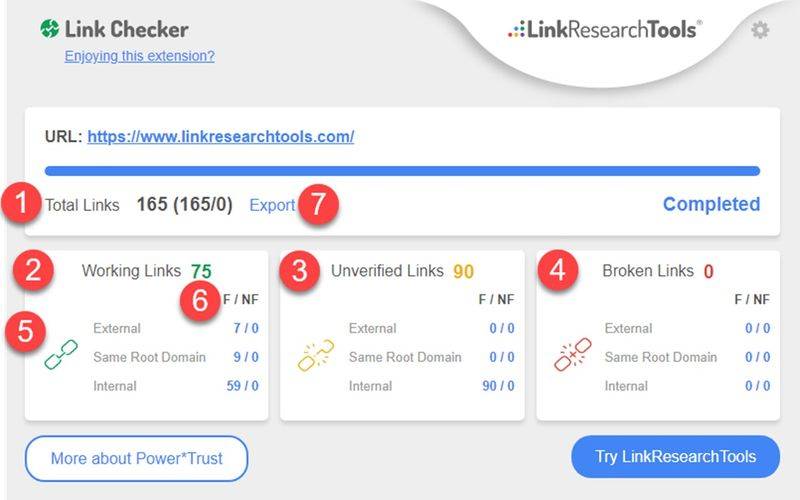
Screenshot #1
1. Total number of links to statistical pages
2. Statistical activity links
3. Statistics on the number of unverified links
4. Statistics on the number of live links broken
5. Different range of links to internal, same domain and external
6. Compute the number of links between concern and indifference per link range. Click these numbers to go through code details
7. Validation and export function (see figure below)
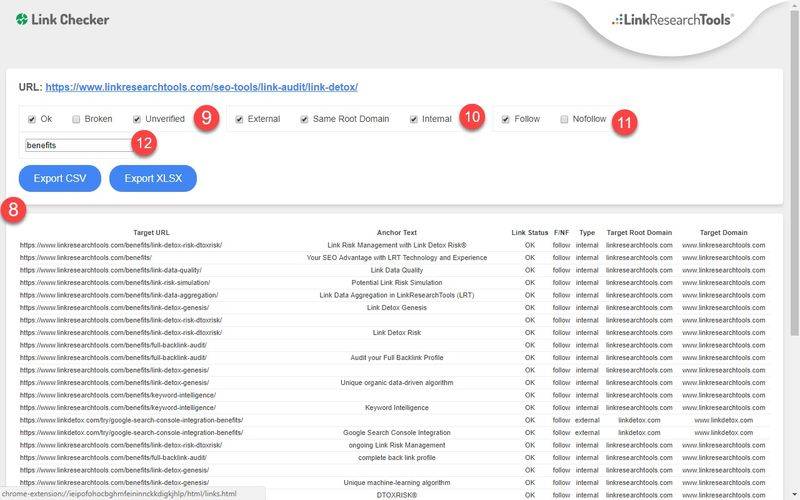
Screenshot #2
8. Full dynamic link breakdown and export to excel and csv operations
9. Show links by network status
Show links by range
11. Show links by concern and disinterest
12. Filter links by keyword
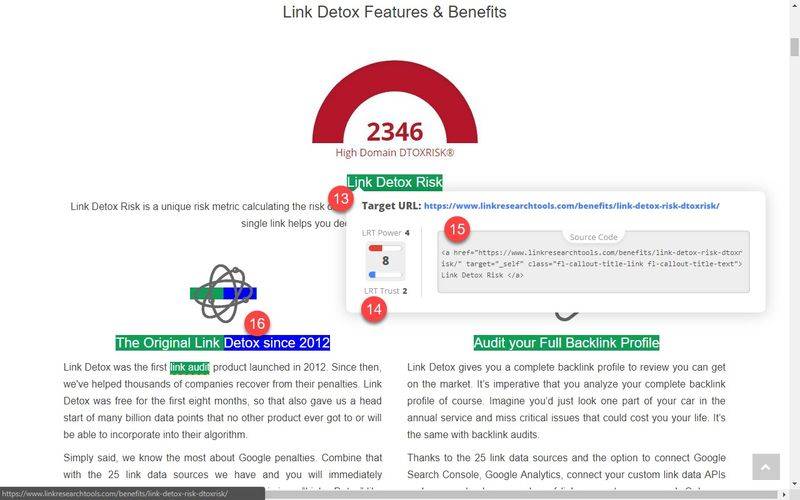
Screenshot #3
13. Pause mouse over any link to see details
14. Lrt power*trust measures the intensity and trust of the link to the target page - if very low, this may be a problematic page or a new page noodles
15. Full HTML source code for viewing and possibly finding waste content
16. Blue tag for your domain (configured in extension settings)
Version history
2080917 v0. 1. 2 - initial version
2080918 v0. 1. 3 - improved export function and text labels
2010912 v0. 1. 5 - add pairs to ugc and spoSupport for nsored link rel attribute
20190917 v0. 1. 6 - solving source preview problems caused by the "data-HTML" properties。
Plugin installation description
1 extension manager in open google browser
Click on the top three points on the left and select "more tools" in the popup menu
Or you can enter a chrome at the address bar
2. Check developer mode after entering the extended program page
3 . Finally drag the depressed crx file into the browser to install
4. If it is not possible to add to your personal directory, you can right-click the crx file and then choose [administrator takes ownership] and try to re-install
Five. Once installed