We use360 browserWhen software is available, the desktop will pop up with 360 browsersHot newsThe window, the right bottom message box, will also have some ads, instead of seeing the popping news every time it goes off, and will be able to delete the pop-up-related window message from the computer when it goes off in the following ways。

Method i: relevant functional settings
A 360 browser can be set up to turn off hot news features。
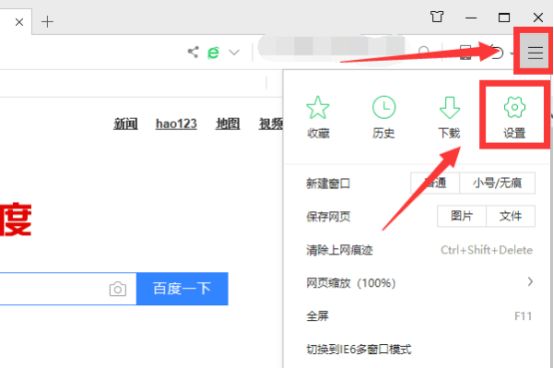
1. Open the 360 browser, click more buttons on the top right corner of the browser and then click the settings button:
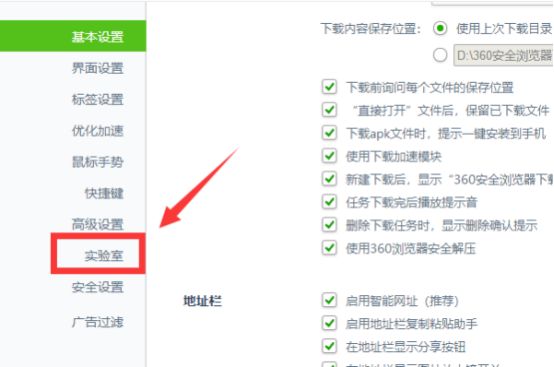
2. Click the laboratory button on the left menu bar at the setup centre:
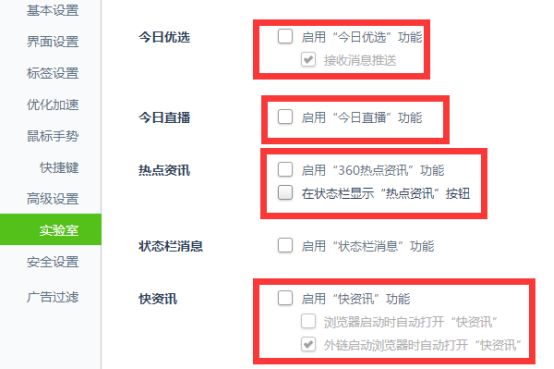
3. In the laboratory setting, all hot-spot information features on the 360 browser were cancelled, and the news-bomb window on the browser was closed:
Method ii: auto-interception of bullet windows
Jinshan's poisonThe software allows you to access the auto interdiction blast, experience a computer without a bullet window and give you a clean online environment。
Click on the picture, download the tape
Quick fix the window ad
Zenium

(click pictures to download software)
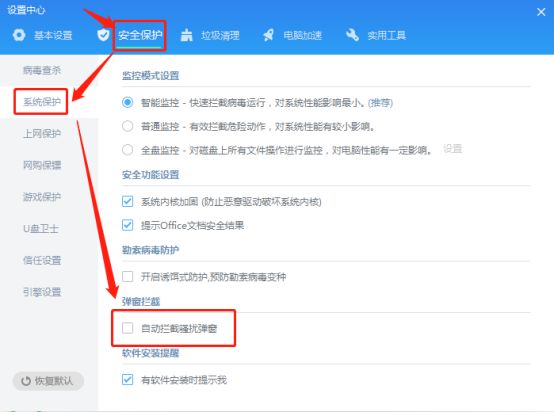
1) open the "golden hills hoist", click [setting center]。

2) click [security protection] - [system protection] - check and open [auto-intercept harassment bullet windows]。
3) the emergence of a bullet window, where the golden mountain drug lord will eject [a bullet window intercept warning], choose to intercept the bullet window/trust, and prevent the re-emergence of the advertising window。

Method iii: intercepting bullet windows
The drug-abuse software is capable of intercepting bullet windows and of detecting, alerting, intercepting and removing malicious bullet windows and software from all directions。
1) open the "golden mountain hopper". Click on [blast windows intercept] and manually add a bullet window program that needs to be stopped。

2) click to scan and wait for software to scan the computer system process。

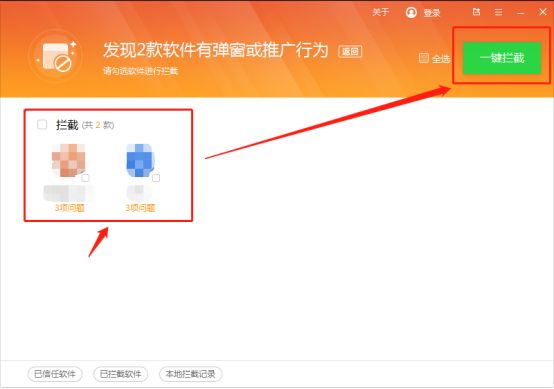
3) select software with bullet windows or promotive behaviour and click a button to intercept it。
The above is the solution of the 360 browser's hot-spot news window removal。
I hope this article will help you to solve the problem of the popping of hot news windows, more window interception techniques, and keep an eye on the jinshan drug network! Contact us