Win7 is active via a laptop wireless net cardVirtual wifiThe functional sharing of access to the internet has been tried, and it feels good, at least without a wireless router, and can also be accessed by a cell phone tablet with wifi functionality, requiring modification of the cmd command。
The launch of the beltwifi using the win7 system is stable and does not require the installation of other software, and the following is a detailed setup:
1, press "win+r" - > enter "cmd" - > into the command line to see what your default path is. My default path is "c:\users\lanzao"
2. Enter the default path by creating a new notebook under the lanzao folder under the c-dissors
3. Put those two lines in this notebook. Command:
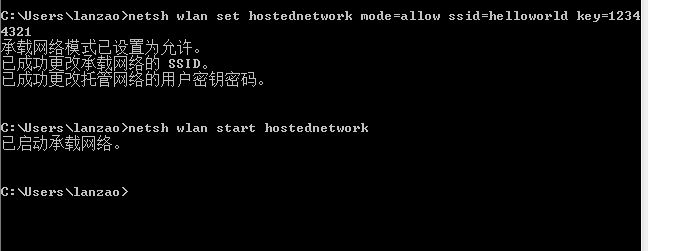
"netsh wlan set hostnetwork mode=allow ssid=xxxxxxkey=12345678
No, no, no
4. Name the notebook "wifi. Bat " (may be named randomly, but change the suffix of . Txt to . Bat)
Five, press "win+r" -> enter "cmd" -> into the command line, enter "wifi" or "wifi. Bat" and see the following interface, indicating that it was successfully opened。
If the hint is not an internal or an external order, it should be your document that is not under the default path。
Solutions: copy the file to paste to the default path (i. E. The path in front when it is opened at the beginning)
If you've never opened it manually, you'll be able to find a wifi, but you can't connect to it or go online
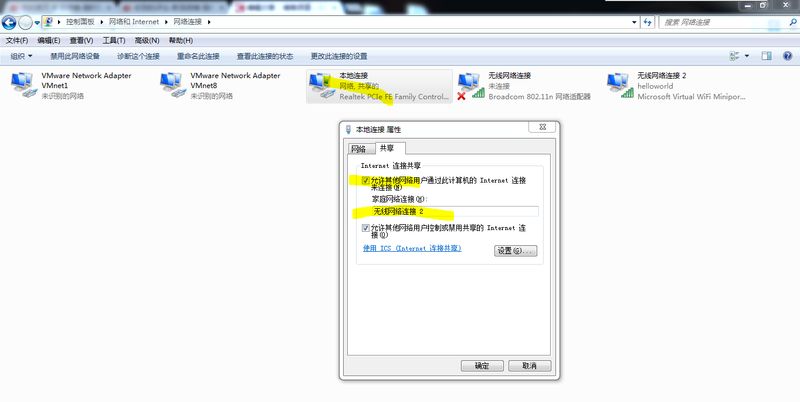
1. Opening networks and sharing centres. Right-click on the icon of the computer at the bottom right corner of the desktop to choose whether to enter, or the menu->control panel-> network and internet-> network and sharing centre。
Select the change adapter settings "-> right-click " local connection "-> properties-> sharing-> checking" in the left-hand option to allow other users to be determined. The following is a chart:
Three, restart wifi. Opens the command line and enters "wifi. Bat"