The newbie wants to build an independent branding station, but is it clouded by domain names, servers, construction operations? There is no need to panic. Today, the most understandable brand station in 2026 will be built into a whole process, from domain name registration to server configuration on line, and every step will be clear and clear, with no professional terminology. The jottao enterprise website, with its own visualization, does not understand the code and can quickly set up an independent site that belongs to its own brand and can easily open up the brand line。

I. Preliminary preparations: understanding the three core issues and results from transition
1. 1 clarity of purpose
Think about your core need to build independent stations and avoid blind operation:
Reminder: the newcomer suggested starting with the brand show and gradually adding sales functions later to make it easier。
1. 2 preparatory materials
These materials are ready in advance, without temporary search and save time:
Enterprise/personal data (for domain name filing, site certification)
Brand-related material (logo, brand colour, product pictures, business introduction) e-mail account number (for receiving certified mail, query information) mobile phone number (for domain name registration, platform login validation)
1. 3 version selection proposal (newer)
There are several versions of the jotao cloud enterprise website, and newers do not have to choose an advanced version blindly, so they can choose according to their needs:
Ii. First step: registration and configuration of domain names (core key, first-hand)
2. 1 domain name registration: 3 techniques, no step the pit
Domain names are your website addresses (e. G., xx. Com), choosing domain names, making it easier for clients to remember them, and facilitating the recording of search engines。
Domain name selection techniques: prioritize. Com suffix (most common, high customer acceptance) to avoid complex spelling; domain names should preferably include brand names or core product terms such as “xxbrand. Com”, good notes and branding。
Reminds us not to pick too long, too complex domain names or use special symbols, otherwise it is difficult for the client to remember. Registration channels: registration through formal domain name registration platforms (e. G., aliyun, telecommunication cloud), transparent prices and easier follow-up management。
Operation: opens the registration platform, enters the desired domain name, asks if it is occupied and can be paid if it is not occupied, for about five minutes. Domain name filing: if your target customer is primarily in the country, the domain name must be filed (free of charge); if you are mainly in the overseas market, you do not need to file, but it is recommended to register. Com after the domain name。
Reminder: it takes 3-7 working days for filing to prepare business/personal data in advance to avoid delays in getting the site online。
2. 2 domain binding: docking joe to the cloud and pointing the domain to your site
When a good domain name is registered, it needs to be tied to jotao yun so that the client can enter a domain name to access your website, following the following steps (full visualization without code):
Login to joe's cloud management backstage, find [setting-basic settings-domainname management] and click " add a domain name " . Enter your registered domain name, click authentication, and the system automatically alerts the dns information that needs to be configured. Open your domain name registration platform, find the dns configuration, and paste the dns address given by jottao cloud and save the changes. Go back to the jottao cloud domain management page and click " confirm binding" and wait 10-30 minutes (dns resolution takes time) to show " tie successful " 。
Common question: unable to access after binding? The probability is that the dns resolution is not valid, waiting patiently for 30 minutes or re-validating the new page; if access is still unavailable, check if the dns address is completed correctly。
Step 2: server configuration (small white zero threshold, no manual deployment)
Many newcomers are afraid to hear about the server, but joe takuyun has already helped us to deploy the server, without having to do it manually. We just have to choose the space configuration according to demand, and it's easy to understand the whole way。
3. 1 core server awareness (newer, no more than knowledge)
Servers are equivalent to your website's “storage”, which is used to store images, files, product information, etc. The larger the server space, the more content it can store; the more stable the server, the faster the site is accessed。
Joe has consolidated server resources and will automatically allocate the corresponding server space without having to purchase, deploy and select the corresponding version on our own。
3. 2 relevant configurations of the joe cloud server (new hands-on exercise steps)
Login to the backstage of joe's cloud management, access to [set-basic settings-space management] and view the server space of the current version (5g in the first edition, 10g in the intermediate version, 50g in the advanced version). If space is not available (e. G., there are many pictures of products and many videos), you can click on the "upgrading space" to select an expansion package based on demand, effective immediately after payment. Enable server security: find [setting-advanced settings-security settings] and check " enable https", the system automatically configures ssl certificates, secures website data, and facilitates the entry of search engines. Sets the autoback: enter [setting-advanced settings-purpose-recovery], opens the "autoback" and selects the frequency of the backup (recommended once a week) to avoid the loss of website data。
Reminders: without first-hand configuration of server parameters, joe will automatically optimize server performance and ensure a smooth flow of website access; if overseas markets are used, the international version will support the acceleration of the global cdn, reducing delays in overseas user access。
3. 3 common server problems (new hands pits)
Step 3: site-building (core steps, follow by)
Once the domain name and server are configured, the site can begin to be built, and joe tatsuya uses drag-and-truck operations, without writing a line of code, and white can do it quickly。
3. 1 template selection: starter selects ready-made templates, saves time
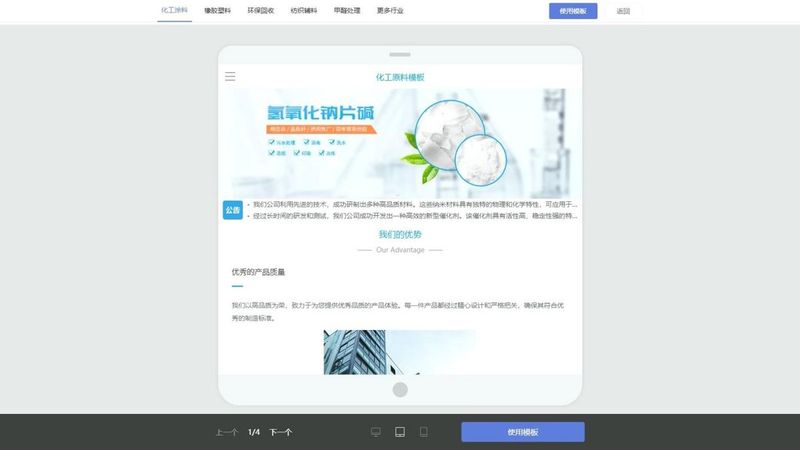
To enter the design page of the jottao computer version of the website, click on the left [templates] and screen the “brander network” type template (covering all industries and depending on their brand style). Select the preferred template, click the apply template, and the system automatically imports the template to your site, where you can see the full site frame. Reminder: templates can be changed at any time, without fear of error, and at a later stage they may not be appropriate, and the template application can be re-selected。
3. 2 content replacement: change the template to its own brand content
This step is the most critical and simple, with a full drag and drag operation, and each module can be customised:
Replace logo and brand colour: click logo in the template, select " replace pictures " , upload your brand logo (recommended png format, clear watermark); enter [styles - themes], set your own brand colour, and align the site style. Modify text: double-click the text in the template, remove the original text, enter your own business introduction, product description, contact information, etc., and freely adjust the font, size, colour, etc. Uploading products/photograms: find [modules-new modules-products/photograms], click on “addressing pictures”, uploading pictures of their products, business environment maps, dragging and adjusting positions and sizes to ensure beauty。
Reminder: pictures suggest compression and upload to avoid affecting the speed of loading the site; product images should be clear and highlight product advantages. Add a core module: add online forms (for client queries), online passenger service, contact details, etc., to demand, path: [modules - new modules - interactive], click on the module to add and drag and reposition。
3. 3 site settings: full details to enhance user experience
Sets the browser title and icon: enter [standard-basic settings-step-step settings], enter the browser title (recommended to include a brand name), upload the browser icon (stage recommendation 16x16px, png format). Sets the bottom information: enters [styles -- bottom], fills in copyright information, contact details, file numbers (filed domain names have to be filled) and enhances site credibility. Multi-end adaptation: click on the top right corner of the design page for a “cell phone preview” to see how the end of the phone is displayed, drag and reposition the module to ensure that both the end of the phone and the computer are properly displayed。
V. Step 4: site uplink and post-maintenance (newer)
4. 1 site online: one-click operation, quick effect
Click on the top right corner of the design page to save all changes after the build has been completed. Back to the backstage of jottao cloud management, find [web site management -- go-live settings], click on " one-key go-on " , and the system automatically detects site configurations and, if there is no problem, suggests " go-live success " . Enter your domain name after you go online, test the website for regular access, check pictures, files, links for normal display。
4. 2 post-maintenance: 3 simple steps to ensure the proper functioning of the site
Summary of common problems of new hands (necessary pit avoidance)
Common problems
Solutions
The site cannot be accessed after the domain name is bound
1. 30 minutes to allow dns resolution to take effect; 2. Check for correct dns address; 3. Check for domain name filing (domestic market)
Slow access to the website
1. Compress images, videos and reduce large files; 2. Commencing cdn acceleration (international version support); 3. Clearing useless modules and content
Not clear after uploading pictures
Upload high-resolution pictures (suggested uniform size) to avoid over-compression; select png format to make the pictures clear degrees
I don't know how to add the query function
Enter [module -- new module -- interactive], add an online form module, set the individual items of the table (name, mailbox, information on the inquiry), and save it
You want to change the content after the site goes online
Login to joe's cloud design page, modify the corresponding content, click " save " , and automatically synchronize to the online site without re-linking
Seeing this place, i'm sure you've mastered the whole process of building a brand independent station! The construction of independent stations is not as difficult as it would have been to imagine, especially with the joe trawling enterprise website, to drag and drag all the way, without knowing the code, without deploying servers manually, and with new hands. Follow the steps above, step by step, and in less than a day, you'll have your own independent brand station, opening the way to online brand promotion