Search extension: enter your required extension program name, such as "advertisement intercept" "cipher manager" in the chrome web application's search box and then press the return key to search。
3. Select extension: select the appropriate extension from the search results. View information such as the introduction, user evaluation, scoring, etc. Of the extended program to ensure that its functionality and credibility are in line with your needs。
Install extension: click on the " add to chrome " button in the extended program details page, and click on " add extension " again to complete the installation after popup confirmation dialogue。
Iii. Managing the extension process
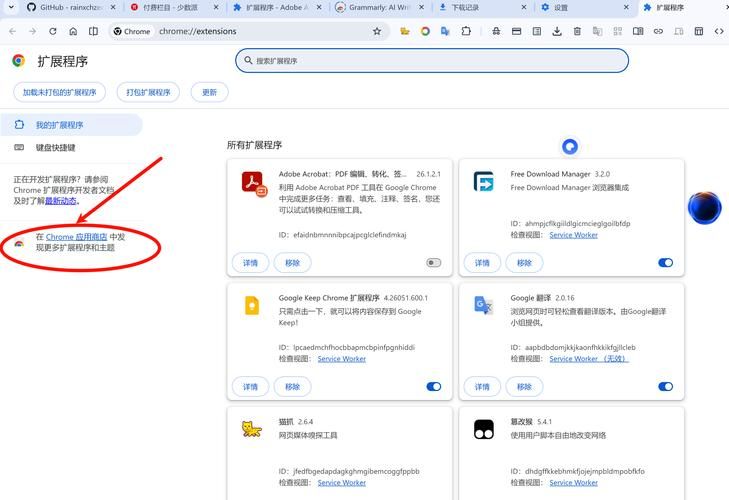
Enables and disables extension: when the installation is complete, you can enable or disable the extension by ticking or deleting the " enabled " option on the extended program management page of the chrome browser (chrome://expensions/). Extensions that are not temporarily required can be disabled to reduce the impact on browser performance。
2. Set the extension option: a partial extension will require some settings after installation to be fully functional. In the extended program management page, click the `details' button of the corresponding extension, enter the settings page, and personalize settings based on tips, such as advertising interception rules, password preservation, etc。
3. Updating the extension: to ensure the functionality and security of the extension, the developer will regularly update the extension. The chrome browser will automatically detect and alert you to update the installed extension. When you receive an update hint, click the update button to complete the update。
Iv. Recommended expenditure for use examply optimizing web browsers
1. Advertising interception categories: adblock plus, ublock origin, etc. These expansions can effectively intercept all types of advertising on the web page, including window advertisements, banners, video advertisements, etc., and reduce advertising interference and speed of viewing。
Password management category: lastpass, 1 password, etc. They can help you to safely store and manage web account numbers and passwords, automatically fill in login forms, avoid troubles caused by forgetting passwords, and generate high-intensity random passwords to protect your accounts。
Notes and marking categories: evernote web clipper, oNote web clipper, etc. This type of extension allows you to easily edit the content of interest while browsing the web page and to store it in the appropriate notes application to facilitate subsequent collation and viewing。
V. Notes
Reasonable choice of extension program: do not install too many unnecessary extension programs to affect browser performance and stability. Only those extension programs that are really useful to you and come from reliable developers。
2. Privacy and security: when installing and using extended procedures, carefully read their competency requirements and privacy policies and avoid disclosing sensitive personal information. To the extent possible, download and install extension programs through official channels to reduce security risks。
3. Regular clean-up and optimization: periodic check of installed extension programs and unloading of extension programs that are no longer in use or have problems. At the same time, attention is paid to updating the extended procedures and updating them to the latest version in a timely manner to ensure the effectiveness and security of their functions。
Through the rational installation and use of multiple extensions of the chrome browser, you can customize the individualized browsing experience to suit your needs, optimize the web browsing effect, and improve the efficiency of your work and learning. In doing so, however, care must also be taken to ensure reasonable selection, privacy security and periodic clean-up optimization, so that the browser remains in good working condition。
It is hoped that this paper will help you to make better use of the extended program of the chrome browser and enjoy a more efficient and accessible web browsing experience. If you have any other questions or need further assistance, please leave a message for exchange。
Previous one: chrome browser fixes multiple performance gaps to improve browse stability: how to increase the loading speed of mobile pages through google crome