Chrome's a good browser but wants to be smoother? It takes a few settings to speed up downloads, optimize browse, and avoid cardon's collapse. The following nine optimized techniques, ranging from basic settings to experimental functions, cover such scenarios as speed, easy operation, personalization, etc., and apply the core browsers of the chrome and edge, opera and others。

Basic optimization: ensuring that browsers are kept up to date
There may be loopholes in the old version that increase the risk of attack. Clicking on the top right corner of chrome at three dots "helping on google chome", the browser automatically checks and updates to the latest version (the same as the chromium kernel browser). Reset experimental functions (to address instability)
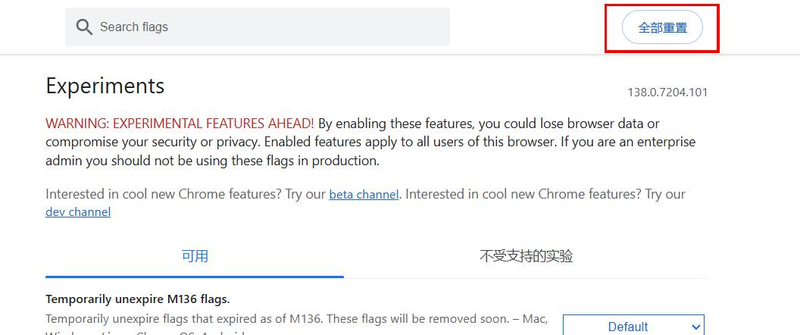
If the experiment function in the chrome://frags is previously broken, the browser collapses: the address bar enters the chrome://frags into the laboratory centre; click on the top right corner "reset all" to reset all the settings and restart the browser to stabilize。
Speeding techniques: faster downloads, more fluid and open multiple-wire downloads on the web page (multiple speed)
The default download is a single-line drive that opens multi-lines to accelerate resource acquisition: access to crume://flags, search for "paralle downloading"; change the option from "default" to "enabled" to restart the browser。
Actual: original 100kb/s downloads may be upgraded to 200-300kb/s (subject to resource server support). Enable quic protocol (for supported websites)
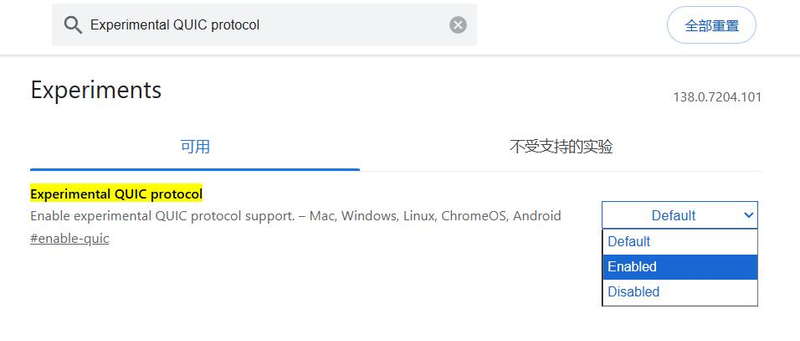
The quic protocol is faster than the traditional http, suitable for video, large file sites: access to chrome://flags, search for “experimental quic program”; set as “enabled” and restarted, and loads are significantly higher when accessing a website that supports quic (such as some video platforms)。
Iii. Empirical optimization: easier to operate and more comfortable web-page dark mode (eye protection)
Automatically turn all pages into dark mode, with no sharp night browsing: access to chrome://flags, search for "auto dark mode for web contents"; set to "enabled" and then reboot all pages automatically to dark style (without website support). Before restart can recover after closing page noodles
You don't want to look for closed tabs? This setting: clicking on the top three points of the right corner to " setup start page " ; ticking " continue browsing the last page opened " , the previous tab is automatically restored when the browser is restarted. Adjust page zoom (according screen)
Inappropriate font or page size? Directly adjusts the scaling: click on three points in the top right corner to zoom in, and select "+" "-" to adjust (or quickly scale by ctrl+roller) until visual comfort. Iv. Fast-track operations: labels for rapid recovery of faults to improve daily use efficiency page
Turning off important pages by accident? Press ctrl+shift+t to recover (twice times to restore multiple historical tabs); or right-key tab bar blank, select " reopen closed tabs " . One click to view all browsing records
Looking for a page that you have seen before? Press ctrl+h to browse the log pages directly, which can be searched by time, keyword, more efficiently than on the inner layer. Summary
These nine techniques are simple, but can significantly improve the experience: multi-wire downloads solve the "tort speed" problem, dark models protect the eye at night, and quick operations reduce duplicate steps. Both ordinary users and heavy browser users can use these settings to make crome more compatible with their usage habits. Collect this guide to keep the browser fluid and useful against optimization