With the end of the two-hundredth event, all the steps of loading, shipping, distribution, etc. Will be very busy, but if your products are not distributed nationally, you will need to set up a freight template for the non-distribution area well in advance, so as not to make mistakes in the two-hundredth distribution order. Today, let's talk about the way in which the small red bookstore section is set up for the non-distribution area。
The small red book section does not provide regional freight template settings
Log in first, find the [transaction] module backstage, find the [logistics management] option under the transaction module, find the [logistics tools] option under this option, click on this option to enter the new page and then find the [freight template] in the new page. Button, click on the button to enter [the freight module management], and you can see all the shipping templates you set here。
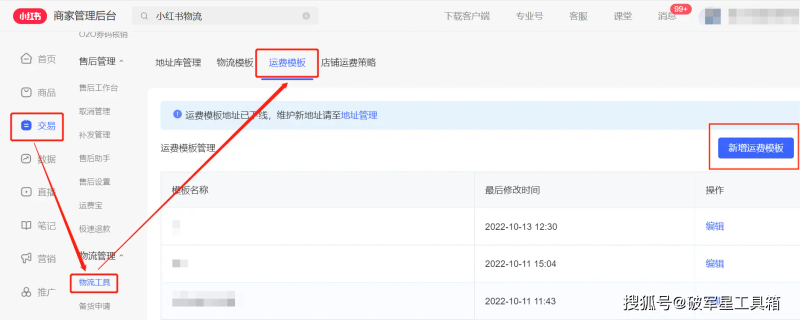
The small red book section does not provide regional freight template settings
1. Modification of non-distributive areas in existing freight module
If you want to modify certain parts of the existing freight module to non-distributable areas, you can find the corresponding freight template and click on the [editor] in the back. Button, enter the freight module, click on [open/closure undisplaced area] and turn on blue; click on the edit ticked undisplaced area at the bottom [non-displaced area] to determine if the currently undisplaced area can be accurately located in the district area。
2. Freight template for new non-distribution areas
If you're trying to add a new freight module to the non-distribution area, you can click on the "freight template management" page. Button, enter the new shipping template page, set basic information for the freight template, click on [open/close undistributed area], click on the undistributed area below, click on the edit to check the undistributed area, and then click on [identified] the non-distributed area at this point. Button, go back to the list page, find the corresponding non-distributable goods in the region, click on [editor], modify the bound freight template for the commodity, select the new freight template for the non-distribution area and then submit it, and if the entire store needs to use the freight template, it is possible to modify the freight template for the goods directly in bulk。
"the toolbox of a broken star."
Registration address: www. Pjx666. Com/register/i/654d33
The toolbox supports treasure-hunting, skycat, kit, ali baba, kyung-dong, twitching, fast handing, and so many others, such as the collection, uploading and so on of the platform shop, which can be used by users when downloading the toolbox software。