1, tool set 1, question: i've got a relatively large cad terrain map, i've only got a small piece of land, i've got a frame, i just want the frame, i've got to cut the figure and answer: method i: 1, put the small piece of your drawing in a frame 2 and select the frame by command selentbypln (tools-options-set-within) 3. Command www (copy) 4. Create a new acad file and then iii (original coordinates paste) solve method ii: use the command selentoutpln (tool-option-set-outside) and delete it. Topography 2 questions: in the topographic map, text transitions, not all can be generated
2, small and maximum. Reason 2 is that part of your high distance is a number, part of a block (or the gcd layer generated by the southern cass software), and the solution is: the terrain-highway point (drawlsd) chooses the o-car, and then the high-speed piece on the map. Toolset 3, question: how do you change the colour of a layer in the source? Answer: ft commands select the same layer entity, and then you can change all colours to terrain 4, problem: it's different fonts, how to turn into uniform fonts, and some high points are blocks, and there's nothing left. High points in topographic maps are different fonts, how to translate into uniform fonts. There's a single line command under the tool text that can be converted to the same font at a time; some high points are blocks, and there's nothing left to explode
Once the blast is over, the selected entities in the terrain-high-range command will be able to select the high-range points of these blocks. Road 5, problem: the corner of the road is, i'm using a "single junction," but for example, there are moments at the intersection that don't react, or only two angles change, and the others remain unchanged. Answer: you select your path with a jj command and then you use a single junction. This way, you change the z value below the tool menu to zero. Question 6: how to regenerate the boundary line of the plots only if they are filled if this fill is 6. 0, you can use the boundary command getoutline in the surface line below the menu; if the version of 5. 0 or 4. 0, the boundary command hatchline is filled under the tool menu. Land-use indicator 7, question: new
4. Calculation of the balance sheet: method i: complete the total area of the plot using the total area line landoutpline, indicator - generate table - balancetablebalancetableout is sufficient. Method ii: indicator - generate table - balancetablebalancetableout, then calculate the area of the road using the red line less the remaining area of the land area, manually enter the area of the road into the balance sheet. Method iii: blow up the ground generated by 6. 0; tool-fill-road fill command hatchroad fills the inside roads with colour blocks; tool-calculating-filling command hatcharea calculates all land area and balance sheets. (this resulting balance sheet is in the format of the old land classification) figure 8, question: how can it be solved by rounding, for example, the indicator volume rate? Response: load the version of the source code after february 16 and then operate. Like
5. Below: method i: delete all figures. 2. Order settuzeparm to return to the vehicle and clear existing parameters using "charts parameters". 3. Delete all useless drawings by "pu " command. 4 inserts a new chart page with chart page. Method ii: 1, with the "bedit" command, select "chart indicators", by "confirmation". Double-click the " volume " attribute definition object, and there is an editorial attribute definition window, with " 0. 00 " in the " default " column. Press "close block editor", save. 4. Run the " battman " command, select the " chart indicators " in the box below the block, press the " settings " below, select all, confirm, press " sync " , press " confirm " . Land-use indicator 9, land-use module: what do you mean, " interior line " , " character change " ? Response: landaddinpln is mainly ordered by the plot
6. Figure - modification of features after the interior line of the plot: a number of relevant changes to the custom entity of filling land. You can read the orders in detail. What does it mean to use indicator 10, to show changes in the ground module, to show patterns, to show connections? Response: land fills are sometimes filled with patterns, so sometimes they are shown. It shows that sometimes the plots are small and the indicator blocks cannot be placed in the plot and link the plots and the indicator blocks through a line. Figure 11, graph module: when are the associated indicators normally used? Answer: add a chart to create a single chart by selecting the corresponding box block line on the chart. When a single chart is specified by the user, the system automatically generates the contents of that range in the specified range box, where the given location can generate a single chart, and the frame and indicators of the chart require manual work brush
7. New. The command is not recommended for graphics, which can be used to quickly generate range views. Linked indicators: the indicator in the cluster of indicators is updated through the linkage indicator, following a change in the chart. Do you want to use a field code instead of a ground code when using indicator 12, and when using a source to generate a ground block? There's no need for code on land like water. Response: method i: setlanddef cancels the tick before the field code is used and then paints the ground block without the code being shown. Method ii: area blocks have been drawn, land-to-show changes-to-show codes, and then select the closure code for the waters. How do you measure the size of the squares of terrain 13, high range analysis or slope analysis: 1; ft command return; command line: select reference block (i. E. Select a colour block on the legend) return vehicle 2; command line: construct physical group type 0-same entity 1-same entity 2-same and similar entities
8,3-same entity selects 3-back, enter aaa-back command line: p/p/p-back selects an area of hectares, square metres or acres, 4-the command line: choose method 0-point 1-entity 2-line 3-by-subline: choose 1-return, command line: choose number, closed curve or fill pattern: enter p-back 6, command line: enter location point: select the position to enter on the chart. 7. Duplicate the work above to measure the size of all high-range or slope areas of different colours. (occupational step of the high-range and slope analysis map for terrain analysis: 1 terrain-word-high. Converts the elevation point of the topographic map to an identifiable discrete point of origin; 2 topographic-grave analysis-high-range or slope analysis select the equidistance of the dialogue box to determine the instantaneous. Can draw a high-range analysis or
9- is a gradient analysis map, and the legend is automatically generated) answer with an indicator 14 on the ground, how the back red mark keeps the 1-2 digits behind the decimal point: ft selects the label of all the red lines used on the map, and deletes the text replaced by the text inside the mo. How about green ground and water bodies showing its original colour rather than gray in the layout that is generated? Can we copy the layout of the road, and then look like the layout of the road? Response: use ground-draw colours, then change the colours you want, and do not change the colours you don't need; use ground-system drawings, video-port block commands. The map used in the low version of the source code 6 of tool 16 is lost with the decomposition block and the blasting property is not responding
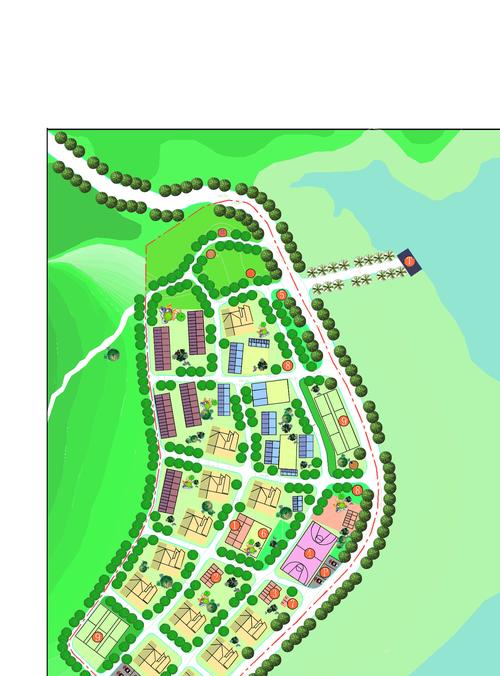
10: the low version does not contain high-volume properties, and the filled-in ground blocks of syndicate regulation 6 are self-defined entities and not fast, and the solution is to decompose into a low acad version in syndicate rule 6. Where are the sizes of the indicator blocks generated by indicators 17, 6. 0 and if they are consistent? A: ft selects all land uses in the mo command with an indicator block ratio and you change to a consistent one on it. For example, the right figure is 18, and why the content cannot be frozen when it is frozen. When content freezes a high block, you can freeze the high block by choosing a triangle below the high block. On the earth, when there is an earth wall, there may be two status or design heights at the top of a grid. Response: when a grid vertex exists, there may be two status or design heights, at which point both values can be written on the grid node, and a "d" or "l" can be added at the end of the number to distinguish between (
11, "d" means that the square below is high and "l" means that the left is high. For example, the node of a grid is marked " 32. 50 below the square, " 32. 50d, " 33. 80 at the left of the square, and " 33. 80 l". As shown in the figure below, the current status of the four peaks is high at 32. 50, 33. 80, 34. 20, 34. 90 instead of 34. 50, 34. 80, 34. 20, 34. 90, respectively. A fine-earth formula is used. Precise earth formulas are used to produce a status triangle using such high lines as the current status point or the status quo, using such high lines as design markers or designs, and to produce a design triangle, which is then based on the status triangle and the design triangle, for each grid, in order to find its current size and design size, and finally to obtain the quantity of the fill and the quantity of the excavator. This method is used to calculate the geometrical accuracy of the earth, and the total amount of the earth is independent of the size of the square, and allows for the perfect handling of special terrain such as the walls of the earth and the steep terrain. The following conditions must be met for the calculation using this method: 1) and the current status point or status line must exist in the chart. 2. The chart must have a high design label or a high design line. 20, code 6. 0 file open requires input paths that cannot be called: input filedia command and then enter 1 2012-5-15