Hello
For most computer users, there have been more or less difficult system failures, such as blue screens, crashes, unlimited restarts, etc., which have also taken a great deal of time to look into the curriculum and make it operational, yet there are few ways to really work。
So it's been said that 90 percent of computer problems are solved once again, 99 percent of computer problems are solved by reloading, and 100 percent of computer problems are bought again. Don't tell me it's true. This reloading system, it really works

Why did you have to reload the system
Before we know how computers can re-assemble the system, let us simply see why there is a need to re-establish the system. What are the benefits for us of re-loading the system
How does the computer reset the system
How do you reload the system? In general, when it comes to reloading systems, what we're thinking about first is the reloading system, which is really a more common method, but what if there is no flash drive? How do we reload the system
In the next section, we'll show you two different computer system re-assembly step diagrams for the existence of flash drives and the absence of disks
How do you reset the system with a flash drive
How do computers reset systems for people with flash drives? The whole operation process is really simple, and you just have to download a corresponding iso image of the system, then make it into a system disk, and then direct the system from the system disk to reload the system process。
This may be somewhat unclear, but it doesn't matter, and we will give you details of some of these operational steps below, thereby helping you to gain a clearer understanding of this basic skill that almost all computer users know。
Step 1. Go to microsoft network or msn to download a pure iso image of a system you want to reload。
Step 2. Connect your disk (a blank disk of around 8gb) to the computer and ensure that the system can detect it, download a rufus software and make a system udis of the iso mirror you have just downloaded。
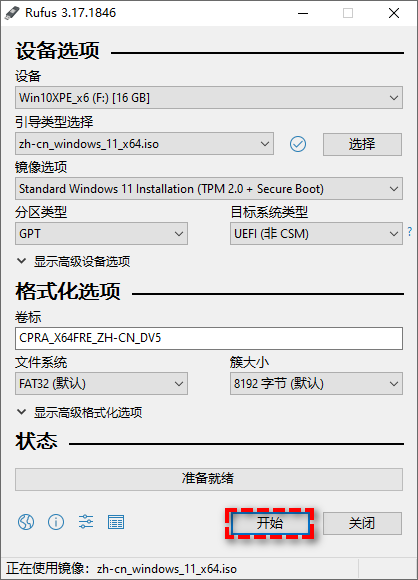
Step 3. After the system disk is finished, please restart the computer and then click on the bios key to the main panel. (the keys are normally f2/f8 and are based mainly on the main panel type, so you can search for the bios key on your own panel 100 times if you are not clear.)。
Step 4. Go to the boot tab after entering the bios and set your lead priority to the system disk you have just made。
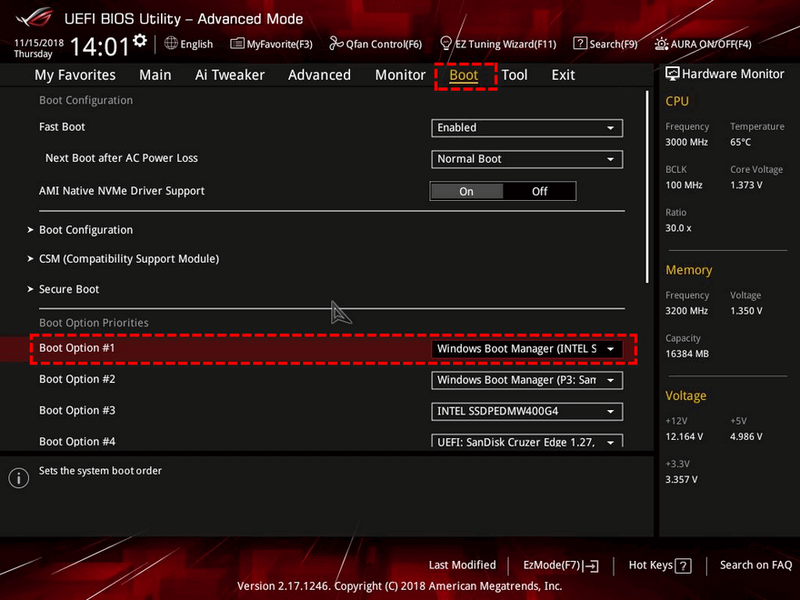
Step 5. After setting up, save and exit by pressing f10 and restart the computer again, you will find that the system will automatically enter the system installation mode. You will need only a more common system installation process to set preferences and then click " install now " 。
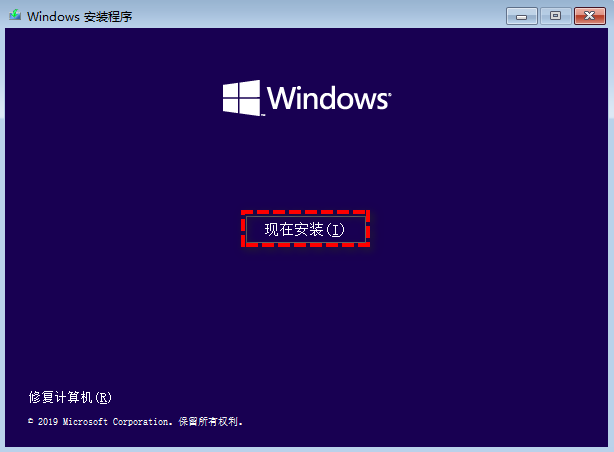
Step 6. This is followed by a well-known system installation process. Please choose the custom installation method, then format the current system partition, then install the new system into it, and then finish the system reloading at the next point, and then you will receive a completely new system, with all your system settings and familiar layouts being reset, but data in other data partitions will not be affected。
How do you reset the system without a flash drive
So the question is, how can computers reload the system if they happen to have no flash drive in their hands? And there is a way, and in the next part, we're going to give you a very simple illustration of the re-assembly step of a computer system without a disk。
Step 1. Please also go to microsoft network or msn to download a pure iso image of a system you want to reload。
Step 2. Click this iso image right after the download has been completed and select load to mount it as a virtual disk。
Step 3. Enter this virtual disk and double-click the setup. Exe file。
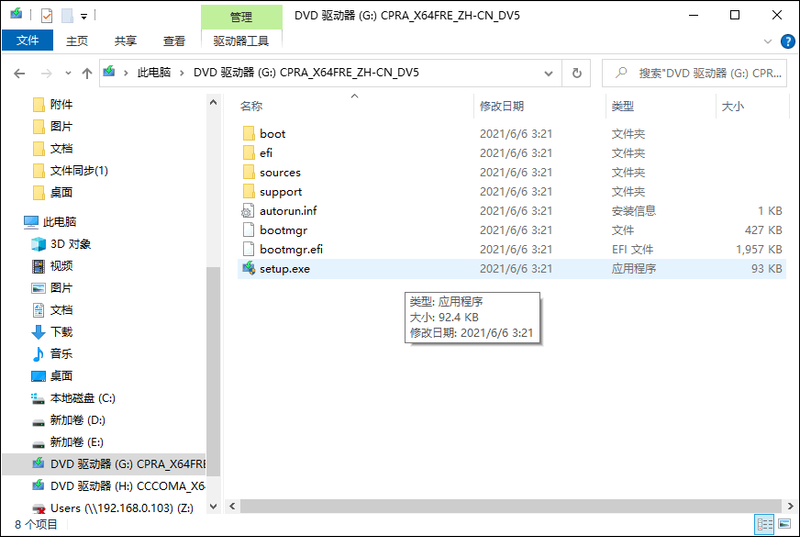
Step 4. You will then enter the process of reloading the system, and you will only need to point the following window。
N. B. In addition to the way in which the setup. Exe files are operated directly, there may be concerns among some small partners that the task of reloading the system will be imposed directly on the basis of a functioning system. Usually, you do not. If you are concerned, you can also enter the " change advanced start options " and open it in the search box at the bottom left corner of your desktop, then click " start up now " , after which you will enter windows to restore the environment, then you will select the command hint inside, and then you will start the setup. Exe file on your mounted virtual disk by cmd command line。
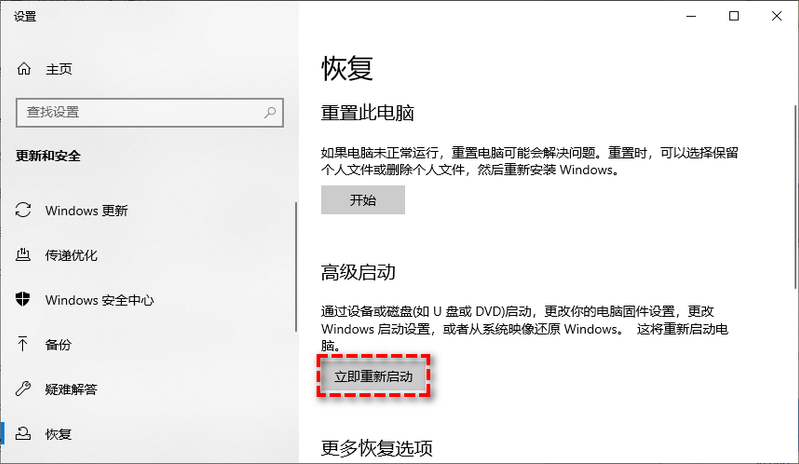
Another possible way to reload the system
I wonder if you've learned how to reset the system after reading the above-mentioned curriculum? It's not really hard to reload a system, but why is most people still reluctant to reload a system? It is because reloading the system will reset the set-up and layout that you were familiar with, and it will take a lot of time and effort after reloading the system to be put back in one by one, which is very difficult, leading to a group of people who are reluctant to reassemble their systems even if they know that they have minor problems。
This is indeed a big pain in the rearmament system, so how do we solve this problem? If your needs are not completely clean, you want to keep your familiar system configuration, and you just want to solve some of your current system problems, the backup system is a good solution。
When your system is running, it is good to have a simple backup to the current system, and then, when you have some minor problems, you can quickly restore the system to the state in which it works when it is back-up, so that you will be free of the problem of the reloading system, while you can achieve a similar purpose to the reloading system。
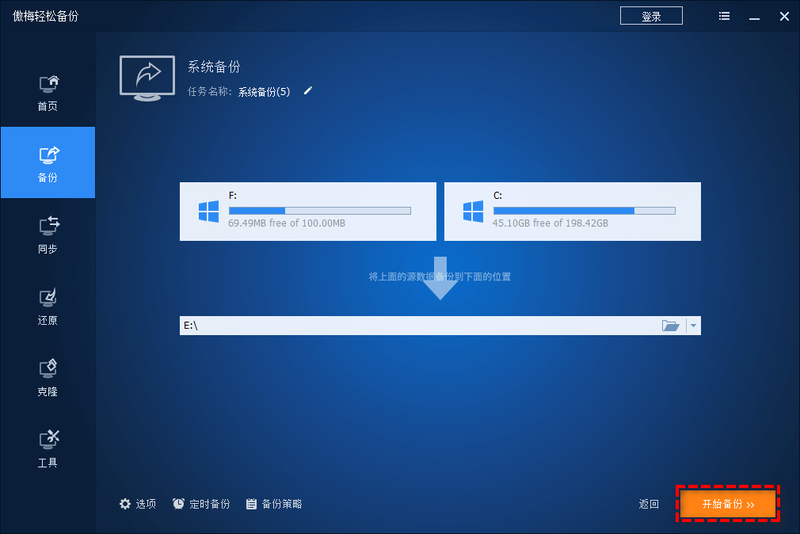
All you have to do is select the system backup program, and the software will automatically help you select the partition of the system, and you will only have to select a target position to store the system mirror, and then click " start backup " 。
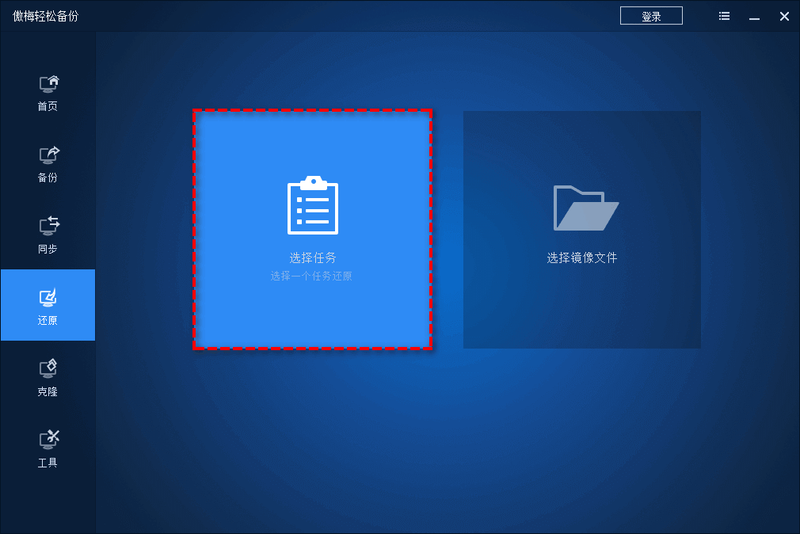
Click " revert " > select tasks to select your previous system backup task, and then click " start revert " to where you want it to be。
— — — — — — — — — — — — — — — — — — and — — — — — — — — — — — — — — — — — — — — — — — — — — — — — — — — — — — — — — — — — — — — — — — — — — — — — — — — — — — — — — — — — — — — — — — — — — — — — — — — — — — — — — and — — — — — — — — — — — — — — — — — — — — — —
All right, friends, we're done here
In order to help you better understand how computers can re-assemble the system, we share with you in this paper two different ways of re-assembly, both of which are accompanied by a more detailed chart of the steps taken to re-assembly the computer system
In addition to the traditional reassembly system, the back-up of the system would, to some extent, be an alternative to the reassembly system, which one could also simply look at. In addition, in addition to the system backup function mentioned in the text, the easy backup has many other practical applications, such as moving the system to a new hard drive, synchronizing data to another location, and completely erasing disk data