Here we choose static ips and set the necessary parameters. Figure 2 below shows that the ip set here is to be consistent with a machine with a line that has a regular access to the internet, but it is to be seen as a computer that has a link to the device, and of course it cannot be occupied by another computer with a line。
The wan portal should fill out the ip address with the router, otherwise it is not available online。
Dns recommends the completion of the dns ip provided by the local isp, which i have tried to fill in with a router, i. E. 192. 168. 1. 2, which, although accessible, occasionally has an impact on the speed of access。
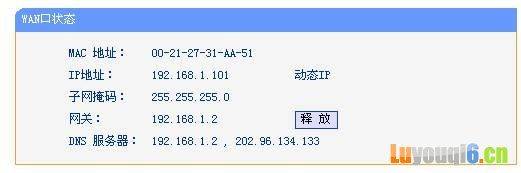
Figure 2
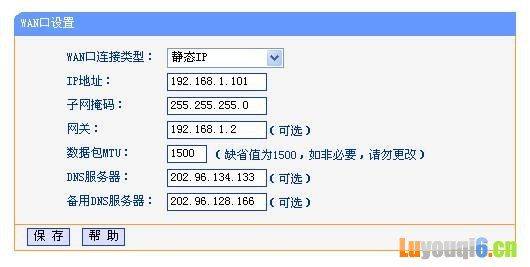
Figure 3
Key points: wireless is linked by wan ip to the lan ip. Gateway to fill with router lan ip
3. Launching of dhcp services with automatic distribution of ip by wireless routers
The address pool segment will be the same as the wireless router, which is an ip of 192. 168. 2. 1, so we'll set the address pool as 192. 168. 2. X-192. 1. X
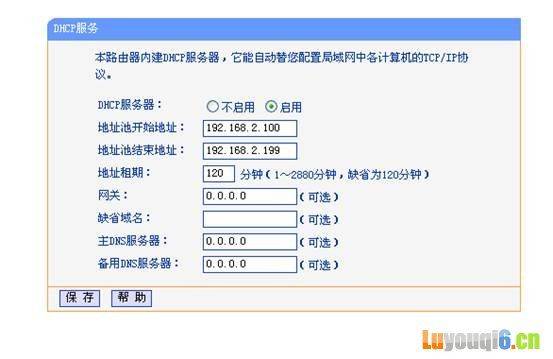
Figure 4
3. Computer settings
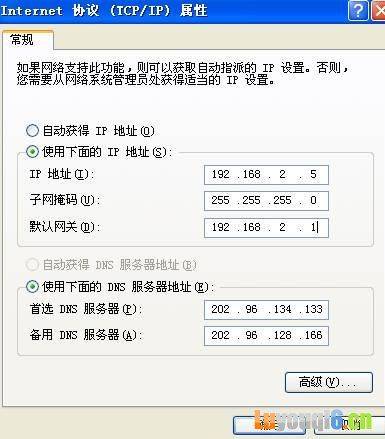
A computer connected to a wireless router is created for automatic access, and it can also be set up as figure 4 if it is manually distributed to the computer for management convenience
So the ip segment is the same as the wireless router, which is 192. 168. 2. 1, so we can fill in the 192. 168. 2. 5 gateway to the wireless router
Finally
To ensure that all settings are successfully maintained and that the wireless router is restarted, wireless access is possible and, of course, it would be preferable to add a password to the wireless device in order to prevent people from being drawn。