Samsung tabs7 (t870 country line) telephones officially support a brush model brush, which is commonly referred to as the odin model brush, which is a bottom-up brush mode and which addresses all non-hardware level damage. And the odin tool also combines downgrade upgrades, etc., with fast-lines to the version of the system you want. If your system takes root and wants to remove root back to official, the odin brush will be your only option. This is samsung tabs7 (t870 national line) detailed brushing, editing from the rom base
Preconditions for a detailed brush
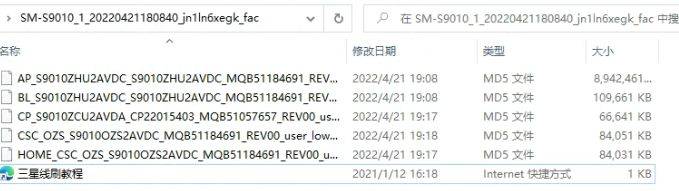
When you download the triple-star brush you download, you get five brush files that exist in tar format; some brush packs have four or six files; and only one tar file is available in part
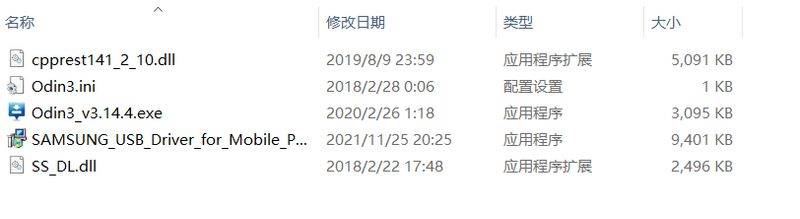
Antique samsung odin brush tool
It is recommended that you use the latest version of the odin tool to perform a brushing operation, which is basically compatible with all three-star mobile phones, an anti-pressure line brush tool, a direct click on odin3 v3. 14. 4 and the appearance of a korean bullet window, which can be accessed by the main interface. And the three-star brushes are all three-star driven, and the three-star driver in the toolkit samsung usb driver for mobile phones 1. 5. 63. Exe is installed on the alert, and if the driver is not effective, please restart your computer once more
Enter odin brush mode
There's a lot of models, and there's a difference in the type of entry. If you have a type with a bixby button, you turn it off, then you insert a data line, which is the volume minus + bixby key, you enter a brush guide mode, and you enter a brush mode with a short voice, and if you don't have a bixby button, you turn it off, you insert a data line, you press the lower volume + the top button, you enter the brush mode, you enter the brush mode with a short volume
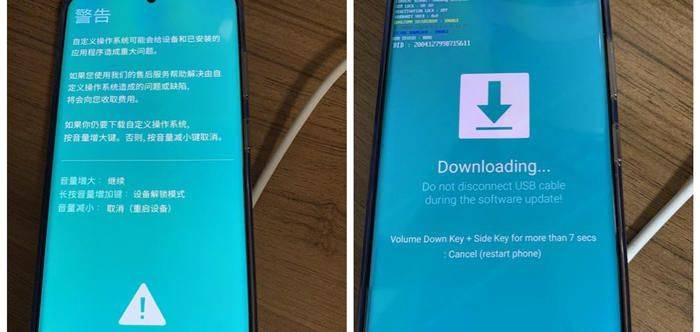
Configure odin brush file
Open the samsung odin brush tool, and we look closely at the depressed brush package file, matching the buttons on the file and the brush tool. Bl-starter file, configured bl button, cp-starter file, configured cp button, csc-starter file, configured csc button, ap-starter file, configured on the ap button. It's a very big ap file, it's very slow to load. Don't doubt the tool card owner, wait till it's loaded
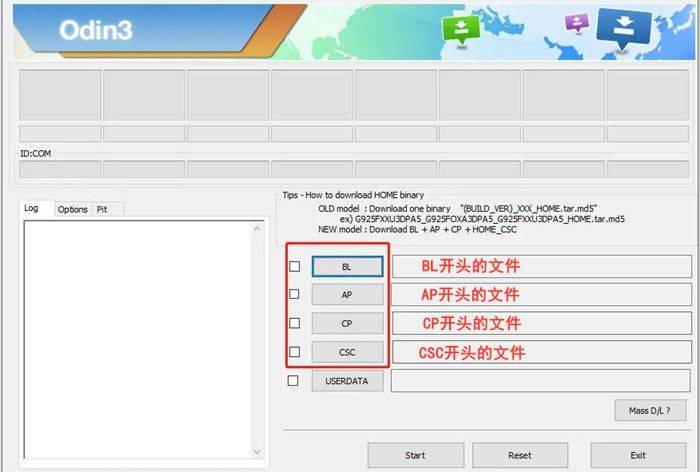
Normal odin brusher
All configurations are complete, and mobile phones are also connected in odin mode to the computer to see if the top left corner of the odin tool starts with port identification co. If there is, clicking on start (starts) is officially brushed into the phone, the process will normally be completed in five minutes, the tool will alert the pass and the mobile phone will automatically restart the engine into the desktop. If the brush is wrong, please continue to look down and respond to the brush problem。
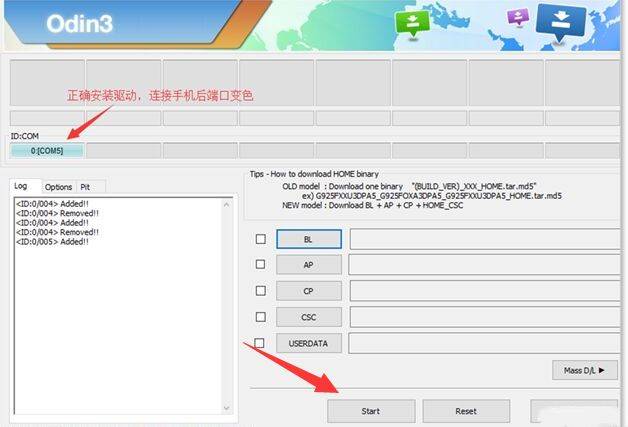
Unlock error analysis: scrambling and reporting errors immediately, hinting to xbl-related text red? The current brush package version is too low; replacement of the newer version of the brush kit repainting; the odin tool does not recognize port or failed police during brushing? The data lines are unstable or the data lines are damaged, the replacement of a new data line can't be solved
The rom base is committed to helping you solve all the problems associated with the brush, and thanks you for reading the curriculum and supporting the rom base

Paper label: tristar brush, tristar brush, tristar brick, tristar brusher package, rom base