The use of writing devices similar to paper and pens has become more intuitive with the increasing size of the ect screen. The most common way for manufacturers to support handwritten pen functions is to use active or passive pens. An electronic component using a handwritten handwritten pen requires a power supply and sends a signal to the mainframe device. Use an active handwritten pen to support the display of high-level features such as suspension, pressure sensitivity, key support, writing, etc. The passive handwritten pen uses conductive materials, which are equivalent to the extension of the user's body. The electronic configuration of the user's hand supports the transmission of a signal when a passive handwritten pen touches the screen, and there is no active communication between the handwritten pen and the host platform, so it is difficult to distinguish between the finger and passive handwritten pen。
In many cases, there is no need to add additional costs to the system if both active and passive pens achieve the same characteristics. The additional components and power requirements of a handwritten pen make it difficult to open up the market, while the poor performance of an passive handwritten pen and/or its heavy head would lead to an unnatural handwritten experience. Thus, if the handwritten pen is 1 to 2 mm in front of the handwritten hand, the user can hold it on the screen while maintaining sufficient speed and accuracy and ensuring that the point of contact is exactly the “ink ink ink” and the user experience of the passive handwritten pen is enhanced。
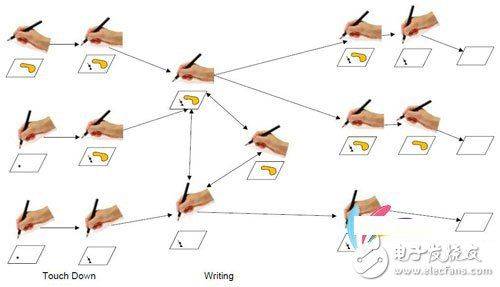
In order to create a practical realization programme that supports both finger and passive handwritten operations, a variety of uses must be considered. For example, developers should consider the speed of the system to detect the switch between finger and handwritten pen input. Similarly, they define how the system reacts before, after or while touching the screen. Other important factors are that handwritten pen signals are not detected when handwritten pens are close to hand. Figure 1 provides examples of the status machine process in handwritten pens。
620)this. Width=620; "syle=cursor:point"/
Figure 1 examples of state machines used in unsourced pens
The paradox of handwritten pens
Unsourced handwritten pen testing is a complex issue for touch manipulation engineers. The root of the problem is the “handwritten paradox”. The so-called “hand-written pen paradox” means that the signal of a hand-written pen is much smaller than the normal finger-touching input, whereas the user believes that a hand-written pen is so thin that it should be more precise than a finger。
Accuracy and linearity are proportional to system noise. Since the noise floor does not change with input, a weakening of the signal will have a greater impact on the cell noise ratio. The signal level of the capacitor touch screen depends largely on the area of coverage entered by touch. This means that the signal strength of the 2 mm passive handwritten pen is 25 times less than that of the typical 10 mm finger touch. This gap in signal intensity creates many problems for tactile engineers. Even when there is a larger touch signal, solids must detect smaller handwritten pen signals, which often require different sensor scanning patterns, with both noise resistance and refreshment rates affected. In addition, passive handwritten pens are most suitable for use with larger touchpads, but large touchpads are already low-renewal or are intended to use larger spacing sensors, both of which affect system performance indicators。
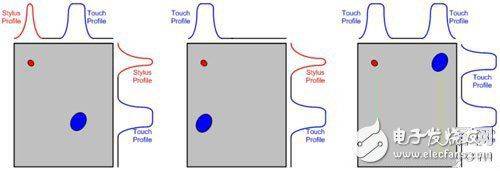
Essentially, addressing signal intensity gaps requires addressing two issues. First, although the signal is extremely low, handwritten pens must first be detected. Second, as soon as handwritten pens are detected, accurate reporting is required. These two issues are difficult. Conceptually, the most reasonable method of handwritten detection is to maximize sensor signals. Problems are usually addressed by minimizing the dynamic range of the sensor to the signal level (very close to the expected signal level), or even by using software multipliers and filtering. However, the high-benefit system is easily saturated through larger inputs, such as normal finger touch, so normal touch and smaller handwritten pen signals must be carefully processed. A common method is to conduct two independent scans of each expected signal level, distinguishing normal touch from handwritten pen input。
Touch and handwritten brief
620)this. Width=620; "syle=cursor:point"/
Figure 2 touches and handwritten brief
This pattern is susceptible to error detection and must be filtered out. A typical example is a finger close to or away from the touch screen. When the finger is near, its signal level is low (in the passive handwritten pen area) and when it leaves, it is also low, so that any detected handwritten pen input must be confirmed by other judgementors。
Management of dead areas
When a handwritten pen is detected, the report must be accurate. Unlike a typical finger touch, the pointy pen of a passive handwritten pen enables users to see precisely where it is placed on the lcd. Thus, despite a significant reduction in the level of letter noise, the accuracy of written manipulation by the user counterparty is expected to be higher. In addition, linearity is a key factor, as handwritten pens are usually written。
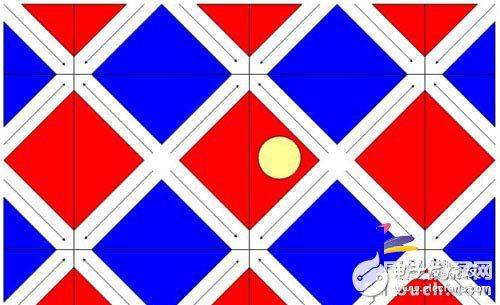
The key issue of the passive handwritten pen in relation to accuracy and linearity is the “dead zone”. “death zone” means an area on the touch screen in which no change in the signal level is reported even when the input stimulates the transfer to a new location. For example, a 2 mm passive handwritten pen tip on the touch screen can be completely surrounded by a typical 5 mm sensor。
Handwritten pen pen to death
620)this. Width=620; "syle=cursor:point"/
Figure 3
The small movement of handwritten pens at the centre of the sensor is difficult to detect, but for sensors, input is usually quantified to the centre of the component, so when handwritten pens are confined to the sensor, they are reported to be in fixed position, which is the so-called dead zone。
The general approach to the problem is to analyse all the sensors around it and use them to create an index of the search table as a way to correct the reporting position and thus gain a better grasp of the actual location of the pen. Therefore, the problem of precision and linearity of passive pens is ultimately an extremely creative way to generate an index of the above positions, or to design more advanced search tables, since dead areas are usually an insurmountable physical problem, and therefore an appropriate correction must be found。
The need to remove the touch action
The early passive handwritten pen realization programme supports only one single type of input at a time, and normal finger touch has higher priority. The handwritten pen system will not work if it appears on the screen, including on the edge of a handwritten mobile phone or tablet, or if the handheld is placed on the screen for a normal finger touch. However, both cases are common when handwritten pens are used on large screens. In order to be user-friendly, when handwritten pens work on the screen, it is important to remove such errors and errors, thereby increasing user satisfaction。
The reason for the impact of the writing performance of the touch-screen opponent also depends on the signal gap. Touch screens can spread their signals to multiple sensors, while peripheral sensors are usually in the handwritten pen area of the signal level. The normal touch signal level is much higher than the handwritten pen level. It's like two flashlights in a dark room, one bright and one dark. The stronger the flashlight, the harder it becomes to see darker flashlights. In addition, normal touch produces coming noise. Therefore, if the sensor receiver is shared by the larger noise and the handwritten pen, the input of the handwritten pen will be difficult to detect。
These issues of communal noise are another major area. Normally, we can resolve this problem by scanning only specific sensors of interest in order to isolate the signals required for passive pen writing. At that point, we assumed that we could initially detect handwritten pens and track their movement on the screen, thus making the first touch of handwritten pens the weakest. However, most of the troublesome touch problems can be solved once the sensor collection tracks the handwritten pen。
While most of the above-mentioned issues appear difficult to resolve, the current development of touch controllers has enabled us to have products that are sensitive enough not only to detect small tipless handwritten pens, but also intelligent to filter noise and other interference objects on screens. From a user's point of view, the smart touch controller can handle many input-related questions for detecting and tracking objects. At the system level, the key to success lies in the development of applications that enable users to better use, create and control their own equipment, thereby increasing the efficiency of their work and generating more natural manipulation experiences。