A 100% price adjustment tool for the purple cloud assistant.
Purple cloud assistant is a 100-degree pricing tool for 100-degree extension users
Key checking, smart pricing, competitor digging, creative aids, etc
The starting point is to increase the outreach of users. First-time-fixing, first-rate core cloud algorithm, one key set
Integrated detection, smart pricing, counterparty analysis, keyword mining and creative aids to promote user outreach
Effect。
The following is a graphic display of a 100% price adjustment tool for purple cloud assistants. Smart bid settings: selection in the keyword list
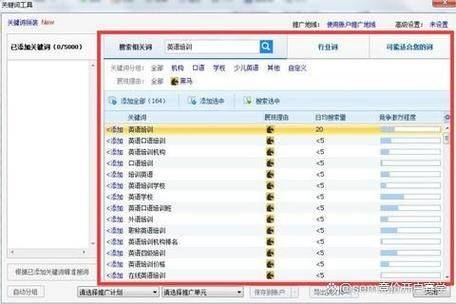
Some keywords are shown here when they start setting smart price adjustments. Or it could be direct intelligence
Adds keywords to the price adjustment page。
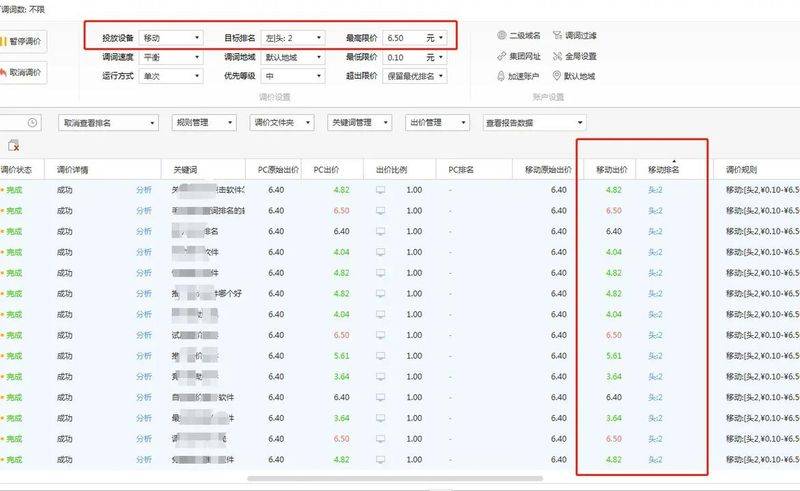
Here you can see the original price of each keyword, the current price, the original ranking, the current ranking, the smart ranking
Information on programmes, price-fixing areas, targeted competitors, successful bids, modes of operation, timing of competitive updates, etc。
(a) original prices: prices given before the start of the key word for this smart adjustment
Original ranking: the key word is ranked on the 100-degree search result page before the start of the smart adjustment
(a) current prices: current competitive prices after this smart adjustment
Current ranking: the current ranking on the 100-degree search result page after opening the smart adjustment
Current status: validity, suspension or invalidity of keyword
(a) whether or not the bid has been successful: the bid has reached the desired ranking, showing “success” and not the expected ranking, showing “failure”
(a) time of update: the time at which the bid was completed
Smart ranking scheme: presentation of information on the expected ranking of keyword settings, bids, etc.
Targeting of competitors: targeting of competitors according to the conditions set, if set in terms of smart pricing other
(a) in case of conflict, targeting of competitors is a priority
Competition mode: bid mode for key words to reach the desired ranking, [rapid mode]: price adjustment slightly faster
(b) [accurate mode]: a little slower, and the price is accurate to a point, or about a cent
Run mode: you can choose run once or cycle adjustment [run once]: keyword adjustment to specifie
After ranking, no more price adjustments; [recycling]: after the keyword is adjusted to ranking, after a certain time interval, there will be automatic recovery
Check, lock in the ranking。
Action: edit an intelligent pricing solution to modify a keyword。
Click add button to add the selection of the key words that require smart price adjustments:
After selection, click next, set the smart price adjustment, select a time frame bid setting or lock the competition
Settings, which can also be set at the same time, but which, at the same time, are given priority in the time period during which the counterparty is locked:
Time frame for price adjustment: 00-12 a. M., 12-18 p. M. And 18-24 p. M.; left expectation ranking: 1
- 10; right-wing aspiration ranking: 1-10; left – right highest bid: 0 — highest budget
Locking competition settings: entering the competition's web site is required, with the option of locking ahead or behind the competition
One, and set a lock period
(a) smart bid models: fast, precise models are available
(a) run status selection: run once or recycled
Beyond the maximum price: if the key price exceeds the maximum price, you can choose the best ranking within the limit, restore the original price
Models such as maximum price limits
When settings are complete, click " save " , i. E. Add the key word that requires an adjustment to the smart adjustment page
Finally, pick the all in the full box of the smart adjustment page and click " turn on the smart adjustment" to start the smart tune
Price experience。
After the price adjustment is completed, you can click the right mouse button in the keyword list to see the 100-degree ranking and adjustment of a given keyword
History。