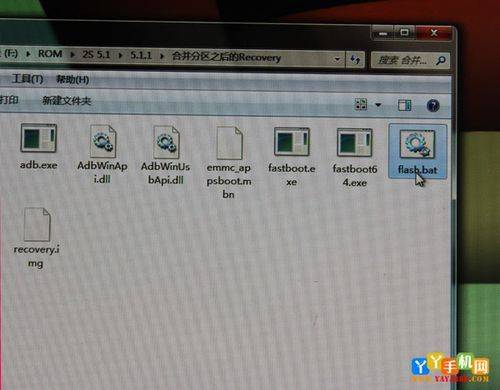
I'm not the original, but the millet forum. It is recommended that the general oil sector be 300m space. Fever oil sector 400m space? Start the tutorial? Many people don't know how to go into shell mode. I'm telling you, run cmd under the win7 system, use administrator mode. See my last count is system 32? Place those two files in the system32 directory. Then enter the tadb shell. I personally think that the system subdivision is small, that the remaining space is less than 2m, that i can't add to the application, so i want to resize the system subdivision much larger, with the following results: after all, rezoning is a high-risk act, and if i am not sure, try not so easily. Next steps and attention are described below: 1, download the attached text of the tadb. Zip to compress to two documents and place it under the c: \windows directory. Backup of your own program and data (rezoning, all data will be lost, equal to the effect of three cleans). 2. The cmd command line (which does not ask friends) enters the tadb shell back when the mobile phone connects the computer with a data line and re-enters the shell mode if it can enter the shell mode. 3 the entry of su-back vehicles into root mode (which requires cell phones already root) 4 in shell mode and the entry of busybox fdisk/dev/block/mmcblk0 into the zoning tool is a graph of entry. Enter p to print out the current partition table, the following figure? 5, delete the original partition, and the last number is the partition number. For example, system is 15,1-14. In command (m for help): enter d back and then in the next line part number (1-20): enter 20 and then block 20. The same is true for the 19th and the 19th, respectively, to delete partition 19. 6 rebuilding 6 sectors deleted. In command (mfor help): enter n return at first cylinder (1636-477184, default16369): enter the end value after the starting value is returned. Repeat the above actions and enter a different threshold and end value to complete the reconstruction of six sectors. The initial and end-of-conversion of the partitions is difficult, and i have prepared an excel file, which is included in the attachments, only if it contains the size of the divisions. ? 7 print the new partitions to see if they are the same as the ones you have set. If there is an error, delete the new partitions and make sure that there is no problem, then make sure that the 17 partitions are marked with their original values. All new points are defaulted at 83 and should be returned to 60. The method is to enter back at command (m for help): enter back, part number (1-20): enter back at 17 and after hex code (typel to list code): enter back at 60. 8. Preservation of changes. All the operations done above are currently not written in the partition table if at command (m)