If you want to register a web site, you first have to identify a domain name that is not registered by another person. Common domain name suffixes are. Com,. Cn,. Net, etc.; then you select a formal domain name registerer, enter a search of the desired domain name on the platform, confirm the availability of the domain name registration information (including the name of the registrant, contact details, mailboxes, etc.) and complete the registration process with a hint to enter the domain name。
Domain name registration channels: service providers such as aliyun, telecommunication cloud, chinese cloud, 18 interconnections, western digital, etc。
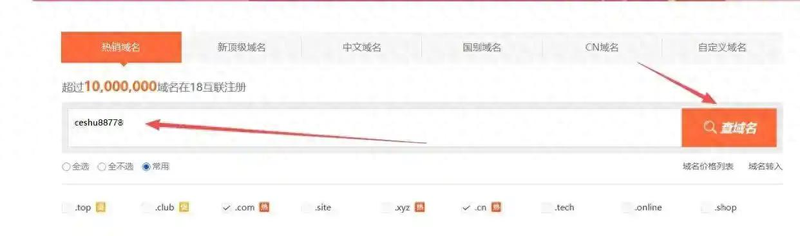
Enter the domain name that you want to register and search in the domain name query box: if the page shows " registration now " , it indicates that the domain name is currently not registered and can continue the subsequent registration process; if the domain name is shown as " registered " , other domain names need to be replaced for re-search。

3. Information on the person or unit, including the name of the registered person/unit, contact information, document number, etc., will then need to be completed according to the circumstances of the case. It is important that the information entered is genuine and valid, since the registration of domain names is subject to a real name verification, which, if the information is wrong or not in accordance with actual practice, is likely to result in a failure of verification, thereby affecting the proper registration and use of domain names。

Upon completion of registration, relevant materials for the registration of domain names are submitted and the verification of domain names is completed. When uploading material, please ensure that the document is clear and complete and that it is not returned twice because it does not meet the requirements。

5. The domain name interpretation operation can be performed once the domain name verification has been completed. Login domain name management console, position resolution configuration module, and point the a record of the domain name to the corresponding virtual host or server public network ip address。

Second step, rental of virtual mainframe or server
Virtual mainframe is a virtual small space that divides a real server into virtual spaces that provide basic services for individual or small websites to store documents, run programs and access the internet。
Servers are dedicated computers with high-performance computing, storage capabilities that can provide web services (e. G., website access, data storage) to users or other equipment。
The core distinction between virtual hosts and servers is reflected in these:
1 the essence is different: virtual mainframe is an independent virtual small space that divides a real server by technical means, whereas the server itself is a dedicated device or cloud example with full computing, storage, network capability。
2. Differing resource occupancy: virtual mainframe needs and other virtual spaces with servers share resources such as cpu, memory, bandwidth, etc., while servers are the sole source of all available resources and some cloud servers are able to allocate resources in a flexible manner。
3. Management privileges differ: the virtual mainframe has limited administrative powers and can only operate basic content such as web files, databases, etc.; the server has the highest privileges at root or administrator level, is free to install systems, software, and customize the operating environment。
Virtual mainframe and server access: service providers such as aliyun, telecommunication cloud, chinese cloud, 18 interconnections, western digital, etc。
Virtual mainframe opening step:
1. The virtual host configuration may be selected according to the actual needs of the site, such as the size of the storage space, the type and capacity of the database, the amount of traffic available per month, etc。

2. It is then necessary to log on to the virtual host management backstage, find the ftp management functionality portal, create the ftp account and set up a high-intensity password - it is recommended that the password contains case letters, numbers and special symbols to avoid simple combinations of characters, and that some hosts can set the account 's operating rights and accessible directories as needed; once set up, keep the account and password properly and then use the ftp tool to remotely upload, download, update and back up website documents。

Steps for server opening:
1. Select the appropriate server configuration in the context of the actual needs of the website, taking into account the core factors such as size, daily access, data storage needs, type of business, such as bandwidth, cpu, disk, memory, etc. The server operating system is then selected on the basis of the website development reference to ensure that server configuration supports the steady operation of the website。

Note: once the website file is approved, the site domain name will be added to the white list of the server, or the domain name binding will be completed in the domain name management function of the virtual host in order to achieve a precise connection between the domain name and the host and ensure regular access to the site。
Step 3: web site icp filing
Website icp filing is a statutory requirement for websites in the country, and all websites built using domestic servers are required to submit a filing request to the communications administration and obtain a filing number. Material such as personal/unit qualifications of the host of the website, server rental vouchers, etc., are required for filing and submitted to the authority for review by the server accessor; after the review, the website will be legally operational and the uncompleted site will not be accessible properly。

Note: when a website file is submitted, it is necessary to ensure that the provider information provided (personal or unit ids, etc.), server access information is fully consistent with the actual situation, that the material is clear and complete, that the subject of the file is consistent with domain name registrants, server users, and that information such as the name of the site, the purpose of the website, etc., is accurately completed, that sensitive or irregular content is avoided, that notice of certification is followed by the filing operator and the authority, that it is timely to cooperate with the completion of texting or face-to-face verification and that the filing process is well advanced。
Step 4: site tool selection
Site-building tools are a type of software or system that does not require a complex programming code, such as self-defined management, modular configuration, which enables individuals or enterprises to quickly build up and access websites, freely deploy to the mainframe or servers, and freely bind core capabilities such as domain names on websites, whether individual blogs, government offices or business networks, to lower technical thresholds and efficiently complete construction。
Download site tool: pageadmin web content management system
1. Open the browser, access the template area of the pageadmin official website, and select the matching site template from a range of dimensions, including industry attributes, design styles, page layouts, etc., taking into account its own construction needs。

2. Select the template and when the download is completed, you will get the corresponding program install package (usually in . Zip format) and the template file; if the template is integrated in the program install package, it can be used directly, and if the template is a stand-alone file, it needs to be properly saved separately。

Fifth step: website deployment
Website deployment is the uploading of locally prepared website programs, template files, databases, etc., through the ftp tool or server management panel to a configured server or virtual host, and the completion of a series of operations such as domain-designing, database connectivity, system configuration, which ultimately enables the site to be regularly accessed by internet users via domain names。
1. Upload template files: upload downloaded template files to a configured server or virtual host。

2. Decompressed template file compression packages uploaded through server or virtual mainframe file management tools。

3. Open the browser to enter a bound web domain in the address bar and access to pageadmin's system installation process upon return。