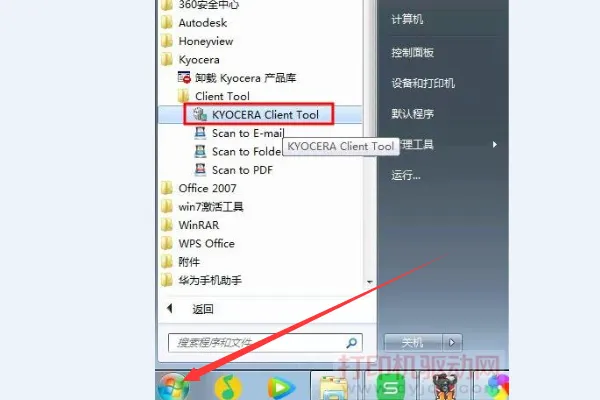
1. Following the installation of the kyouta fs-1020 mfp driver, open the kyocera software and click on the start of the computer in turn, all programs, kyocera, kyocera clinic tool options。
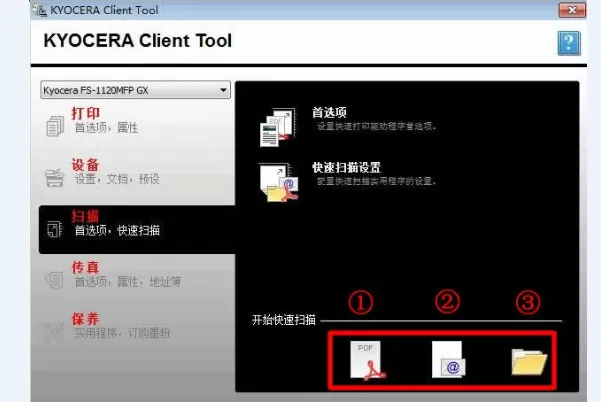
After opening the kyocera clinic too option, you can see the start of a quick scan in the middle of the page and choose a different scanning option according to needs. Scanners support scanning into PDF files, sending them via email, scanning them into pictures and saving them in folders。
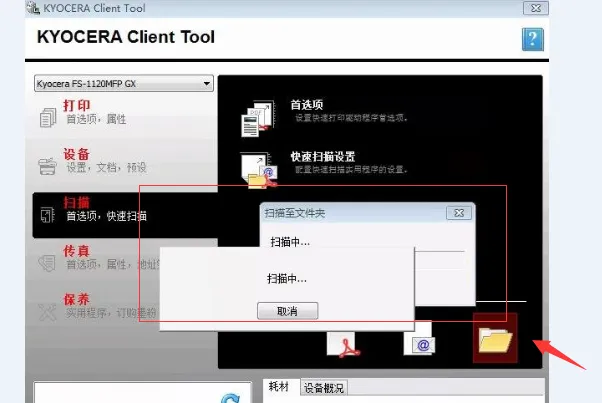
3. General scanning files are selected to be scanned into a folder and then to select the location where they will be saved and to complete the scanning of the picture once the scan progresses。
Extension:
How to improve the quality and clarity of scanning pictures:
1. General scanners provide three scanning options, of which black and white apply to the scanning of texts in white and paper; greyscale applies to the mixing of graphic and text-based sketches; and photographs apply to the scanning of colour photographs, which are multilevel sampling and storage of the three channels of the red and green blue。
2. Set the resolution of the scanner. The higher the resolution, the clearer the image, but the scanners have different maximum resolution based on the configuration of different models, and the normal scanning picture or text sets the resolution to 300 to get a clear picture file。
3. A preview function is available prior to the official scanning of documents by the scanner, which allows for the scanned file size and image location to be checked and adjusted in a timely manner as required。