Many of the drivers like carplay on wireless, without plugging in, with automatic connection to the car, and with very easy navigation。
But most people have experienced these terrible problems:
The vehicle was unable to find the equipment, the pair failed, the automatic break-up for several seconds, the frequent break-off on the way to the car, the delay in the navigation of the carton and the intermittent sounding of the song。
Today's one-time talk about all the causes of carplay's failure + complete repair, with the original self-contained and rear-packed boxes in common, and a complete cure for the break
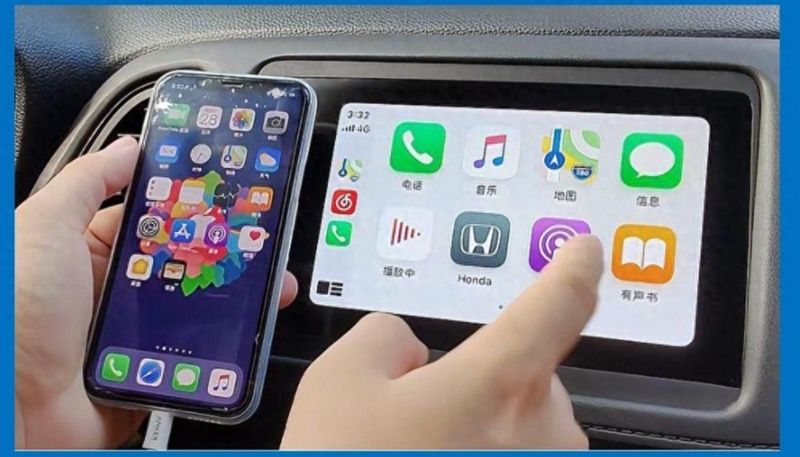
I. Understanding: the real contact of radio carpe
Many of the drivers spent years wondering:
Wireless carplay has to open the bluetooth + wifi dual channel simultaneously
• bluetooth: awakening, twinning, handshake
• wifi: transmission of video, sound, navigational data
Bluetooth, wifi, never connect or break。
Only wifi, turn off blue teeth, cannot reconnect automatically。
This is the cause of all the failures
Can't get in the car. Can't find the equipment? 4 mandatory steps
1. The phone must be turned on simultaneously, bluetooth+wifi
No hot spots, no flight patterns, no lan closures。
Wifi, a wireless carplay, is a hidden frequency, and wifi must be turned on to automatically match。
Turning off personal hotspots
Cellular hot spots are turned on, which directly captures the wifi channel, resulting in a lack of handshake and 100 per cent connection。
3. Delete old pairing records (most useful)
Cell phones accumulate old vehicle caches over a long period of time and are subject to direct conflict。
Operation:
Cell phone setup, general. Carplay loaded
Find your vehicle name
Also delete the machine from the bluetooth
The machine bluetooth list also removes the phone
Rebooting the mobile phone, rebooting the engine and rematching it is extremely successful。
Siri must open
A lot of people shut down siri and carplay was unable to start the service。
Setup to open siri to trigger the vehicle-mounted interconnection。
Iii. Frequent break-ups, automatic break-ups open
1. Signal interference is number one
These devices in the car could seriously interfere with carplay:
:: carlog wifi
:: car-borne hot spots
• backstream media equipment
• other car-borne bluetooth equipment
Resolve: all cars are closed while driving, avoiding conflicts of faith。
2. Examination of mobile phone-saving models (as appropriate)
The iphone low power model is likely to freeze backstage services, but is not a necessary cause of disconnection。
Recommendation: if there is a frequent breakout, try to turn off the low power model to see if it improves:
Setup zoom battery zoom turn off low power mode
Check simultaneously: setup zoom universal zoom backstage app refresh zoom ensure open
3. Cellular overheating (heating)
The heat in the car during the summer is high, and overheated mobile phones trigger performance protection mechanisms, which may lead to wireless transmission of cardon, delay and even retreat。
Solving: cell phones are used as far as possible to heat up the air conditioners and avoid direct sunlight。
4. Unstable signals from tunnels, underground garages
Complex environments, such as tunnels and underground garages, may have stronger electromagnetic interference, affecting the motor wifi's stability, which is an occasional phenomenon and generally recovers automatically upon departure。
Iv. Lined up but karton, delay, soundless
1. Wifi speed occupied
If the engine is connected to the hotspots, the network is updated, and the online map is online, it's a good idea
Carplay's bandwidth will be squeezed, images delayed, sound carlton。
Resolves: when carplay is used, all non-essential network updates, online services are closed。
2. Obsolete version of ios
The old system has carplay compatible bug
The new version of the system had all been able to repair the cut-off and delays。
Recommendation: mobile phones maintain the latest stable version of the system。
3. Backfilling box solids are too old
If your original car is wired carplay, then you have a wireless box:
The box solids are not updated for a long time, and the adaptation of the new version of ios will go crazy。
Solutions: scanning into the back of the box, upgrading the latest solids, doubling stability。
4. Unstable power supply to the usb interface (for outside boxes)
Some of the car-type usb interfaces are limited in power supply, and the lack of access to the outside wireless boxes may lead to frequent restarts。
Address: attempt to replace another u. S. B. Gate with a more stable vehicle belt, or switch head power with a smoke lighter。
No automatic connection in the car? The most annoying problem of lazy people
A lot of drivers have to get in the car manually. It's a lot of trouble
There are three reasons:
One, get in the car, bluetooth automatically cut
The engine's out of fire, power out
3. The mobile phone did not turn on the autoaccess drive wifi
Final settings:
• cell phone end: keep blue teeth open; enter the set-up wifi, find your carplay engine, click on the right-hand "i" icon to make sure that autoaccess is on。
• end of the vehicle: check the interconnectivity settings to ensure that carplay or similar options are activated。
At the same time, check a hidden setting: set the time for screen use, content and privacy limits to ensure that carplay is not disabled。
Once all set up, every time you get in the car, you open the door。
Vi. The ultimate stabilization technique
1. Do not switch mobile phone bluetooth devices frequently
Watches, headphones, and car-cars are switched back and forth, which can easily disrupt carplay's handshake logic。
2. Elimination of all long-used vehicles with wifi and bluetooth devices
Reduced back-office disruption。
3. Long-distance high and self-driving for extreme stability
Priority cable carplay
Zero delays, continuous succession and the ability to charge by car are the most stable。
4. The most economical first move: restart
I don't care what's going on, i'll reboot the iphone and reboot the engine system. In many cases, a mere re-launching would solve 80 per cent of the problem。