I. The dissipation of laptops
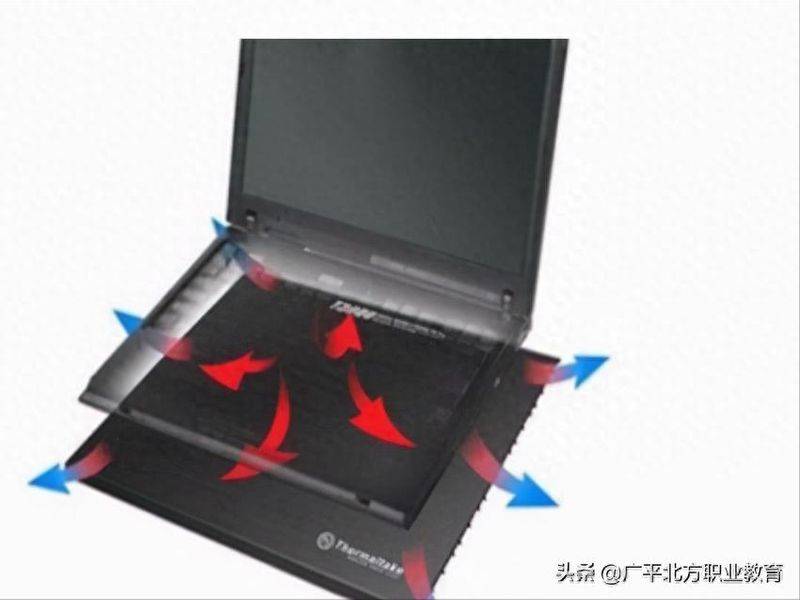
In computers, the cpu is a hothouse, and the faster the cpu is, the greater the effort, the greater the heat. Thermal dispersion methods generally used are mainly based on radiators and fans. On the bottom and on the top of the main plate, there is a metal-dispersion panel. At the position of the cpu, there is a system to help diffuse the heat and absorb the heat generated from the cpu. The dispersing fans have three classes of non-start, low and high wind, depending on the temperature of the cpu. The greatest benefit of this heat dispersion method is its low cost, which is accepted by most pc producers. In addition to this commonly used dissipation method, the keyboard is also an innovative method for spreading heat. We know that the laptop is thin, and when you load the keyboard on the mainframe board, the bottom of the keyboard contact the main panel, and it is possible to use the bottom of the keyboard to export the heat generated by the cpu. In the construction of the keyboard, there are four holes in each key, and the heat is excreted by the key hole, and when the heat air is excreted from the key hole, the cold air flows from the key hole to replace the heat air. Among the numerous heat-dispersion technologies, water-cooled heat tube technology is a very effective heat-dissemination technology proposed by ibm. The original idea was to dig ice cream spoons, and the heat of the hand is channelled through the air pipe to frozen ice cream, which melts softly and then digs out the food. Fibres and liquid conductive thermal media (most of which are water) are present in the bulk tube, where a vacuum is created, one end is close to the cpu and the other is far from the cpu. It works on the principle that, in a vacuum, the boiling point of the liquid conductive thermal medium is low, and if one end of the tube is heated, the medium will evaporate, evaporate to the other end, cool it and then flow back, so repeatedly, the heat will be taken away. The advantages of the radiator tube are so great that without mobile parts, there is no noise, no electricity consumption and effective work over time. In addition to ibm's radiative tubing technology, there are also more characteristic technologies for cold, hot-board dispersion of toshiba laptop computers. Dispersion efficiency increased by about 6. 5 times, which effectively addressed the problem of computer dispersion. Many brand-name laptop computers currently use a three-tier heat-dissemination method for radiators, keyboard-to-dissemination, and temperature-controlled fans. There is no software that directly controls the operation of laptop fans, but effectively reduces cpu heat through htl commands. Windows 2000/xp has incorporated support for the htl directive。
Ii. Why is the laptop starting slowly
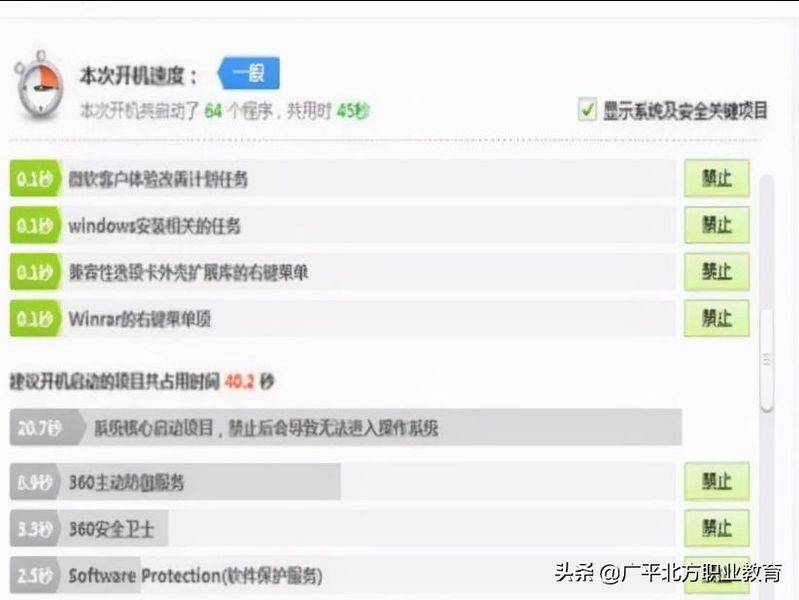
My laptop has recently had strange malfunctions, as shown by the flashing of hard drive lights after start-up, the slowness of the system after five to six minutes, the fact that the viewing process, known as system (not system idelproces), has taken 99 per cent of the resources, with a size of 268kb ~272kb, cpu fans on (the machine is a temperature-controlled fan, which is used half an hour on cs), and the return of the resource, system idelproces, in about 15 minutes. The latest edition of the jinshan drug cartel was undetected, there were no other suspicious processes, and skynet surveillance had no suspicious connections. Is my machine a virus or a wooden horse? Or system failure? According to what you're saying, it's a system failure, and there's probably some kind of unknown virus program affecting your system. The ideal solution would be to back up critical data and then format the partitions of the system and re-install the operating system, which should enable your computer to return to normal. In addition, ordinary laptops routinely bring their own systems back to the disk at random, but the use of the recovery drive will restore the system to the state of the plant and may result in the loss of data, so be careful。
Iii. Reasons for breakup of laptop fans
Without running any program, the system fan rotates intermittently for about five seconds, then stops for 10 seconds, then turns for five seconds, and repeats. It's normal, because laptops don't always work to save electricity consumption, but only when the temperature inside the laptop reaches a certain level of heat, so it's a constant stop。
The most common failure of laptop pv is a mechanical failure, followed by a circuit failure, and the failure of circuits caused by inappropriate user adjustments is much more frequent than the failure of a metaphone device, so do not randomly adjust the various pvs in the laptop when dismantling or maintaining the optical device. There are three main types of computer-driven common malfunctions: operational failure, accidental failure and inevitable failure. 1. Operational malfunctions, such as error in driving or incorrect installation resulting in the absence of a laptop pv in windows or dos; error in a laptop pv connection or jump line rendering the laptop pv inoperable; failure of a cd line to connect to or listen to the cd; failure to correctly place a laptop pv on the tray resulting in a pv disc; loss of clarity of image or a standstill or serious marseak phenomenon due to disassembly resulting in various pv connections or looseness. Unforeseen malfunctions, such as in-house integrated circuits, electrical capacitor, electrical resistance, early failure or sudden damage to metaphones such as transistors, or sudden damage to a number of mobile mechanical parts, which are rare but require repair and replacement to remove the malfunction, are also called “real” failures. 3. Inevitable malfunctions of the laptop drive, which inevitably occur after a certain period of time of use, are, inter alia, the ageing of the laser diodes, the length of the reader's time and even the inability to read the disc; the deterioration of optical lenses in the laser head assembly, etc., resulting in audio or video distortions or death machines; and the malfunctioning of the mechanical moving apparatus as a result of wear, deformation and relaxation. It needs to be clarified that the rate of repair for inevitable failure depends not only on the quality of the product, but also on the user's man-made operation and maintenance and frequency of use and the environment. Check if the external adaptor is properly connected to the notebook, and if the external adaptor is working, check whether the battery type is the original battery if the battery is powered only and whether the battery is charged; whether the battery is charged with electricity; whether the battery is charged with electricity; whether the battery is fully charged; 3. Check whether the dcb plate is functioning; 4