Happy new year, february 2026
Ps: at present, the computer diy market has a relatively high memory price and a relatively low probability of falling it in the short term. The recently installed memory can be considered for the purchase of second-hand small-capacity memory excesses, and subsequent memory prices can be restored and replaced。
The configuration in this paper has no stake in it, and the proposal is based on value for money and will be updated in a timely manner at the beginning of each month. It is hoped that you will be able to say a few words in support of ha – purely for love – and that support will be my driving force。
I'd like to thank your friends for their support. Just look at the configuration sheet and pull it down。
For comments on simple questions, detailed advice may be paid:
If you want a computer host at diy, you need to know what parts are needed for the computer mainframe, which has eight essential parts, including cpu, master board, graphic cards, memory, hard drive, power, machine case and heat radiator。
Hardware to determine computer mainframe performance:
Cpu, graphic cards and memory
Other fittings have no effect on performance as long as they are fit, and if hardware is not specifically selected, the following selection guides and recommendatory articles are available, and the selection of accessories is generally known。
Hardware selection guide and recommendations
As a result of the guidelines for the selection of essential accessories, the computer mainframe consists of eight of the above, all of which are self-wired and need not be purchased without other requirements。
The above guidelines for hardware selection, solid hard drives are now widely available, only a few users with storage needs on mechanical hard drives will select, mechanical fans will generally be unloaded, and mechanical fans will generally be used to assist with bulk heat for high-composed hosts or to install argb fans in pursuit of appearances, not essential accessories。
Cpu performance ladder map
Speculation of card performance
Cpus and graphic cards, the most important of which are cpus and graphic cards for computer performance, do not know what the cpus and graphic cards of the specific type are, and can be used for cpus and graphics, which can be easily and clearly ranked。
If you don't want to assemble yourself, buy a brand-branding machine and read this brand-branding recommendation:
The 2025 desktop branding machine is recommended
20 per cent government subsidy for brands, recommended brands
Monitor
The monitor is the most important external feature, and you think about it, all the hardware is for the monitor, and we are facing it directly. The display effect of the monitor directly affects the host's experience, so the monitor's budget cannot be saved and the good monitor selected as much as possible。
Monitor: monitor selection guide and recommendations
Game highbrush monitor recommendations: electron highbrush game monitor recommendations (priced versus priced)
Home, office, design monitor recommendations: office, design monitor recommendations
First-hand load problem
I don't know how to use this answer
You want to load it yourself or go to the store
Once installed, the system is installed, and the system is actually very simple and can be seen in the next version of the installation of the win10/win11 system。
More than 13 generations of cpu have recommended the selection of the win11 system, with the remainder being based on the customary choice of individuals to install the latest version of the w11 system without preference。
Teaching of installation of the win10/win11 system in its original version in 2026 (pure version)
If you want to test the computer, then you can look at the answer, and i'll list the usual computer runs, test software。
Which software will be needed to test the computer? Related reading
2026 nvidia card selection guide
2026 pure white computer diy hardware recommended
In 2026, pr video clip computer configuration recommended
2026 ai drawingstable diffusion configuration recommended
The black myth: the goku computer configuration recommended
Configure recommendations
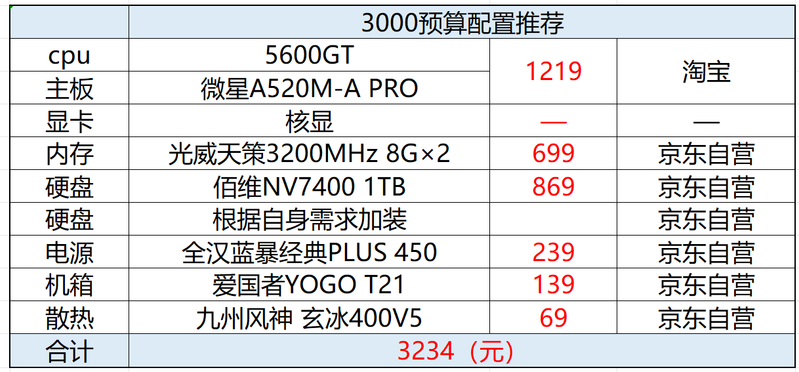
Host performance analysis and purchase links:
Gyusang: 3,000 budget computer configuration recommended
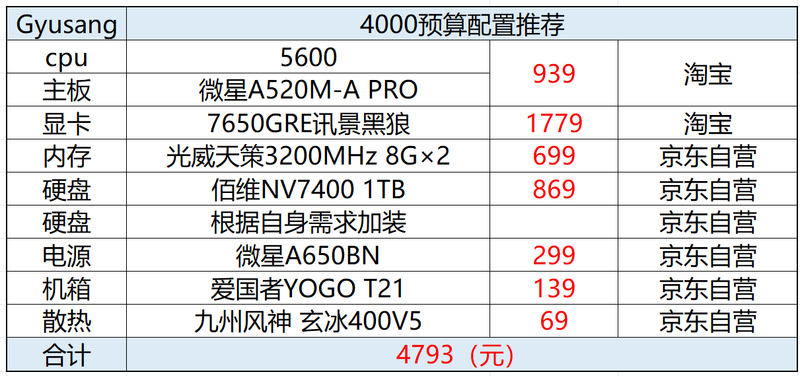
Host performance analysis and purchase links:
Gyusang: 4,000 budget computer configuration recommended
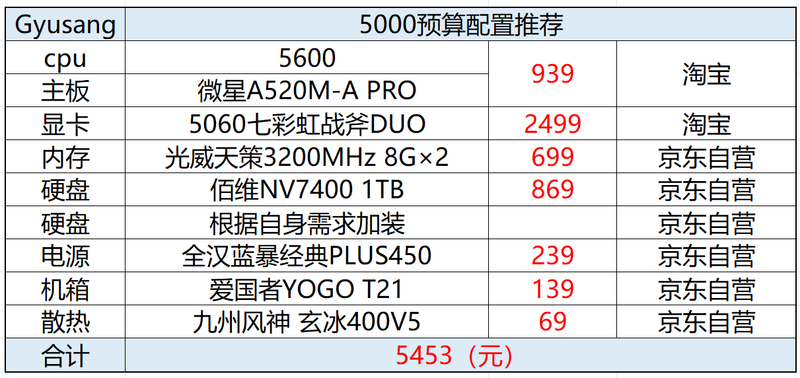
Host performance analysis and purchase links:
Gyusang: 5,000 budget computer configuration recommended
Host performance analysis and purchase links:
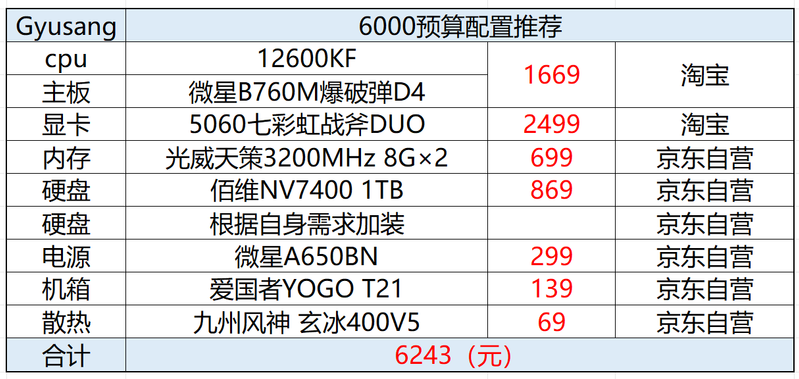
Gyusang: 6,000 budget computer configuration recommended
Host performance analysis and purchase links:
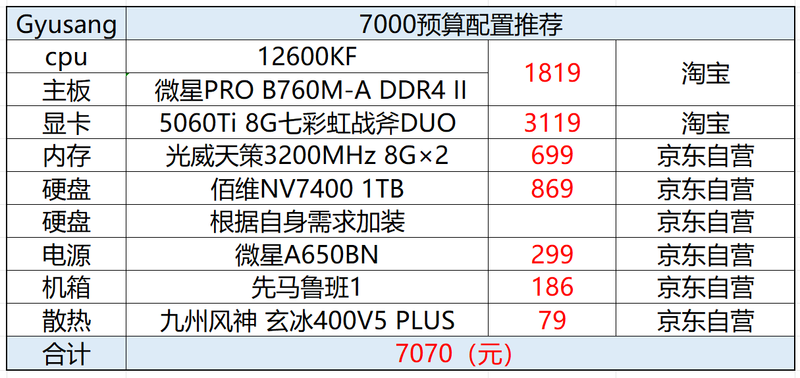
Gyusang: 7,000 budget computer configuration recommended

Host performance analysis and purchase links:
Gyusang: 8,000 budget computer configuration recommended
Host performance analysis and purchase links:
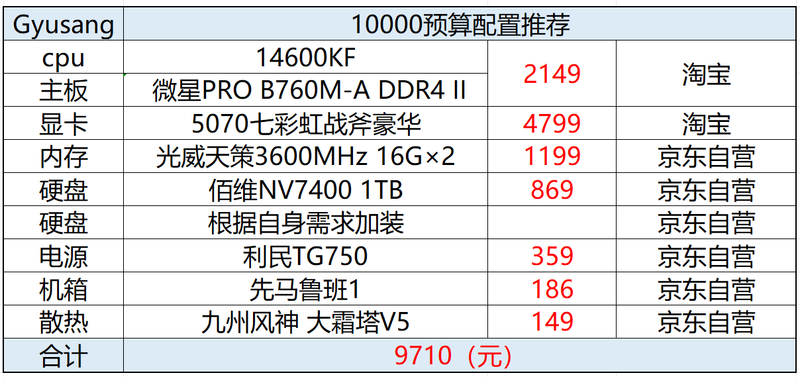
Gyusang 10,000 budget computer configuration recommended
Host performance analysis and purchase links:
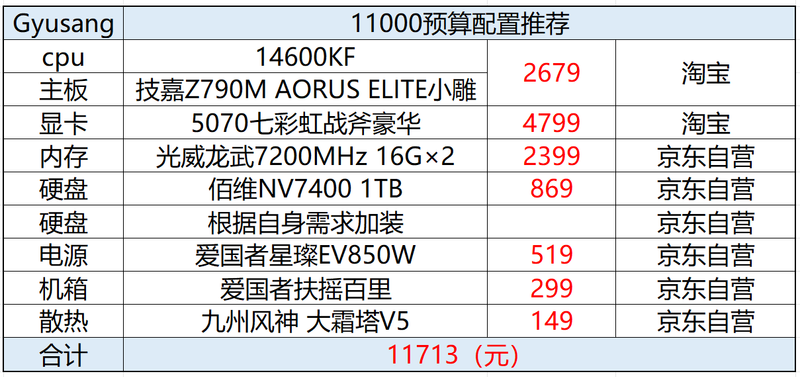
Gyusang: 11,000 budget computer configuration recommended
Host performance analysis and purchase links:
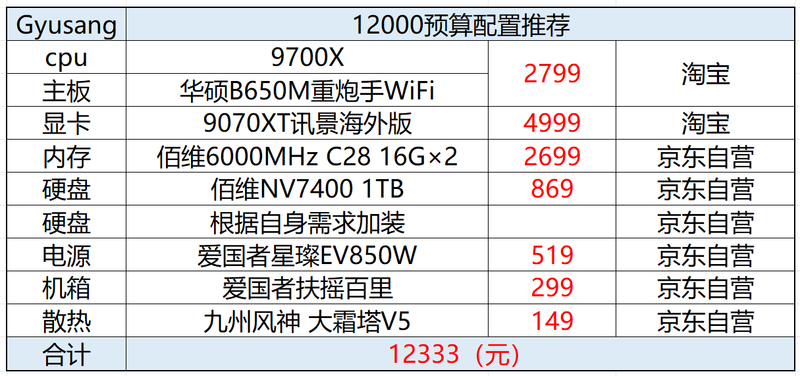
Gyusang:12000 budget computer configuration recommended
Host performance analysis and purchase links:
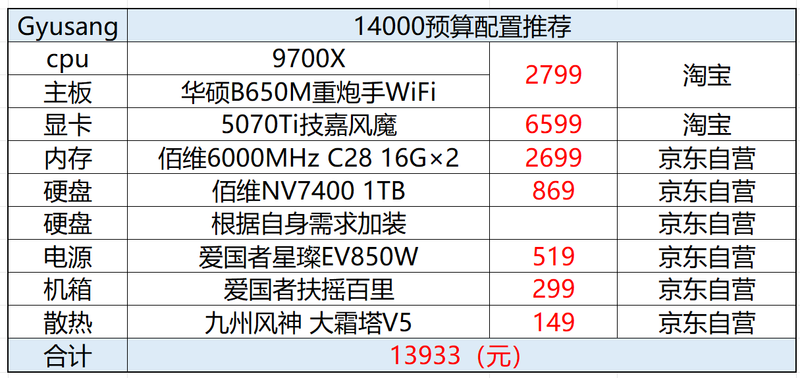
Gyusang: 14,000 budget computer configuration recommended
Host performance analysis and purchase links:
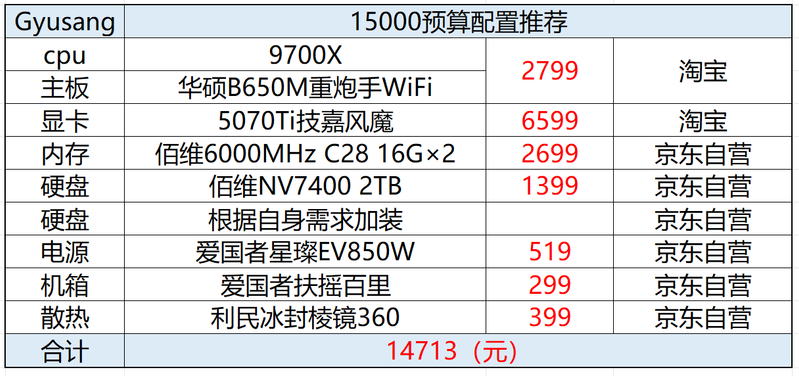
Gyusang 15000 budget computer configuration recommended
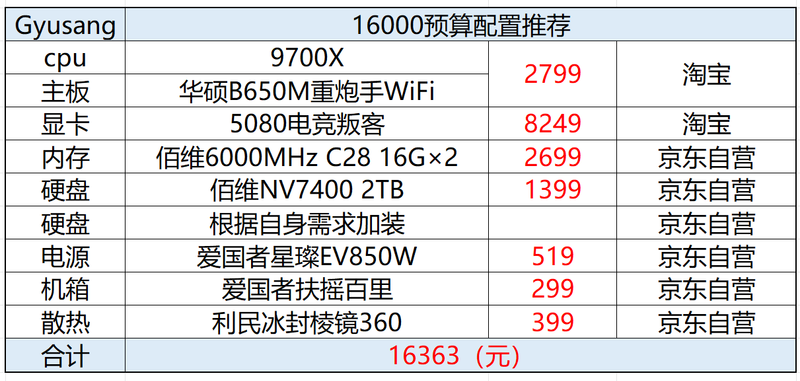
The 16,000 budget allows 9,700 x + 5080, and the other 32g+2tb memory and hard disks are configured, with a high value value of 850 w pcie 5. 0 power and a value for money model。
Visible cards can add money for first-line brands, such as the seven rainbow war axes, the tweeting wind, and the cooling of heaters, which can effectively reduce cpu load temperature。
If you want to choose, i'll write this one with a nice heat, so you can choose the one you like。
If kyodong doesn't have a card, he can buy it。
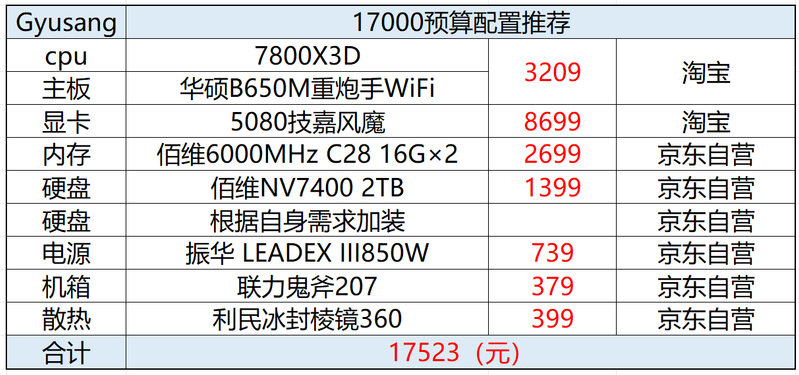
Host performance analysis and purchase links:
Gyusang: 17,000 budget computer configuration recommended
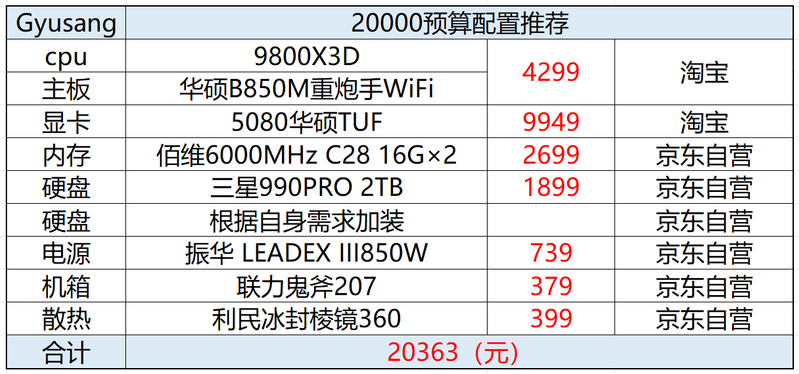
Host performance analysis and purchase links:
Gyusang: recommended computer configuration for the 20000 budget machine
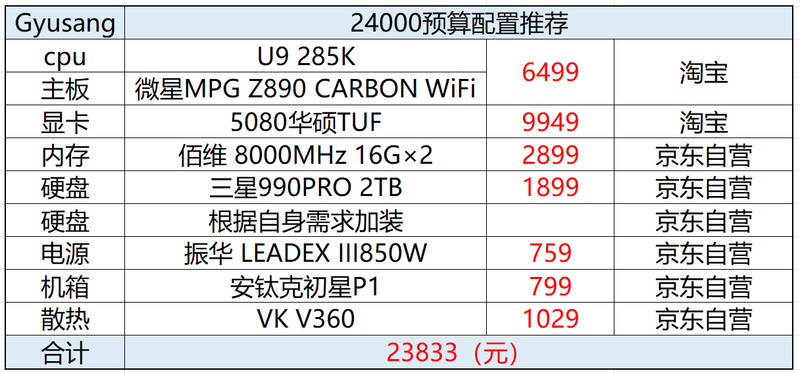
Host performance analysis and purchase links:
Gyusang: 24000 budget computer configuration recommended
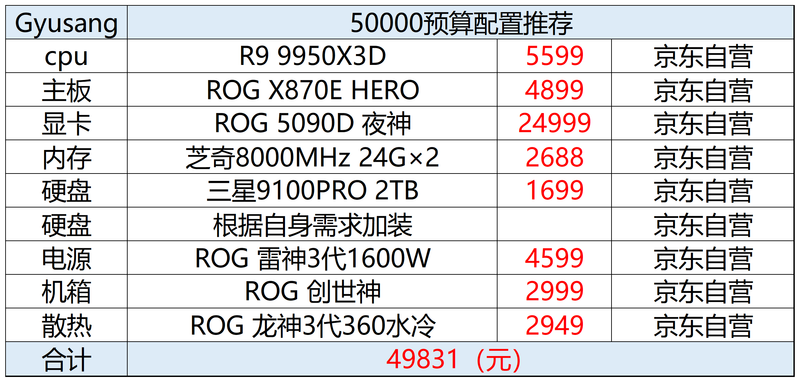
R9 9950x3d+rtx 5090d rog family barrel, currently host ceiling of diy。
Hardware analysis and purchasing links:
Gyusang: 9950x3d+5090d