Win 7WellVirtual wifiTransformationNo router
If there is only one line in the home, and two or more notebooks need to be connected to the network, do we have to buy a wireless or wired router? No, actually using software, you can turn your laptop into a wireless router, the wifi hotspot. In the case of windows7, it itself brings wifi and softap, so you can turn your laptop into a "wifi hotspot" and connect the other notebooks to your laptop。
Tools/materials
We'll install a windows7 than a computer
Wireless network
Step/method
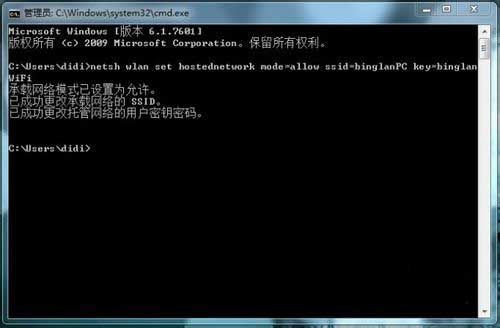
When you open your laptop's wi-fi switch, you'll be working as an administrator on the operation of the win+r to enter cmd back. Enter and press back the command "netsh wlan set hostnetwork mode=allow ssid=binglanpckey=binglanwifi" in the opened command prompt, thus enabling and setting up a virtual wifi card。
When you're on a "network connection", you see an additional wireless connection 2 called microsoft virtual wifi miniport adapter, which is a sign of success. In order to distinguish it from other cards, it was renamed "virfi."。
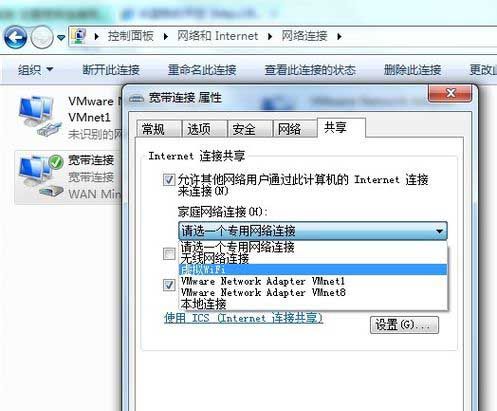
And then it's connected to the internet. In network connection, the right-click on a network connection that has been connected to the internet, and then select " properties" to "share" to allow others to connect "n" to "virfi" in turn. And after you click ok, the word "shared" will appear next to the shared card icon。
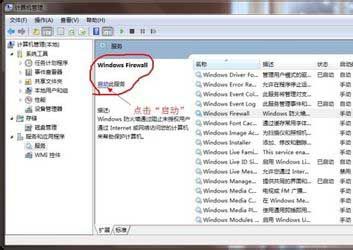
At this time, there may be " unable to enable shared access error code: 0x80004005: no error specified " . In this case, the right-click on the " computer " on the desktop, and then double-click the " manage " to the left to open the " service and application " menu selection to the right to find and select " windows firewall " click on " enable this service " , and then perform an operation in the previous section。
Next, run in the command hint: neth wlan start hostnetwork, thus opening the wireless network。
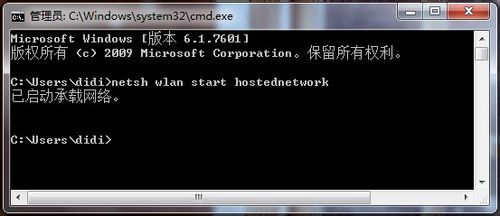
When "start" is changed to "stop", the wireless network can be shut down。
Finally, this virtual wifi red fork will disappear, which means that the wifi base station has been built. Then the other notebooks search the wireless network "binglanpc" and enter the password "binglanwifi" and then share it!
Attention
"netsh wlan set hostnetwork mode=allow ssid=binglanpc key=binglanwifi" command has three parameters. Mode: disable by using virtual wifi cards; ssid: wireless network name, preferably in english (this is the case with bininglanpc); and key: wireless network password, eight or more characters。