
The owner of the car who buys a zero run, a lot of people have had a "no reaction" problem with a u-rider. Today's dry product helps you analyze possible reasons and provide solutions for the u-seconds to turn into a car-borne music library。
I. Six-point reason why the zero drive is not recognized
A lot of zero runners responded, and the u drive was plugged into the engine with a hint "not inserted" or no direct reaction. The problems are concentrated in the following six areas:
1. The ucd format is not correct
The zero runner system requires that the drive must be in fat32 format, while most newly purchased drives on the market are in ntfs or exfat format。
Solutions:
Insert a flash drive into a computer, select "formatize" by right
Filesystem selection fat32 (best compatible)
Allot cell sizes "default" and tick "quick format"
Note: formatting emptys the data on the disk, please back up
2. Overcapacity of disks
Some of the zero models are poorly supported for oversized disks, especially those above 256 gb, which are prone to identification failure。
Recommendation: switch to 32gb or 64gb disk tests, which are most compatible。
3. Usb interface type mismatch
The usb interface for the zero-run segment (e. G. C10) is below the central armbox and is less compatible with usb 3. 0/3. 1 than usb 2. 0。
Proposal: prioritize the usb 2. 0 interface 's disk, and when plugged in, hears the sound of 咔哒 to indicate good contact。
4. Incompatibility of music file formats
It's the easiest to ignore! Zero-runner support for audio format is limited:
Supported format: mp3, wma
Format not supported by most models: flac
Partially supported but unstable format: wav
Format not supported at all: ape, ogg, kgg
Solutions: conversion of the high-format audio converter to a machine-compatible format
5. Folder levels are too deep
The zero runner has limited support for the file path and the subfolder cannot be played together。
There's a car owner spat: "only the current folder, the subfolders can't be played together, and if you have a lot of albums that specifically build the corresponding folders, it's really bad."
Recommendation: music files are placed directly in the u-disc directory, or at most in a folder。
6. File name with special symbol
The system's compatibility with special characters is poor, and symbols such as % * @ in the filename may result in failure to recognize。
Recommendation: file names are named in pure letters or numbers, e. G. 01-jelen-bring. Mp3。
Ii. Quick-track inventory
If you don't want to go through it one by one, just follow this list:
Switch usb 2. 0 udis with a small capacity (6464gb)
Format to fat32
Several standard mp3 (bit rate 128-320 kbps) tables in root directories
For filename read plain english/number
Insert u. S. B. Mouth below the central armbox (position c10/c11)
Restart the engine and try again
If the drive remains unrecognized after the above steps, the probability is that the u. S. B. Interface hardware is malfunctioning and it is recommended to contact the after-sales testing。
Iii. What about the incorrect audio format
Many of the owner's music collections are in undamaged formats such as flac, wav, or are downloaded from the online kgg, ogg format, which is not directly copied to the utm machine。
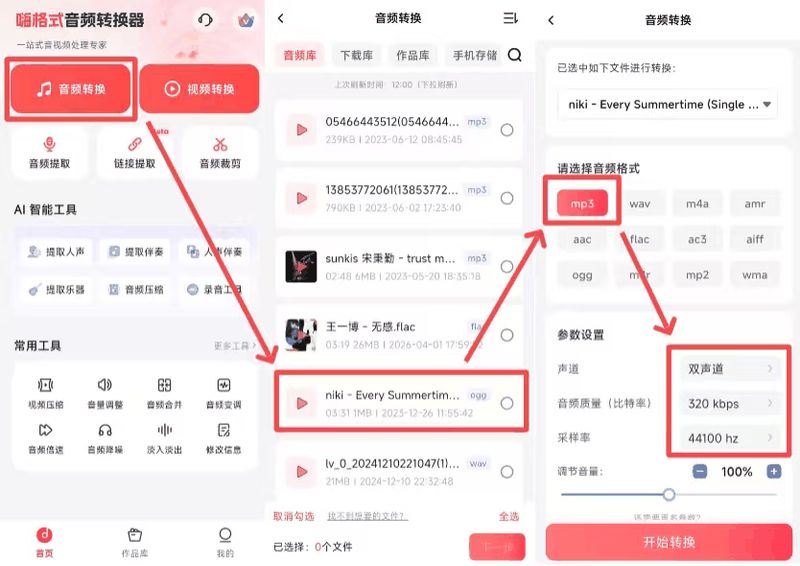
This is when you need an audio format conversion. A simple good tool is recommended — the high-format audio converter app。
It helps you:
One key to convert flac/wav/aac/ogg format to mp3
Support batch conversion. Hundreds of songs are done in minutes
It's very simple. White can do it in seconds
Iv. Attention to the use of the zero runs
Zero-run c10: usb interface below the center armbox, only front-row usb, subfolder unrecognized
Zero-run c11: usb interface is in the central armbox to support the installation of a third-party app on the disk
Zero-run c01: usb interface inside the center armbox, similar to c11
Zero-run t03: usb mouth on the left side of the front row, with hint formatting on the plug
V. At the end
Zero runs as a "value-for-money" brand of new domestic energy, and there is indeed room for optimization in the u. S. A. Systems. But with the above methods, the vast majority of unrecognized ucds can be solved。
Three final reminders:
1. Regular formatting of disks (fat32) to avoid document fragments leading to reading anomalies
2. Avoiding the extraction of disks on start-up of vehicles and reducing loss of interfaces
3. Focus on the upgrade of the ota and the zero run will optimize disk compatibility through system updating