Solutions: configure the miscellaneous editor to set a line of df
10
Program 1 set home location
When editing the program, the first instruction is set to a home location, at which point we can finally find the home location criteria and save manual mobile robots time。
Eleven
How to turn off the output signal manually when the test encounters an emergency situation (preheat failure, program error)
Solution: displays the numerical output end of the input/output end to hold the driver's number (closed or opened) and we can open the output signal again with kcp after the problem is resolved. Our output signal is 3 low pressure oxygen, 4 high pressure oxygen, 5 propane
12
Resolution of 6d mouse failure
The system indicates 6d mouse still has a hint like voltage, the mouse's dead, and we can unplug it, and we can wait from the new push to the green
13
What if the robot turns on self-preservation
Solution: configure the external input/output end to allow movement change 5 to 1025, so that robots can move without system protection, with attention to regulating robots' movements, adjusting their speeds, leaving the crash site, and adjusting the value of “permissible movement” to 5。
14
Under the following circumstances, the kuka robot needs to remark zero
1. The robot is not completely shut down, and zero points are lost when the battery is depleted。
2. When a robot hits a hard limit, it loses zero. Manually delete zero points。
3. The turn-off failed and the opportunity was lost at zero。
15
Program data parameters
Cut speed: 0. 005 m/s, accelerator 1%
The robot is moving at 20% or 10%
Line speed (non-cut) 0. 05 m/s, acceleration 70%
Output signal: 3 low pressure oxygen, 4 high pressure oxygen, 5 propane
16
The specific operation of the kuka robot failure
Opens the control cabinet, finds the power of the computer (this power interface is above the computer, closer to the keyboard and mouse plugs) and pulls it out, waits 30 seconds to reconnect it and restarts it。
You'll find that throughout the process, the cooka server system is working, avoiding the problem of being unable to store rdc。
17
What if cooka robots get overheated and smoked?
1. Reasons for overheating of kuka robots for servicing electrics
(a) a high power voltage;
(b) the power supply is too low and the electric motors are running with rated loads, and the currents go through the ambassador's round to heat;
3 inappropriate heat-dismantling and burning of iron cores when repairing deconstructions;
4-electrically overloaded or frequently activated;
Five electric motors are missing and operating in parallel;
(b) insufficiency of varnish after retour;
7 the ambient temperature, high electrically driven surfaces are much dirty or ventilated。
2, kuka robotics server maintenance suffered heat failure
Reduction of power voltage (e. G., adjustment of power transformer interfaces);
2 increase power voltage or change of heavy power lines;
3. Repair of steel cores and troubleshooting;
4 decreasing; controlling start-up as required;
Reactivate trio running;
The application of secondary varnish and vacuum varnish;
7 cleaning of electrical motors, improvement of ambient temperature and introduction of cooling measures。
18
Kuka robot failure information (software limit switch + a3), unable to get back to where it came from, how to handle it
1. Select the working mode switch on the robot kcp operating board for teaching first
2. Observe whether to close the axle to zero and do not interfere with direct return to zero, first by pressing the page switch button, opening the resource manager, observing the bottom menu options of the monitor, and the operation to exit the current product processing program to opt for zero。
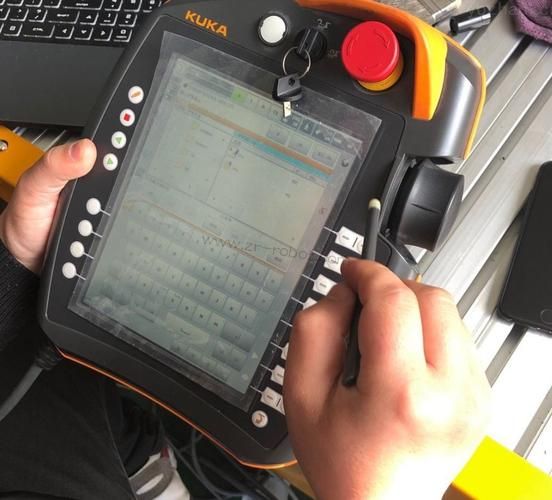
Pressing the stop power switch (any of the three white keys on the back of the kcp operating panel) while holding down the forward green key until the robot returns to its original location, and the upper right corner of the machine's compactor dialogue interface (simon screen) will display a green-back zero sign。
If the interference moves to a safe location and then press steps 2 and 3 to zero, then press the first button of the vertically white button on the left side and select the +-- mode of manual movement。
19
Fault alert - tip text: program stack overflow
Change the structure of the procedure
20
Fault alert - tip text: too many tips
Krc has to lead
21
Bad alarm - hint text: error reading "o file"
Copy file "ident-vx. O" to directory "/ir-spec/l-ident", or increase storage capacity by modifying the value of "vxwinram" in the register
22
Battery alert - hint text: broken or unknown hardware found
Re-installation or change hardware configuration
23
Bad alarm - hint text: server dse-no.%1 and sharer no. 2% is unknown
Remove unsupported devices from the contact mainline
24
Fault alert - hint text: electrical sequence error (axis)
Power switch on drive. Check power module, dse
25
Battery alert-tip text: external emergency shut-down pressed
Check the stop button. Adjust and confirm the failure of the notification
26
How do you change the control cabinet batteries every two years
1. Prepare a new section of 3v lithium batteries
2. Wait 30 seconds after robots turn on the power
The robots turn off the power, turn on the controller's locker, remove the link and remove the old batteries from the main panel。
4. Load new batteries and plug them in。
27
How to replace the robotic battery
Maintaining robotic power on and pressing the machine's stop button
2. Open the lid of the battery box and remove the old battery
3. To replace new batteries and to ensure that no faults or negatives are installed
4. Cover the lid of the battery box with a screw。
28
What if the cooka robot doesn't get into system maintenance
Carefully observe whether there is a break-up inside the frequency transformer, whether there is a charred component, whether there is a leak in the capacitor, etc。
Welcome to the flying robot