Newbies must see! Eight little computer maintenance techniques
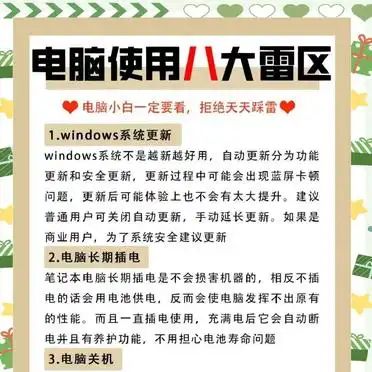
1. Computer shutdown: if the computer is not used for a long time (over half a day), it is recommended that it be shut down. The prolonged powering of computers can heat up, affecting life expectancy. Try not to use long power buttons to enforce the shutdown, so as not to damage the computer。
System update: windows system update divided into functional and security updates. Automatic updates may lead to blue screens or carton problems, and post-update experience is limited. Ordinary users suggest to close automatic updates and manually update. Business users recommend updates for system security。
Long-term computer plug-in: long-term laptop plug-in does not damage the machine, but rather does affect performance using battery power. When charged with electricity, the power is automatically cut off and maintained without fear of battery lifetime。
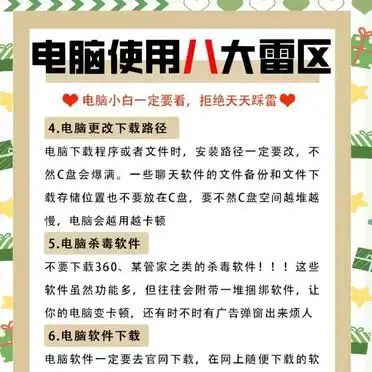
Change the download path: when downloading a program or file, the installation path must be changed to avoid a lack of c-card space. The file backup and download storage of chat software should also not be placed on disk c, which maintains sufficient space on disk c。
Computer poison-killing software: avoiding downloads of poison-killing software such as 360, a housekeeper, which tends to be accompanied by tied software, which can turn computers into cardon and possibly advertising bullet windows。
Software downloads: software must be downloaded on the official web to avoid binding software. If there is no official network, professionals can be consulted。
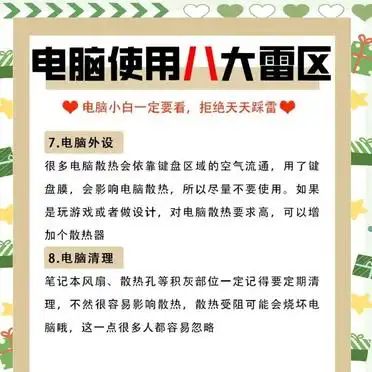
Computers: many rely on the flow of air in the keyboard area, and the use of keyboard film affects the dispersion of heat. When playing or designing, you can increase the radiator。
Computer clean-up: regular clean-up of dust from notebook fans and heat vents to avoid the impact of heat dispersion, which can burn down computers。