A lot of people backstage asked me, "why do you search for information, write reports, and organize material so fast?"
In fact, the difference between ordinary people and masters is not computer configuration, but an efficient extension of browsers. A lot of people see chrome or edge as a simple search box, but in my eyes, they're fully capable of expanding indefinitely。
Today, unreserved, share eight of my hidden productivity shrines and suggest ash-eating. They address different issues: web notes, web preservation, video downloads, photo captures, PDF processing, automatic monitoring, and podcast downloads. If your browsers normally just look at the web pages, these tools may make it more useful。
One, leafovers: turn any page into your notes. Ben
Leafovers has a simple idea: to turn the web page itself into a place where notes can be written. When you look at any website, you can create easy-marks directly on the page and post ideas, reminders or notes on the page. For example, to leave a reminder on the commodities page, write notes next to the article or record steps on the tutorial page. When the page is next visited, these signers will automatically appear in their original location, which is equivalent to adding an additional layer of personal notes to the web page。
Main functions: it is possible to create easy signers on any website and to support different colour categories; it is possible to fix them either on pages or in paste mode; and it is possible to support label management, uniform check lists and dark/light themes. The system also provides visibility control so that the signer is displayed only on specified pages or under specified conditions。
Point assessment: many of the notes tools are off-site, while leafovers are posted on the pages. If you do research, read the curriculum or sort the materials, this context note is actually comfortable。

2 singlefile: perfect download offline for any page
When you save a web page, the browser usually generates an HTML file with a resource folder containing various pictures, styles and scripts that look very confusing. The singlefile solution is straightforward: wrap the entire page into a single HTML file. Pictures, styles, fonts, etc. On the page are embedded, so that a saved web page can be independent and more easily archived and shared。
Main functions: one key saves the entire web page as a single HTML file; automatically handles lazy pictures; supports rolling loading page content; maintains original page styles and layouts; and generates documents that can be opened locally or imported into the knowledge management tool。
Point: if you keep information often, this is almost the cleanest solution. One document is a web page that is well suited for inclusion in a personal database or knowledge management system。
3. Mpmux: theorizer for downloading videos from any website
Many video downloads support only regular mp4 files, and can't do anything if you encounter a video or live stream. Mpmux has the advantage of not only downloading common videos, but also processing hls and m3u8 video streams. These videos are actually composed of a large number of small pieces, and the extension automatically captures the fragments and merges them into a complete video。
Main functions: support for mp4, webm, hls and m3u8 video downloads; recording of live streaming; automatic capture and consolidation of video fragments; support and dispatch of downloads for speed enhancement; all downloads and processing are done locally in the browser and no data is transmitted。
Point assessment: many video sites now use hls, which often solves problems if ordinary download tools do not capture the video。

4. Pixhunt: downloading web images in one series
When you need to collect a web image, it's very difficult to save one-by-one. Pixhunt automatically scans all pictures on the web page and provides a mass download capability. The extension lists all the pictures on the page, displays the size and source address, and you can filter them and download them in bulk。
Main functions: to scan all pictures on the web page and to display size information; to support the filtering of pictures by minimum width or height; to allow batch downloads and automatically packaged as zip files; to support url search and view switching; to provide reverse photo search; to send pictures to slimpic for compression and format conversion。
Point assessment: designers, content creators, and electricians will be more useful. Such a bulk downloading tool would save considerable time if photographic materials were to be collected frequently。

5. Copy genee: unrestricted page reproduction
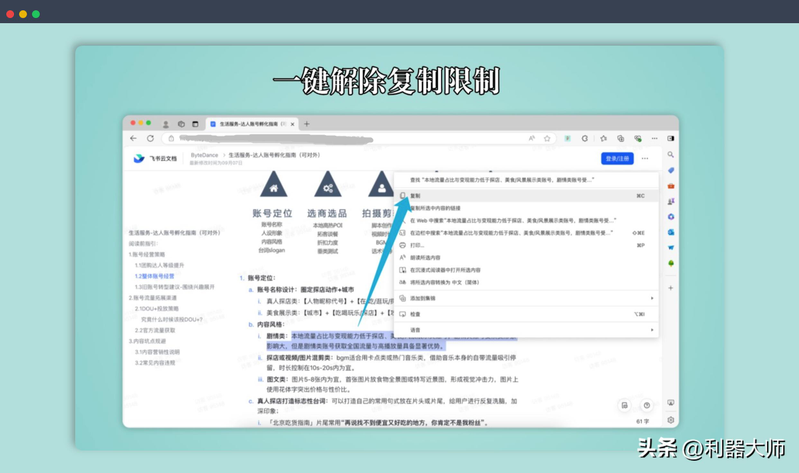
Many websites prohibit copying, such as blocking right-hand keys, prohibiting text selection, etc., which is difficult to check information or take notes. Copy genie's role is to circumvent these limitations and get the page back to normal reproduction. If you open an extension switch, you can select and copy the text like a normal page。
Main functions: one key removes page reproduction restrictions; restores text selection, copying and pasting; provides simple switch controls; is multilingual; does not affect other browser extensions。
Point assessment: this is a simple but practical tool. It is basically the most immediate solution when faced with websites that limit reproduction。
6. Pagesplitty: PDF toolbox in browser
The handling of PDF often requires several tools, such as exporting pictures, cutting pages or displaying. Pagesplitty consolidates these features in a browser extension so that PDF processing can be done directly in the browser。
Main functions: supports the export of PDF pages to photo formats such as png, jpeg, webp; provides 3d page-to-page reading mode and full-screen reading; supports the addition of templates, watermarks and header footers to PDF; provides page cutting to remove redundant margins; and can also demonstrate PDF files like slides. All operations are done locally in the browser。
Point assessment: it's more like a light version of the PDF toolbox. If it's just a daily reading and simple processing PDF, you can do it with a browser。

7, auto refresh plus: auto-renewers
Some pages need to be constantly updated to see changes, such as robbery tickets, inventory, etc. Auto refresh plus can automatically refresh pages and provide more advanced monitoring features, such as detecting changes in web content。
Main functions: support custom refreshing times or random refreshing; provide page keyword monitoring; automatically stop updating when a specific text appears or disappears on a web page; support notification alarms, automatic click links, regular expression testing and multi-label management。
Point assessment: many auto-upplug-in features are simple, and this extension is more like a web monitor. It's very practical when you need to look at the page。

8. Castloom: apple podcast downloader
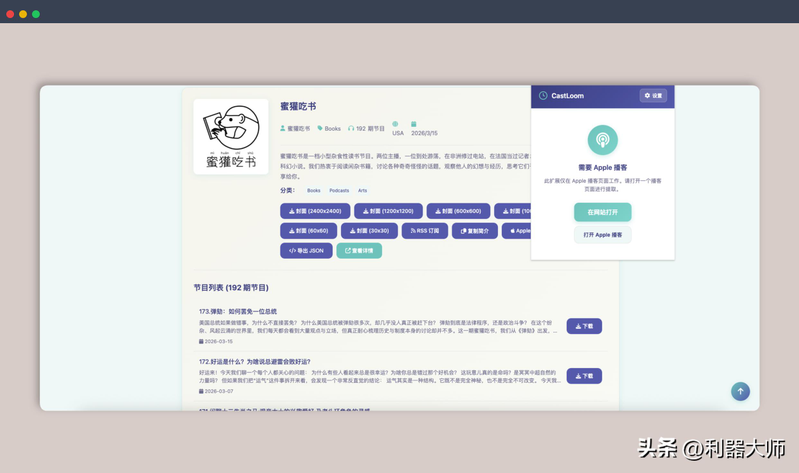
Castloom is an extension specific to apple podcasts. When you open the podcast details page, you can quickly extract material from the programme, including cover, audio and complete metadata. Such information is often valuable to those who need to study podcast content, download podcast programmes, learn or collect podcast information。
Main functions: support the downloading of multi-sized podcast covers; auto-deciphering podcasts with links to all single audio downloads; provide full programme metadata export, including titles, authors, classifications, release dates, etc., and support json export; and provide quick access to podcast rss addresses and support to global podcasts。
Point: if you're just an ordinary audience, you may not need it, but for podcast creators, designers or researchers this is a very convenient tool for accessing information。
Summary:
Articles, searches, downloading of resources and organizing of information are often used, and almost all of them take place on the web page. But the browser's original function is very small, and it's really a productivity tool, and it's a variety of extension plugs。
In many cases, browsers do not themselves lack capacity; what is lacking is a suitable extension tool. When the plugins gradually complete these features, the browser can actually undertake a lot of work that would otherwise require software。
If you have a common browser extension, please share it. A lot of good tools are actually cold, but once they are used, they're practically indisposed。