(ii) by jump-off: 301 permanent and 302 temporary
1. 301 permanent forwarding: expressing a “permanent” jump, the search engine will transfer all seo weights of the source domain to the target domain, which applies to scenes such as permanent change of domain name, brand upgrading, etc., and is the preferred method for changing domain names。
2. 302 temporary forwarding: indicates a “temporary” jump and that the search engine will not transfer seo weights in the short term. However, if 302 is long-term, the search engine may be treated as 301. This applies to short-term marketing activities, page maintenance etc。
What are the main uses of domain name forwarding
First, there is a seamless connection in the flow of website migration. When the site changes domain names, the flow of old domain names is channelled to new domain names through 301, avoiding loss of traffic and ranking。
Second, the convergence of multi-domain name flows and the harmonization of brands. Directs the flow of multiple suffix or variable domain names to the main domain and enhances brand exposure。
Third, the ad hoc flow orientation of compatible marketing activities. Registering an exclusive active domain name, forwarding it to the active page via 302 and quickly canceling it after the event。
Fourth, achieve accurate distribution of multi-end traffic. Depending on the type of device, access will be directed to appropriate pages (mobile/pc stations) to optimize user experience。
Fifth, active idle domain name resources. The flow of idle domain names is directed to the main station or core business page to avoid waste of resources。
Iv. What about the url jump? 3 common methods
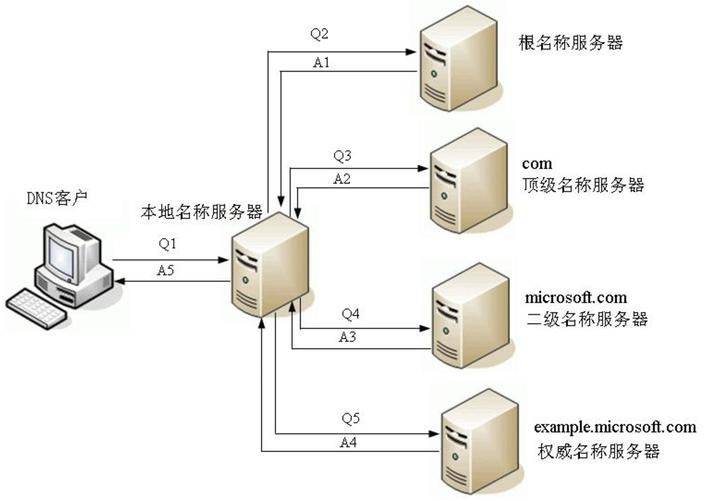
The url jump is a common technique in the operation of the website and is essentially designed to automatically direct one url address to another. The following are the three most common settings。
Method i: through domain name service provider backstage settings
Currently, major watershed name service providers (e. G., kukyun, ariyun, telecommunication cloud, etc.) provide visualised url jumpers. For example:
Preconditions: confirm that the source domain has been documented (domestic service providers require the source domain to be filed); and resolve the conflict (e. G. A, cname)。
Login console: enter the backstage of the `domain name management' in the state koyun, find the source domain name, click on `decomposition' to enter the `resolution' interface。
Add a jump record: click " add resolution " , the type of record select " visible url forward " or " invisible url forward " ; the host record fills the domain name prefix (e. G. Www. Or@); the log value fills the full target url address (including protocol prefix)。
4. Preservation effective: it usually takes between 10 minutes and 24 hours to wait for the decomposition of the record to become effective on the whole web。
Method ii: through server settings (fit for technically based users)
Users with a stand-alone server or vps can jump the url by configuring the rewrite rules and keep the url path intact。
- apache server: edits the . Htaccess files under the root directory of the website, opens the rewrite engine, sets the conditions for judging domain names, prepares the rewrite rules for capturing all paths under the old domain name and collating them with the corresponding paths to the new domain name, and specifies the use of 301 jumps。
- nginx server: edit server blocks in the configuration file, write return instructions for specific paths, specify jump state code and target address。
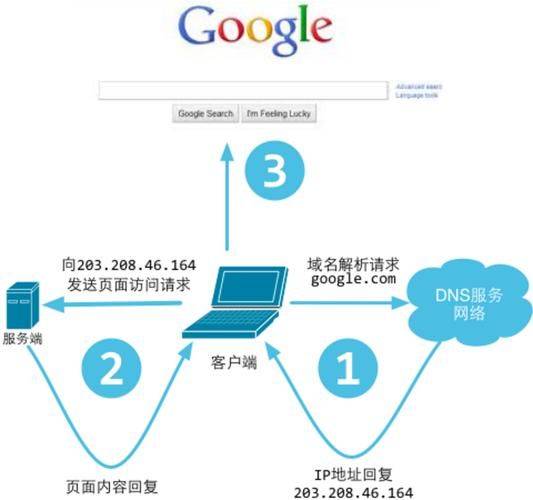
, the jump rule is effective。
Method iii: through HTML code settings (temporary jump)
If you have no server configuration permission, you can use HTML mEta refresh code:
1. New index. HTML document。
2. Add m to the headTab, set a refreshing command (delayed time and target url). If the delay is set at 0, which means an immediate jump, the search engine can transmit seo weights. Adds both hint text and manual click links。
3. Upload files to source domain server space。
The disadvantage is that the source page will be loaded and then jumped, adding one http request to the temporary scene。
V. Attention to url jump settings
1. Record-keeping compliance requirement: source domain names must be completed for the icp file (relay server is located in the country). The filing of the target domain name depends on the location of its server. The source domain does not need to be consistent with the target domain accessor. Jumping services for irregular sites are strictly prohibited。
2. Protocol and address format: target urls must complete the prefix of the agreement (http://or https://) to avoid non-compatibility of the agreement resulting in a jump-off。
3. Jump-type options: 301 for permanent replacement, 302 for temporary activities and not recommended for implicit transmission of non-special needs。
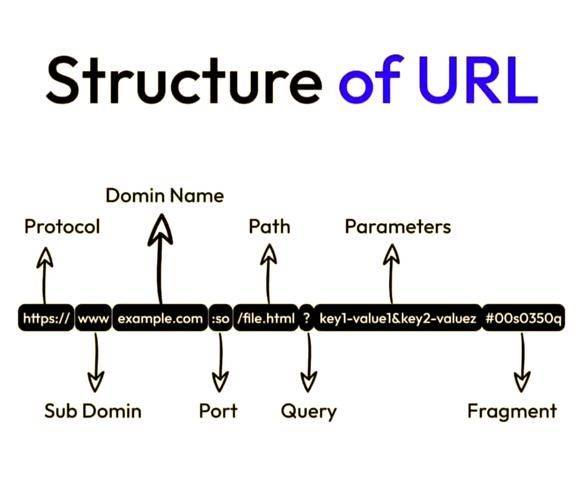
Avoid chain reorientation: multi-stage reorientation leads to a loss of seo weights, and a single stage jump should be set directly。
5. Cache and time for effectiveness: affected by the dns cache, it takes some time for validity to clear the browser cache or wait 24 hours。
Vi. Common problems of url jump and solutions
1. Unable to jump: this may be due to an error in the configuration of the forwarding records, the non-filed source domain, and a recorded conflict. Solutions: reconcile configurations, ensure that filing is completed, and try again after removing conflict records。
2. Cyclical leaps: forward rules form closed loops. Solutions: check and remove the conflict rules and ensure that there is only one forward link。
3. Loss of seo weights: mostly due to the use of 302 forwarding (and long-standing) or unreserved paths. Solution: change permanent replacement to 301; use server-end rewrite rules, if necessary。
4. Inhibited transmissions show anomalies: because they are intercepted by the browser's security mechanism or are not embedded on target pages. Solution: replaced with explicit replication。
5. Domestic domain names cannot jump: source domain names are not recorded and stopped by operators. Solutions: configure forwarding after completion of the icp file。
Summary
Domain forwarding and url jumps are essential tools for internet operations. Domain forwarding is a simple realization of the url jump, which is divided into two core types, visible and hidden, permanent and temporary; the url jump can be done through the server backstage, server configuration, and HTML code. Rational use of both technologies will address the pains of changing domain names, spreading traffic and maximizing the value of domain names to provide strong support for online operations。