0524 different touch screen warning methods
Of course, it's not just touch screens, it's on the machine. But we're talking about touch screens. Let's talk about this。
Read the traditional touch screen alert。
Our traditional touch screen warning practice is that, after the plc program has been completed, a complete alarm list is created, with the first row being the spot address in the plc, the second column being the alarm text, followed by other columns such as the type of alarm, the level of alarm。
Then, whether you make a touch screen or a multi-person division of labour, someone specialises in touchscreen programs, and after getting this dot, enters the table by article or then manually adjusts the format of the touchscreen software, and then loads it into the touch screen。
This should be the traditional plc industry practice of alarm recording。
The disadvantages of this approach are:
The workload is relatively high。
The information in the alarm list is actually made manually and article by article. The former, the nodal address, needs to be recorded individually in the plc program, while the latter, the alarm text, in fact, is recorded article by article by plc engineer。
There is a common consensus that a well-designed system must have complete alarm records to facilitate the traceability of failures. So there is often a plc process that is simple in itself, but the volume of the alert is much greater than the logical processing。
Thus, we can assess that in a control system, the workload of alerting information is likely to account for half of the entire plc process. Count plc only, not touch screens。
Moreover, this work usually needs to be progressively enriched. For example, we have a set of industrial equipment that can successfully run the process requirements at the beginning, so that the alarm section simply points to various operational failures and operational information. However, more detailed alerts are provided when equipment is to mature. For example, when a process switch is loose, or the relay's contact is broken, can be judged and made available to operators via text alerts, so that failure points can be quickly located in production operations, rapid failure repair, efficiency gains and loss reduction。
It is then more acceptable to the client, a highly user-friendly device. Instead of a three-day, three-night debugging of the wiring by maintenance staff against the program and drawings after the failure, it eventually became possible to locate the failure of an invisible element。
(more importantly, if the equipment in the plc industry were sufficiently user-friendly and had a rich self-diagnostic function, then the industry's customers would not have to stare at the vip program, and the plc program would have been banned from encryption. If it wasn't for the complexity of the equipment, and if it was normally possible for an operator who didn't know the procedure to refer to the device to fix the equipment failure, all the plant owners would not be willing to raise a team of maintenance engineers who could do the procedure at high cost
More difficult to change。
For example, a set of equipment, which has been fine-tuned by the above-mentioned steps, has finally become more functional. A client is then replaced and a new set of equipment is available, with minor modifications。
For example, the configuration interface has changed, several control elements and equipment have been added or reduced, or the system process has been upgraded, the original frequency transformer has been changed to a server, or the original limit switch has been changed to a simulation。
In any case, 95 per cent of the equipment as a whole is the same as before, but the same 5 per cent is always the same as before. Of course, that's the feature of non-standard equipment. If it's all the same, the engineer's not working yet! The drawings are printed directly to the workshop, so that the plant can produce continuously. Engineers do more than escorts。
Then it's a dilemma for designers。
If it's done entirely from scratch, it's a headache to think about the volume of data processing that's being processed in this volume of text. And it's obvious that you've done it once, and you've done it all over again, and that's gonna hurt even more。
If the original design is followed and added to or deleted from it, the headache is not minimal. There is a need to single out the obsolete systems and add new elements to each article. There is also a potential overlap in the variable points used. And if you're not paying attention, you're missing one or you're missing one, it's very hard to find it. It is to be found that only after five or six years of operation, when the equipment has been on site, will the user find in use that a diagnostic function is missing, or that there is an additional diagnostic hint that cannot be understood and that the engineer is called for after-sales service。
Hard to inherit
As can be seen, the design structure, as described above, is completely unmanageable except for the designer himself. How many functions did the ex-persons do, how many did they fail, how many did they fail, how many did they fail, how many did they fail, how many did they fail, how many did they fail, how many did they fail, how many did they do? Moreover, even where it is incomplete, it cannot be reviewed. The equipment production function was normal, the acceptance inspection was completed, the debugging engineer was withdrawn and the project bonus was already in hand. When you find out about the problem, you can't find anyone responsible, and even the debugging engineers have left the pool a few times. A complete mess。
So is there a better solution
Of course there was, and it was already there。
S7-300/400 and pcs7 were available, so let's not mention it。
In tia portal, program alarm functions are available in s7-1500, enabling the formation of a plc alert, which is sent directly to the touch screen and wincc. That is to say, it does not require any design work and can receive the complete information from plc directly. Includes time stamp and information text, type of information, etc。
In the plc procedure, the logic of alerting information processing follows the procedure. For example, when equipment malfunctions and this failure information is read in logic, an alert upload order is followed to report the complete description of the failure to the aircraft. That is, the text that was originally written in the note is written directly into the program。
So when the old device is upgraded to a new device, the part that needs to be deleted, the logic of the program and the alarm paragraphs are deleted together. The addition of equipment would also require the addition of a corresponding paragraph。
In the architecture of standardized smoker methods, the logic is done in the equipment library, and so many of the equipment and one less is simply the difference between one more instance of call-up and one less example of call-up. So it can be assumed that the management of alert information can be zero and no longer require concern
This is siemens plc's solution。
It is characterized by an alert message section between plc and the touch screen, which does not require the usual variable collection and communication, but uses a special channel. However, precisely because the corridor is unique, this function must be realized with the same support as the plc and the upper plane. Even this function is available only in a few of siemens' product models. Like s7-1500, touch screen with tp and wincc。
S7-1200, smart 200, ktp touch screen, etc., are not supported at all. Such alert information cannot be generated directly. So for a long time, i've been doing projects that require top touch screens to use tps and next plcs to 1500,400. This cost a lot of money。
Siemens' internal products are still so, let alone across brands. So far, no one has ever heard of a touch screen or scada brand that can directly read s7-1500 alerts。
I've been very concerned about the support of each other's platforms for the upper-machine alarm function as i expand the plc standard-programmed smokers from siemens to other brand transplants. However, most brands are not available, except for rockwell ab, which provides tools that are indirectly achievable。
As a result, the transplant program was not transposed, but instead used wincc. This part of the function has to be abandoned。
So the alarms in these brand systems are done through the traditional way of sorting out tabulations. Of course, alerts under the standard architecture are more regular and can even be planned to develop their own software tools。
Since the beginning of this year, a new book has been being prepared, entitled " the standardized plc pipework method " , and the tc2 section is still connected to the wincc, but, at the tc3 section, i made a visualization of the video with it, and some of it was completed。
Now it's plc who's going to call the police。
In the befort system (which also includes tc2, but is not mature enough), there is a tc3 event logger system component, which is independent of the plc program and operates separately in twincat and provides alert information queues. The plc program sends the alarm to event logger, and then other human interfaces and even other plcs can listen to and read the alerts。
In visu, there's an event table control that shows this alert. However, what the befort family does is more troublesome than having to drag the controls into the siemens. Instead, a separate reading program is required in the plc to read the system alert information into an array and the controls need to be bound to an array to display the alarm information。
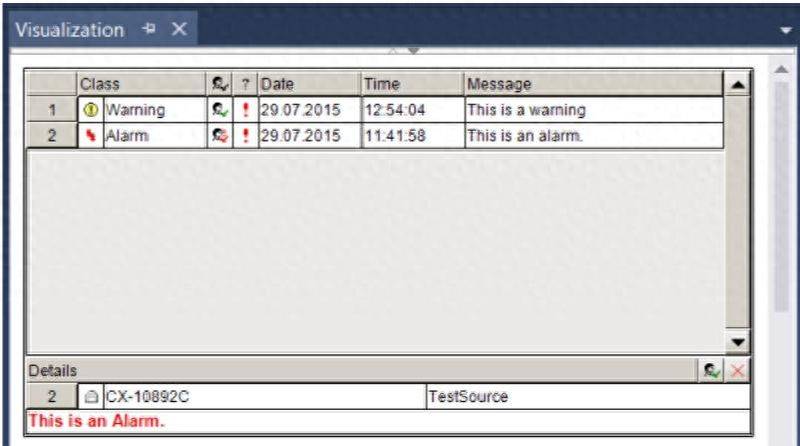
There's a complete introduction on the befort web
Https://infosys. Beckhoff. Com/english. Php? Co{\chffffff}{\ch00ffff} {\chffffff}{\ch00ffff} {\chffffff}{\ch00ffff} {\chffffff}{\ch00ffff} {\chffffff}{\ch00ffff} {\chffffff}{\ch00ff00} {\chffffff} {\chffffff}{\ch00ff00} {\chffffff} {\chffffff}{\ch00ff00} {\chffffff} {\chffffff}{\ch00ff00} {\chffffff}{\ch00ff00} {\chffff00} {\chffffff}
And the sad thing is, i've been playing this for almost a month, and it's never worked out. So, the book says this part, the shell。
Zenium
I'd like to have a colleague who's done this part of the function and can give guidance. At the same time, there are colleagues interested in this part of the function who may wish to study it. I've collected a collection of relevant information and routines here, and i can be contacted for them if you want to。
Also, although the visu3 function that i'm looking at is very rare in practical applications, most applications use a specific touch screen. So, theoretically, befort provides a full-fledged interface of languages, and all touch screens actually make it possible to read。
We hope that more and more touch screen products can directly support this kind of event logger, or that some people find that they already have it。