Big cabbage is an important reminder that many friends don't save what's important in them before they make it, which leads to data being lost. Please copy the important data in your flash drive, move the hard drive, etc. Before making it, so as not to cause unnecessary trouble. A lot of cabbage doesn't know how to use the tools. You just do the system and follow the following steps:
1. Download cabbage, install
Start the cabbage, insert the flash drive, and click on it
3. Download the system mirror file, open it with winra, and find the largest gho file to depress it
Copy this gho file to the disk
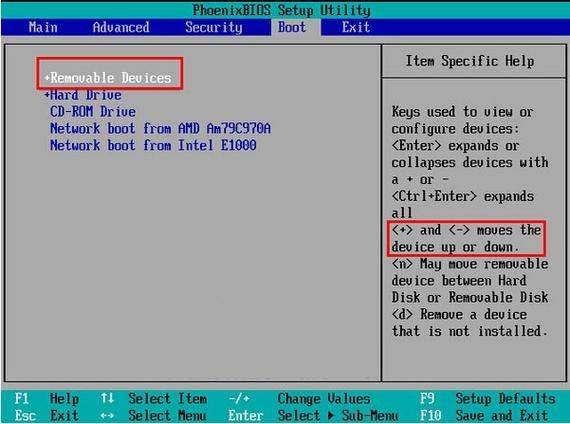
Insert a disk, restart the computer into the bios settings drive as the first start and save the restart
Insert a disk, automatically enter a large cabbage interface when a computer is activated, and select the pe system for access (the actual option name is different, but the pe must have both words)
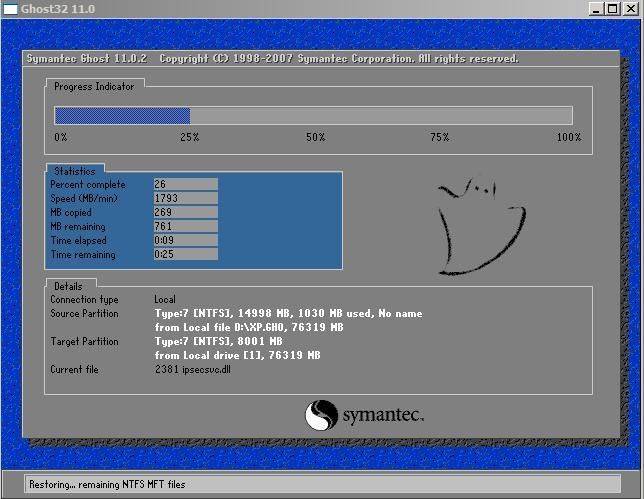
7. Find the ghost tool (possibly different name) on the desktop after entering the pe system, select the gho in the drive after opening the ghos and resume the assignment to c
After recovery, pull the disk and restart the computer.
Note:
One, please back up the useful data on the flash drive before you make the big cabbage flash drive
The flash drive。

2. A system with a hard drive or multiple hard drive with a ntfs partition, a disk in a disk under dos and in windows
The order may not be the same, so please find out for yourself so that you do not misdirect。
3. The main reason for the problem with the flash drive is that the main board does not support the start of the disk (or the imperfection of the support)
Some dos software (especially for disk operating class) may not support the disk very well
The new hardware that has emerged since dos is more varied, and the vast majority of usb equipment is currently without dos
(b) 4u disks
Quality problems per se;5 frequently incorrect operations on disks, such as 2000, xp, direct insertions under 2003
Pull the disk instead of unloading it through " safe delete hardware " 。
Four, some of the bioss on the main panel (especially the old one) do not support the drive start, so they can't find the right option
Item. If the problem is solved, it can only be solved by updating the bios, which, if not resolved, can only be abandoned。