Hello, i'm fire, so i can be followed by students who want to learn a single machine, trust me or answer my questions in the comment section. When a single machine is connected to a stand-alone keyboard, each key needs to occupy an i/o mouth of a single machine, which, if we need more keys for a project, causes the key to over-utilize the i/o resources. The i/o mouth resources in the 51-piece system are invaluable and, after all, lead to a little bit more. In order to save i/o more external enrichment, we need to add matrix keyboards to the project。
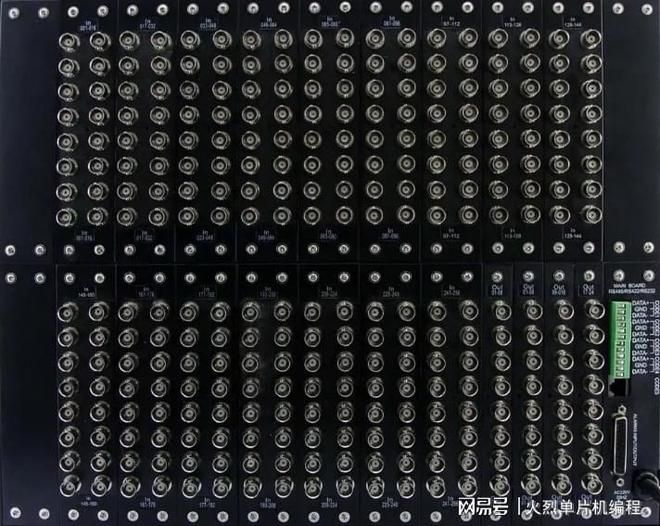
We use the 4x4 matrix keyboard as an example of a simple explanation of how it works and how it is tested. Lines 16 keys into 4 rows, with the first row connecting one end of each key to form a line, and the first column connecting the other end of each key to form a column, so that there are four rows of eight lines, which we connect to the eight i/o mouths of a single machine, can be detected through a program scanning keyboard。
The same basis is used to test whether or not the button is pressed, mainly by detecting that the i/o port corresponding to the key is low. One end of the independent keyboard is fixed to a low level of electricity, which is easier when a single machine is tested. The matrix keyboard, on both sides, is linked to the single machine i/o mouth, so that the low level of power is artificially delivered through the single machine i/o mouth at the time of testing. At the time of the test, one is classified as low-level and the remaining columns are all high-level (at which point we determine the number of columns) and then, on a rotational basis, check if there is a low-level in the rows, if a certain behaviour is detected at a low-level level. Then we can determine which rows of the currently pressed key are, and in the same way, send each column a low level of electricity on a rotational basis to check whether the rows have become low level of electricity, so that all the keys can be tested, and when the keys are pressed, the key of which is determined. And of course, we can also lower the level of the line, if there's a low level of the screen. That's how the matrix keyboard is tested。
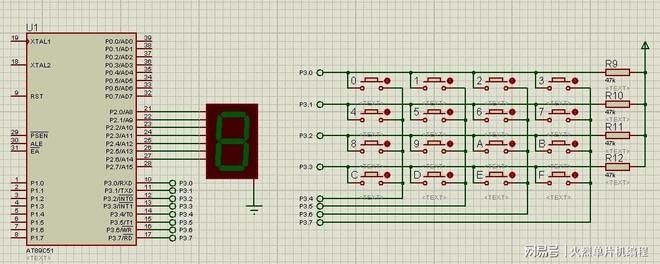
The above figure is a 4x4 matrix keyboard, with 16 keys. We used to call it rows and rows. So 4, 5, 6, 7, what we call the line, 0, 4, 8 and 4c, the line. Remember correctly the ios of each row. Note that each end of a key is attached to a column and line, respectively, that is, "line lines and columns are connected and disconnected by pressing and lifting a key" and "the signal on both ends of the steering line is reflected through a "relationship" to the steering line." these two words make up the entire matrix keyboard scan。
Now, let's elaborate on the principles and methodological steps of the matrix keyboard scan:
Matrix keyboard scanning principle
Method i: line-by-line scan: we can scan the matrix keyboard by line through four-digit rotational output of low-altitude, indicating the key pressed and then determining which key was pressed by which zero the data received were。
Method two: round scan: we can export low-level, low-level four-bit high-level. When the data received are not all four lower than the high level of electricity, it is indicated that there is a key pressed and then, by the value of the data received, it is determined which key is pressed and then, in turn, four higher output high level and four lower output low level, and then, based on the value received, that the line is pressed with a key, so that it can be determined which key is pressed。
Next is an example of a matrix keyboard that uses two sets of ios: p0, p1, which is used to detect whether keys are pressed in the matrix keyboard, and p0, which drives the display of static digital tubes。
"reg52. H"
Typedef unsigned char u8;
Typedef unsigned in u16;
#definine gpio dig p0
#definine gpio key p1
U8 code smgduan = 0x3f, 0x06, 0x5b, 0x4f,
0x66, 0x6d, 0x7d, 0x07,
0x7f, 0x6f, 0x77, 0x7c,
0x39, 0x5e, 0x79, 0x7;//static digital code values
U8 keycolvalue;
U8 keylineValue;
Void delay(u16 i) // timed out function
While (i-);
Void keydown() // keyboard scanning function
Char a;
Gpio key = 0x0f;
If(gpio key! = 0x0f)/test whether the key is pressed in the fourth line
Delay (1000); // timed out
If (gpio key! = 0x0f) // test again whether the key is pressed in the fourth line
Switch (gpio key) ///perform which line to press
Case (0x07): keycolvalue = 0; break;
Case (0x0b): keycolvalue = 1; break;
Case (0x0d): keycolvalue = 2; break;
Case (0x0e): keycolvalue = 3; break;
Gps key = 0xf0;
If (gpio key! = 0xf0) //test whether the key is pressed in the fourth line
Delay (1000); // timed out
If (gpio key! = 0xf0) // check again which column buttons in 4 rows are pressed
Switch (gpio key) ///perform which column to press
Case (0x70): keylineValue = 0; break;
Case (0xb0): keylineValue = 1; break;
Case (0xd0): keylineValue = 2; break;
Case (0xe0): keylineValue = 3; break;
While(a)
Delay (1000);
A ++;
No, no, no
♪ while (1)
Keydown();//test whether the key is pressed
Gpio dig =~smgduan
KeylineValue*4 + keycolvalue
;// according to the column value of the key, the static digital tube displays the corresponding value