The toolbox (also known as the tu latin bar toolbox, abbreviated image) is a collection of hardware tests produced by the tu latin bar, open source, free of charge, green, pure, specially designed for hardware hackers, diy machines and small white users。
The figure combines the detection and scoring tools for cpu, graphic cards, memory, hard disks, screens, etc., into a toolbox that can be used with any one of the keys that is required, without a full web to find tools, secure bundles, and a software to address all hardware detection needs. The hot tools contained in the toolbox are listed below by category:
Main uses of tool classification hot tools
Cpu tools
Cpu-z, prime95, aida64
View processor model parameters, integrated hardware information and stability tests
Graphic card tool
Gpu-z, furmark, gputest, ddu
The core parameters of the card, the oven pressure test
Memory tool
Memtest, memtest pro, tm5
Memory stability and error detection
Hard disk tool
Diskinfo, diskmark, mydisktest, diskgenius, wiztree
Hard drive health tests, reading and writing speed tests, partition management
Screen tool
Screen damage and leakage test, monitor colour field detection
Bad spot detection, screen display quality testing
Run-off (roast chicken) tool
Furmark, gputest, cpuburner
Comprehensive rundown, graphic card game performance test
These tools basically cover the mainstream scene of computer hardware testing, with one toolbox being completed, from the configuration, hard drive to the running dryer。
The latest version of the toolbox, currently 2026. 08, is the official version of the installation package 206 mb, and the new version of the hardware detector library has been updated to accommodate the latest cpus, graphic cards and master boards, and the list of tools has been optimized。
Go ahead and download the toolbox
By the end of the text, the latest official version of the toolbox is 2026. 08, where the package is downloaded:
Chart the installation of the toolbox
The toolbox is green and the installation is very simple:
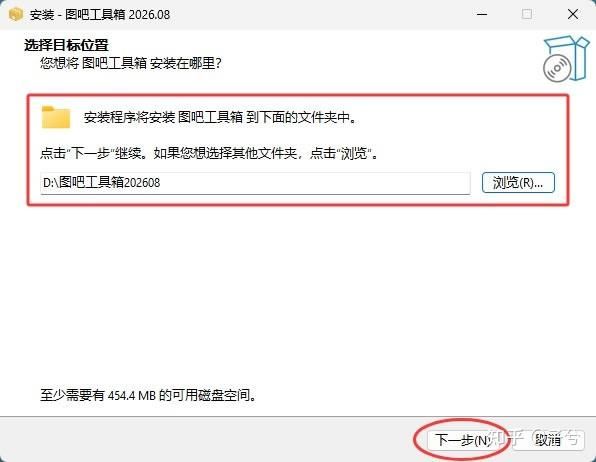
1) double-click the downloaded exe installation package to start the installation program, the software is by default installed in c discs, and it is recommended to be installed in non-system disks (e. G. D discs) to avoid taking c disk space:
2) it is recommended to create a desktop shortcut to facilitate subsequent use of:
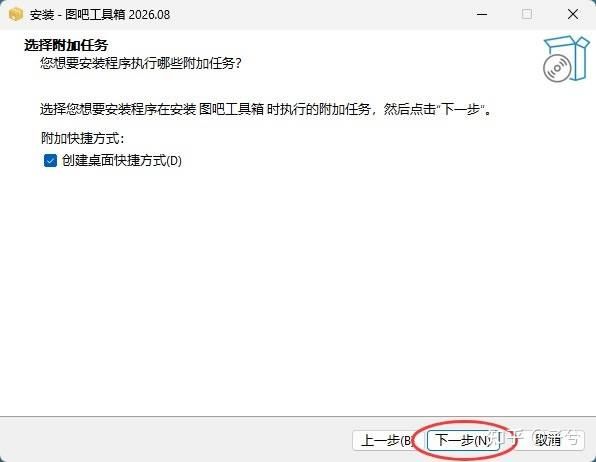
3) click installation:
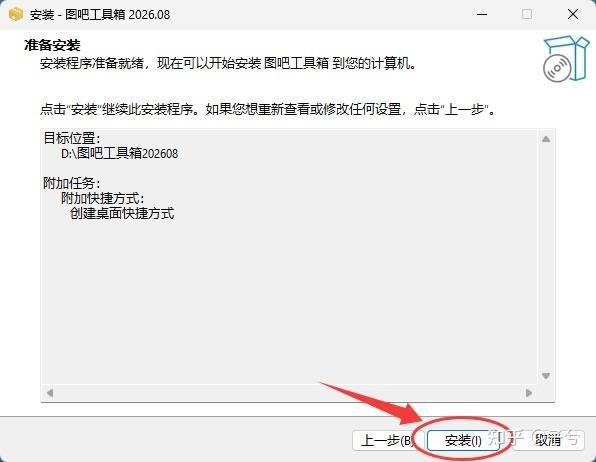
4) upon installation, the speed of adding the bar to the desktop:
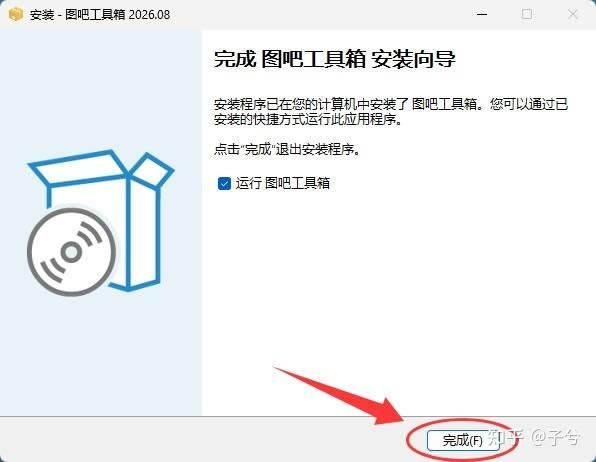
5) installation of the chart bar toolbox with the following interface:
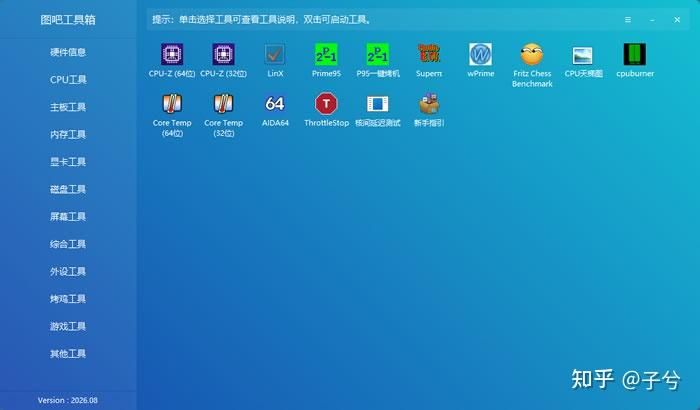
Draw the toolbox basic course
The use of the toolbox is very simple, with zero thresholds in hand. Opens the main interface, with a list of tools classified by hardware on the left and a tool icon area on the right. Click on a category to see the corresponding tool, and each mouse click will prompt its functionality, double-click to download automatically, and when the download is completed。
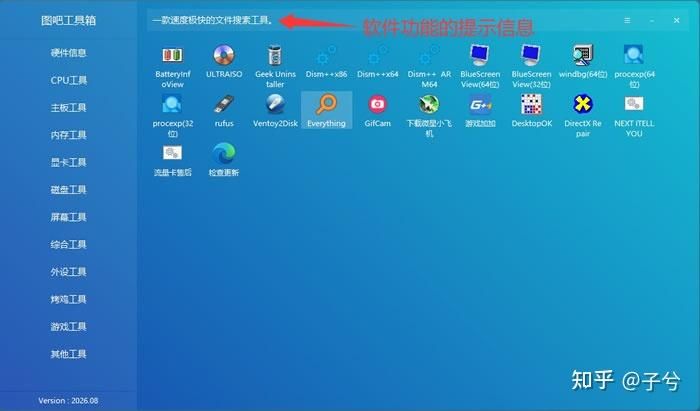
A new computer or a second-hand computer is available to the newer, and it is recommended that this process be followed for a complete test:
And that sort of thing, the real state of the computer is basically clear。
In addition to the tools introduced by classification, the toolbox contains several very practical, pro-active and focused recommendations:
Tool function position main uses
Spacesniffer
Disk spatial analysis
Visible colour block displays disk occupancy, locates folders full of c discs, cleans the target. Yeah
Ddu (display driver union)
Driver unmount
Unload fully the card driver, reload the card or reload the pre-drive residue to avoid displaying problems
Furmark
Card test
Classic baker tools, long-loaded barometer stability and dissipation, depending on the temperature curve. Hot
Directx fixer
System repair
One-click check to fix the directx component, and run first when the game goes off, and the game goes missing
Rufus
Installation tool
Make a u-disk starter, write a mirror of the system into the u-disk system, simple and efficient
Everything
File search
Search in seconds on the hard drive by file name
Dism++
System maintenance
System clean-up, optimization, back-up restoration, relying on it for garbage removal and start-up management
The seven tools cover disk-cleaning, undriving, graphics cards, repair systems, installation systems and several of the most common scenes for document searches, and are worth downloading as a matter of priority。
What if you can't open some tools in the toolbox
The inability to open the tool has contributed to the lack of a running library, and may also be a mismatch between the tool version and the system bits. Solutions: install microsoft run library collections and . Net run librarys first with direct repair tools and then reopen the tool; if the system is 32 bit, select a 32-bit version of the tool. Once you have installed the running library, most of the tools can be properly opened。
2) why some tools are in english version
In collecting and packing the tool, the author gives preference to the official original or unmodified version, and many professional tools are not officially available in chinese, so some of the tools in the toolbox are in english。
3) how to unload the chart
The installation version is unmounted in the "add or delete program" of the control panel or in the "application" set by the system。
Summary
The toolbox is a collection of free, pure, zero-threshold hardware testing tools, and one software wraps up cpu, graphic cards, memory, hard disks, screen detection and run-off tools, green free of installation, unadvertised and untidy, machine testing and routine medical examinations。
The article was downloaded from the diagram barbox, a new version of 2026 (2026. 08 official version) to the installation and use of the tool-by-tool, and it was presented in its entirety so that it could be easily handled。