According to the proclamation of the state tax administration office of xiamen city on the optimization of the time limits for the filing of taxes on urban land use (official gazette no. 8 of 2020 of the state tax administration department of xiamen city), the taxes on property and on urban land use (hereinafter referred to as the “two-year tax”) are paid on a semi-annual basis, with the first half of the reporting period from 1 july to 31 july。
This post is part of our special coverage syria protests 2011
Let's learn together
Collection and declaration of land and property tax sources
How to operate


Part 1 tax collection
If you are the first to declare a tax on your property, you must first register the source of the tax。
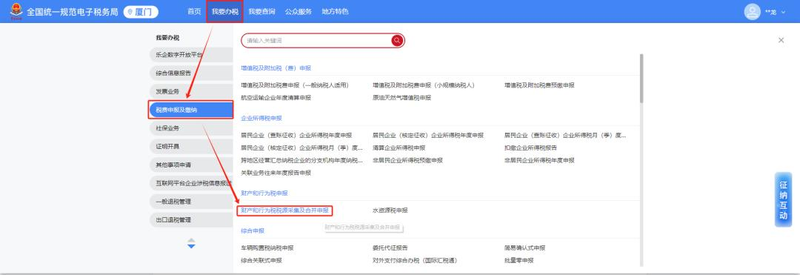
After first logging into the e-tax office, click on [i'm going to do taxes] - [tax and fees declaration and payment] - [property and behaviour tax source collection and consolidated declaration]。
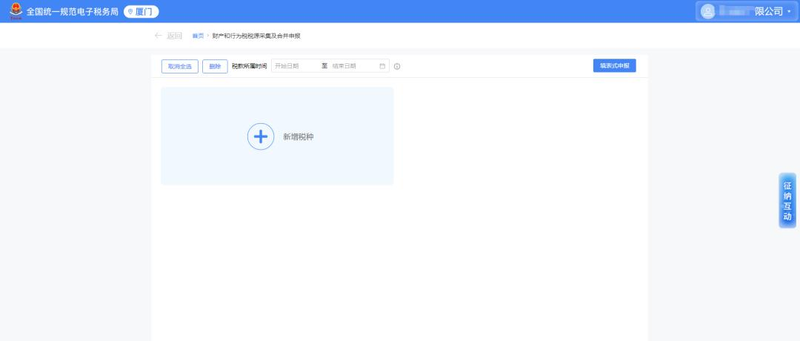
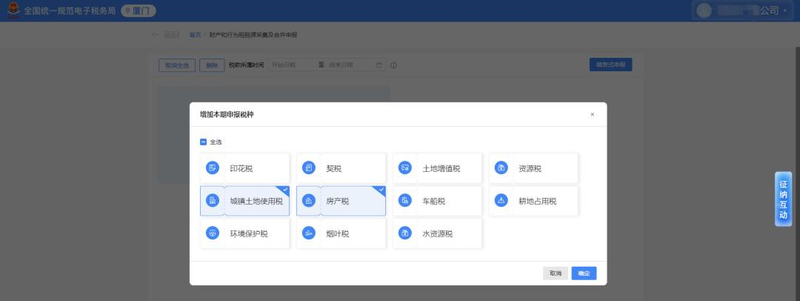
After entering the filing interface, click on [+additional taxes] to choose “urban land use tax” or “property tax”。
And then click on the card [tax source collection] and jump directly to the interface “urban land use tax, detailed list of property tax sources”。
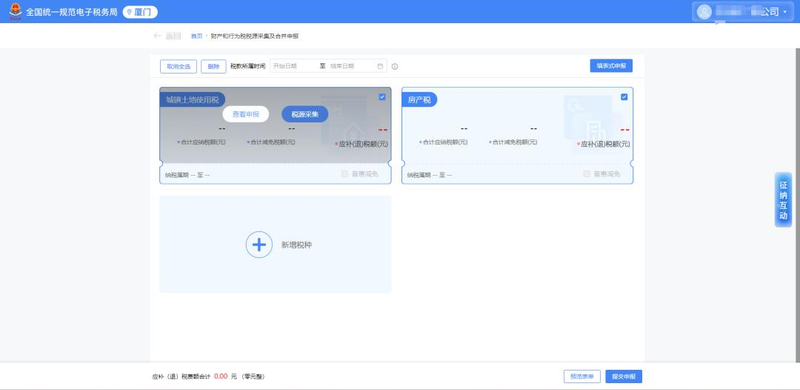
This can be done by clicking on “information on urban land use tax sources” and “information on property tax sources” in tax source information。
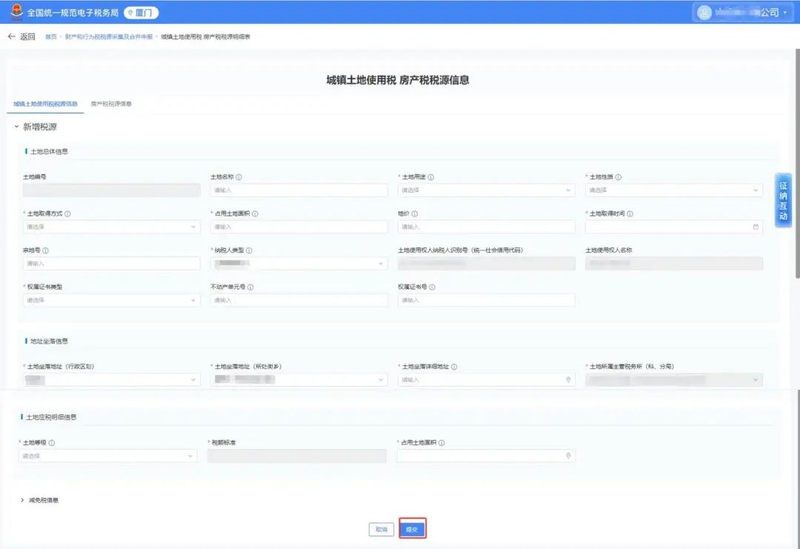
(i) collection of information on urban land use tax sources
Select “urban land use tax source information”, click [new]。
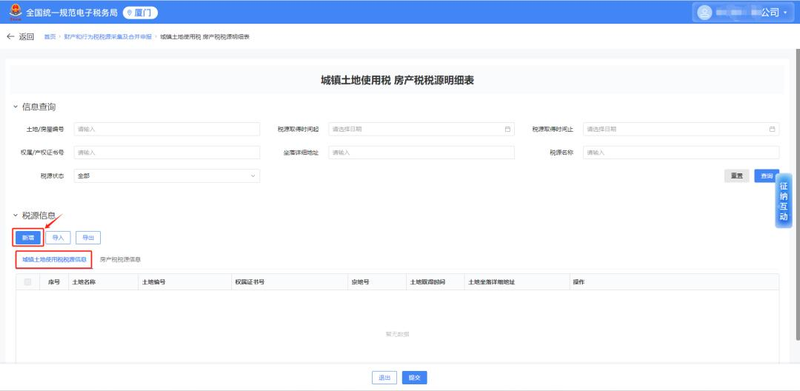
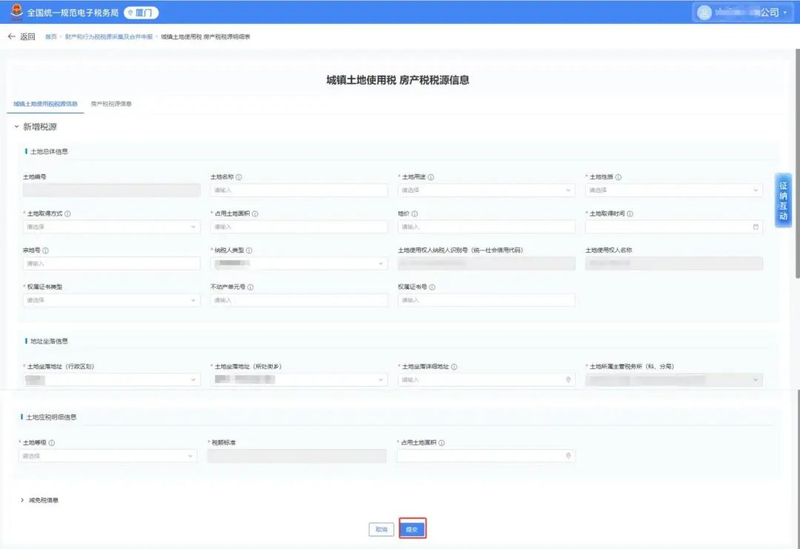
After the pop-up interface fills in basic land information, click on [submission]。
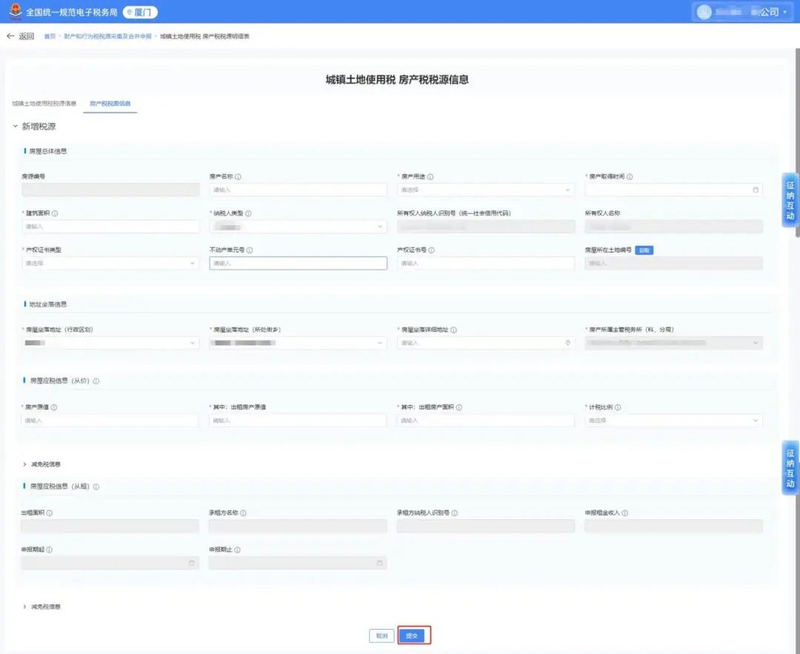
(ii) collection of information on property tax sources
Select “information on tax sources for property”, click [new]。
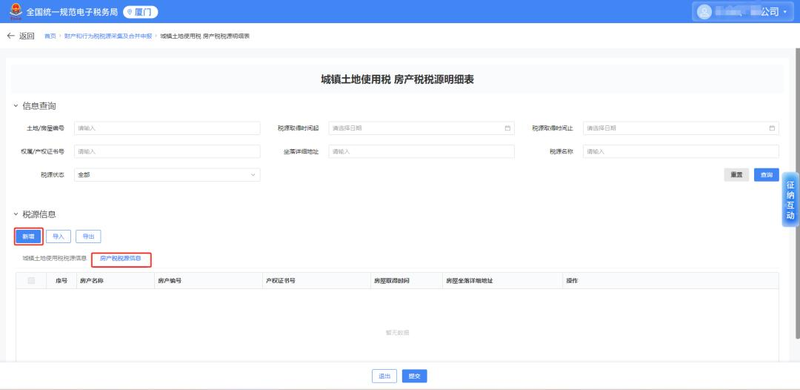
After completing the basics of the house in the eject interface, click on [submission]。
(iii) prefill for collection of information on tax sources
The electronic taxation authority has now made it possible to facilitate the declaration of taxpayers by extracting tax disclosure information and by automatically prefilling property tax, urban land use tax source information。
(e. G. Urban land use tax) the system automatically generates a “subject-to-validation source” for taxpayers to choose from on the basis of tax returns:
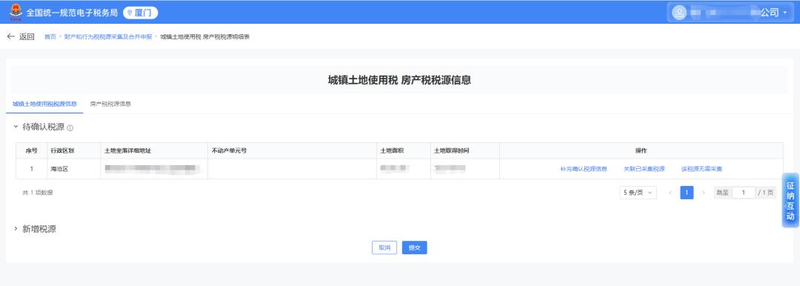
After selecting “additional confirmation of tax source information”, complete basic land information by clicking on [submission]。
Note
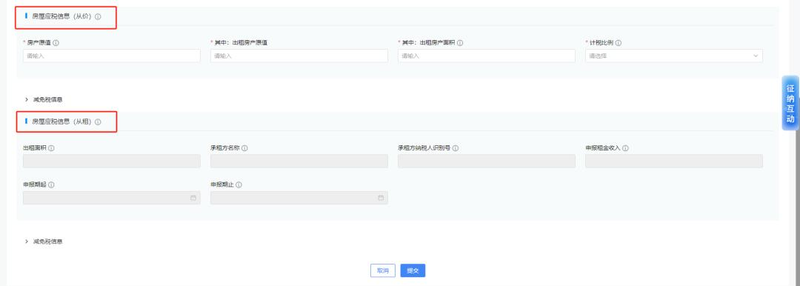
If a taxpayer has a rental property, it is necessary to record the original value of the rental property and the rental area on the “information on tax sources of the property” page, “information on taxable housing (at an ad valorem)”. In the “taxable housing information (from rent)” module, include information on rental space, declaration of rental income, declaration period, etc。
2. When filling out information on urban land use tax sources, care should be taken to complete a form for each land。
The same land is divided between two classes and forms are filled out according to different classes。
If there is no real estate (land use) permit, the form is filled out according to the land address。
Taxpayers are not allowed to combine multiple lands into a record-keeping form。

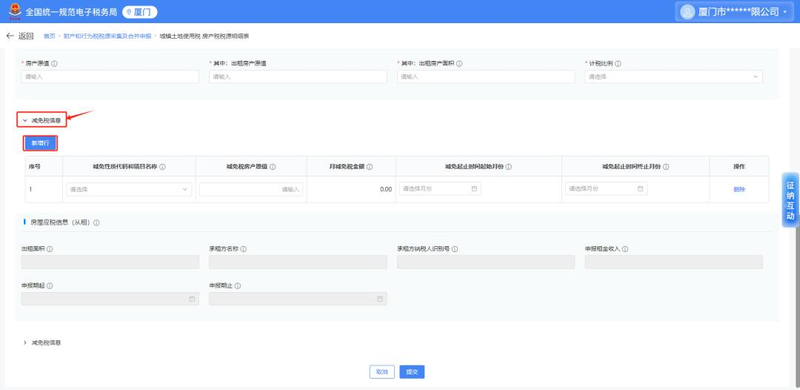
If the taxpayer has information on the relief, he or she can click on the corresponding “tax relief information” module on the return page, eject [new line], choose the nature of the tax relief and enter the relevant information. The system automatically calculates the amount of monthly tax relief and is irrevocable。

Part 2 tax returns
Once the collection of tax sources is completed, there are two types of declaration: a “confirmation declaration” and a “filling form declaration”。
(i) confirmation declarations
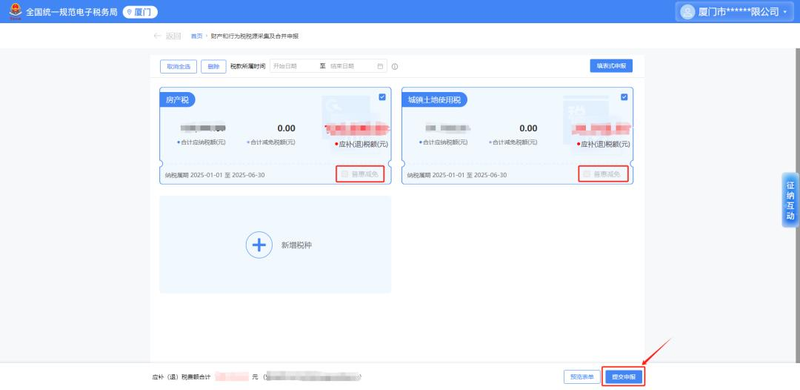
Directly ticking cards for property tax and urban land use tax on the interface between collection and declaration of property and behavioural tax, either single or multiple taxes can be selected for declaration, and then by clicking on [submission of declaration]。
Carnation: enterprises that benefit from inclusive relief for micro-enterprises remember the “inclusive relief” on the bottom right of the tax card。
(ii) form-based declarations
After entering the functional interface, check out the tax card for the land tax and then click on the upper right corner of the report。
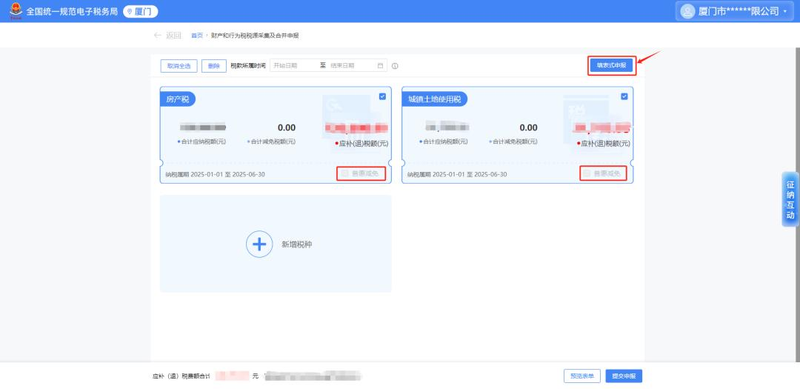
Jumping to the property and tax returns interface and automatically bringing data from the current land tax。
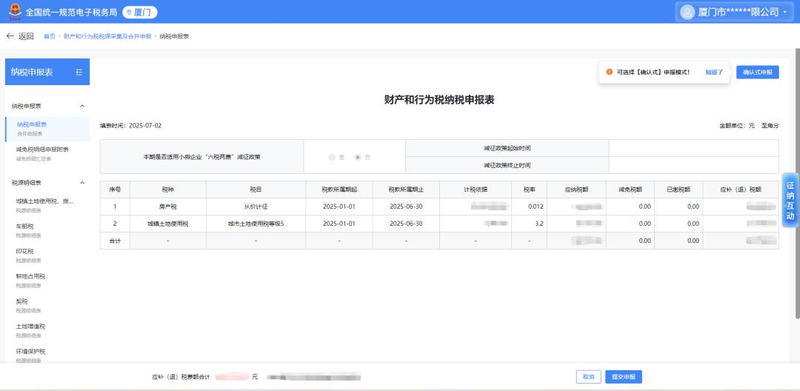
Once the data is confirmed, the declaration is successful by clicking on [submission of declaration]。
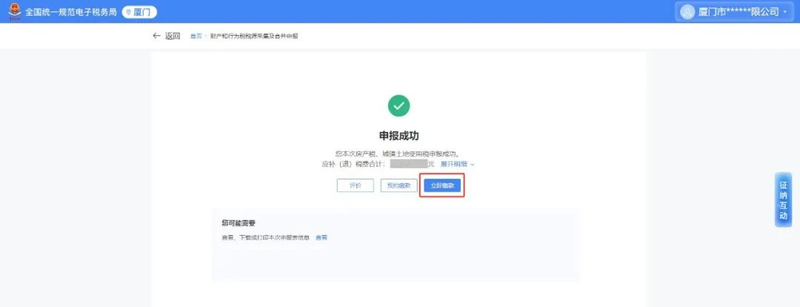
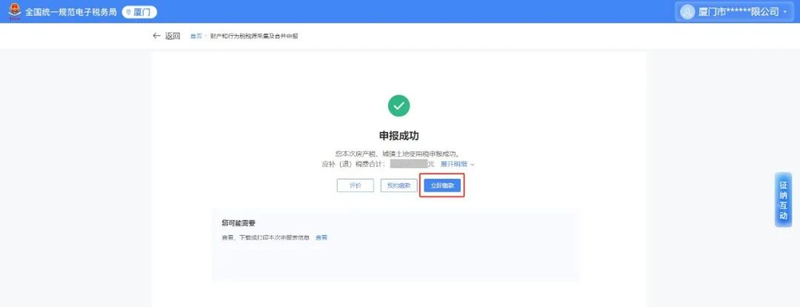
If the declaration is successful, the tax is paid by clicking on [immediate contributions] to operate the tax payment。

Previous recommendations
How can the electronic taxation authority modify tax source information by renting houses and adding new tenants
How does the electronic taxation authority modify tax source information by renting houses and terminating contracts early