B660 main board update cpu support list: 12/13/14 appendices with bios upgrading skills
For many of the friends who are ready to load, the b660 main plate is one of the most expensive options. However, questions such as which cpus are supported by b660? “can the 14 generations go on?” still plague many users. This paper provides a comprehensive analysis of cpu support on the b660 main panel, along with the updated bios technique to help you avoid pits and mines
I. Which algebra cpus are supported by the b660 master plate
The b660 chip group uses the lga1700 interface in intel, which was originally used to support the 12th generation alder lake processor, typically:
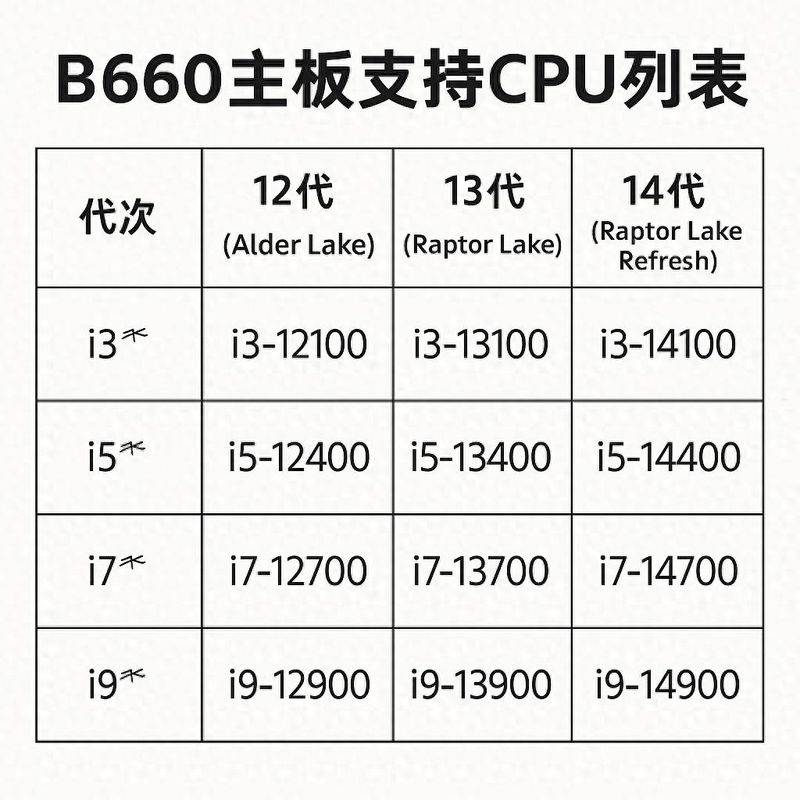
However, through the bios update, the b660 masterboard can also be compatible:
Note: whether or not to support the 13/14 generation depends on whether the main plate manufacturer has introduced the corresponding bios update
Ii. Overview of the brand compatibility of the popular main board
Brand
Support for the 13/14 generation
Whether to support bios flashback
Remarks
Huashu (asus)
Partial support
Tuf series compatibility is excellent
Microstar (msi)
Most types support no cpu brushing bios
Gigabyte
The old cpu needs to be updated
Asrock
Very few low-end models are not supported
How to judge whether the main board supports the new cpu? See interface: b660 uses lga 1700 in a uniform manner, without fear of interface problems. Check the web support list: check the cpu support column on the main panel model page to confirm whether the new handler is supported. View bios version: 12 generations: original support 13/14 generation: need to be upgraded to designated bios version (e. G. 7d43v17, f21, etc.) iv, bios upgrade proposal and techniques i: upgrade bios with old cpu
If you already have 12 generations of cpus, you can access the bios interface, download the bios version and upgrade the disk。
Methodology ii: bios flashback (no cpu upgrade)
The main board that supports this function:
Download the master plate for the bios file; copy the disk and change its name (e. G. Msi is to be named "msi. Rom"); insert an exclusive usb interface and press the flashback button on the main plate; upgrade is successful until the signal light blinks。
This function applies to users who do not have an old cpu but wish to use 14 generations of cpus, and it is recommended that the main board support be confirmed before purchase。
V. Is it worth using b660 and 14 generations of cpu
Although some players feel that the b760 mainboard has been updated, b660 is “old”. However, empirical data indicate that, with a reasonable supply of electricity, b660 could well drive 14 generations of non-k processors:
Vi. Conclusion: recommendation recommendations
If you:
• minor recommendations: avoid purchasing “old inventory” b660 to the extent possible and ensure that the bios version is updated to support the 13/14 generation。