When using smart television, many families encounter a very disturbing problem: television has fewer applications, older versions, no visuals, no practical tools to look at, and the installation of third-party software on a flash drive has failed, either directly to ban the installation or half of it automatically。
Many have mistakenly assumed that television failure, ucd damage, and even that the new smart television function will shrink, and will have to use its own software. It is not a matter of equipment, but a general system restriction for all branded smart televisions. In an effort to secure the system and harmonize its application ecology, the manufacturer by default shut down third-party software installation privileges and most ordinary users could not find the corresponding unlocking entrance。
This paper combines the latest version of the 2026 smart television system for each brand with a generic unlocking method plus the mainstream brand exclusive operation, with a description of daily error zones, rights maintenance techniques, a simple menu operation for the entire journey, which can be implemented without dismantling a machine, without complex tools, and by ordinary people following steps to achieve complete freedom of installation of television software。
I. Understanding: the underlying reason why smart television prohibits third-party software
The smart tvs and tv boxes are now loaded with custom-made androids, and the plant defaults on the application of protection mechanisms. In short, the system only recognizes software installed at official application stores, and third-party packages for external flash drives and cell phone transfers are automatically blocked by the system。
Many users have failed to install, and the probability is that they have stepped on these three core limits and that 90 per cent of users will ignore the details:
1. Discontinuation of unknown sources: this is the central reason for the system's default prohibition of software installation from all unofficial channels, without manual access and without any outside installation packages。
2. Hiding plant/developer mode is not open: some of the new tvs hide access to the backstage, the regular settings page is not found and the hidden mode must be unlocked to remove the installation switch。
3. The mall model is not closed: many users buy new televisions, the default is in the mall demonstration mode, where all custom installation features are locked and only official base applications are retained。
These restrictions are not equipment deficiencies, they are standard security set up by manufacturers to avoid the risks of malicious software, virus installation and to protect the flow of television systems. A manual unlocking of matching rights would allow for the normal installation of formal third-party software, without damage to television systems or subsequent warranties。
Ii. Universal universal universal universal unlocking, 90% smart television brands
Whether it is old or new smart television in 2026, this common set of steps is generally applicable, operating in a logical and simple way, and this approach is given priority without distinguishing between brands:
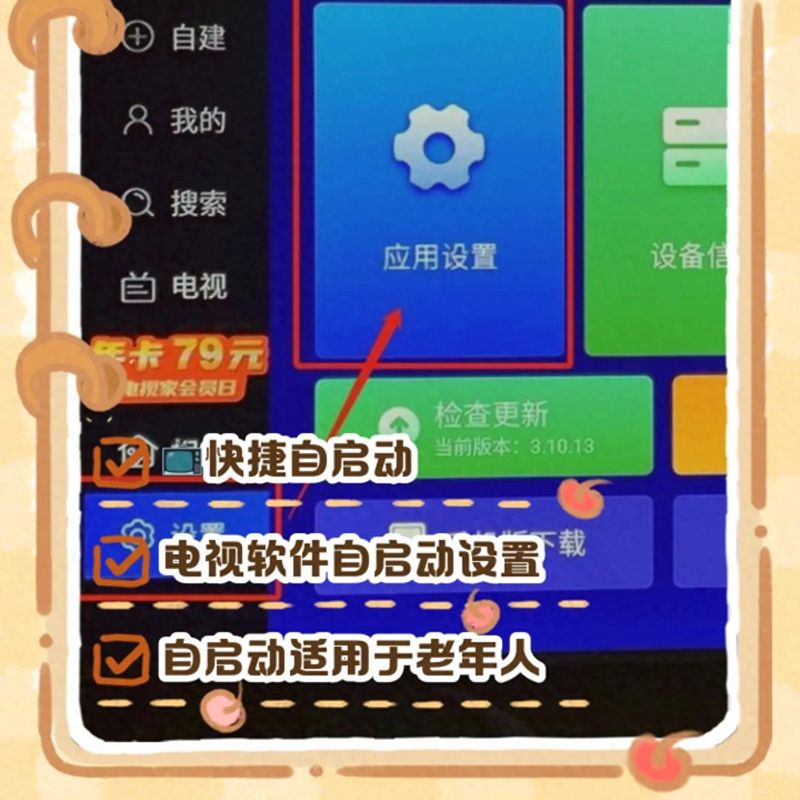
First step, open the main tv interface, find the [sets] icon on the page and click on the system settings page
Step two, in the settings list, find [general settings] or [equipment settings], some of which appear as [systems and updates]
Step 3, pull down the page to find the mall mode options, and if it is on, close it manually. The mall model is the reason for the limited high frequency of the new aircraft, and most of the basic installation restrictions will be automatically lifted upon closure
Step four, return to set the home page, find [security settings] [accounts and security] or [private settings], click on access
Step five, find the option to install an unknown source application [an unknown source installation permission], default to ban and manually switch to allow
Step six, restart television and insert disks with a formal installation package to read and install third-party software。
It should be noted that the latest television system in 2026, which is no longer a single-key global authorization, will be broken down. Once access has been opened, the corresponding installation privileges for [document management] [udiscread] need to be separately allowed to avoid the installation being impossible after access。
Iii. Mainstream brand-specific unlocking curriculum to address installation failures
Access to different branded televisions and the operation of hidden models vary slightly, and where the generic method is ineffective, it can correspond to the home-owned television brand, with precision unlocking, covering millet, tcl, thunderbird, chewie, hae-shin and wah as the mainstream。
1. Mem/red-mi television (all new generic)
Mi mi's latest version of miui tv 4. 0 and above was adjusted to allow access, and many users could not find switches to operate:
Enter tv [sets]- [accounts and security] and move the new version to the [privileged settings] submenu
Drop-down to find [equipment management] and click to select [install unknown source application]
The page displays connected disks, television assistants, file manager devices and opens the permission switch for the corresponding device
If this option is not available on the page, you can see hidden permissions by clicking on the version number 7 of [regarding this machine], automatically unlocking the developers mode。
2. Tcl/raybird tv (2025-2026 new special)
These two brands are the most restrictive, the routine set-up cannot be unlocked, and the hidden adb privileges must be activated:
Open tv [sets]-- [about this machine] confirming device models and system versions
(a) use television remote control, then press the hidden shortcut and remove the plant debugging interface
Open two core switches in the interface
Return to the home page, insert a disk, and read the disk installer via the tv [television guardian] [video watch assistant], choose application management, fast-track installation。
3. Creative/cool television exclusive methods
The installation rights of xavi tv are hidden in the plant mode and the normal settings page cannot be found:
Access to tv [sets]- [general]- [about on-line]
(a) on this information page, press the upper-down, upper-down, left-up and left-up by the remote control in turn
The page will automatically eject the hidden plant mode, find generic settings and open the adb installation privileges
Once you are out of the back-office mode, you will be free to install third-party software。
4. The common method of haisin/china as a smart screen
The simplest logic for the operation of the wisdom screen is that there are no hidden shortcuts:
Open [sets]- [systems and updates]- [security and limits]
Direct access to [unknown source application installation] rights
China requires additional access to the [equipment for external application of equipment] type, effective once restarted。
Iv. Frequent errors in television software
Some users still fail to install after unlocking permissions, mostly caught in operational errors, which are also high-frequency problems for home use and must be avoided:
1. Mistake i: do not restart television when access opens
Many of the new smart-television system changes require restart to be effective. The system will retain the old restriction set-up, resulting in installation failure, by simply opening access and directly plugging the disk。
2. Misdirection ii: random installation of software of unknown origin
The television lost basic protection after unlocking the third-party installation. The installation of decrypted, unknown software is prone to bomb window advertisements, system carden, backstage traffic and, in serious cases, the collapse of the television system. It is recommended that only regular and consistent software be installed。
Mistake iii: long-term access to unknown sources
When you do not need to install the software, you are advised to manually close the installation permissions from unknown sources. Long-term open access increases the security risks of the system and may result in the automatic installation of garbage software on the backstage and the occupation of television memory。
Error iv: unmatched ucd format
Smart tv recognizes only the disk in fat32 format, and the disk in ntfs format is not readable. Before copying the install package, confirm the disk format to avoid failure to read and waste。
V. Transfer of tv maintenance affected yes
Many users are concerned that, when unlocking the installation, television will change the carton and shorten its useful life, but will not affect the use experience at all, but will also allow television to operate over time:
1. Regular closure of inactive back-office applications
Residency in the back of third-party software is the main reason for carton. At the end of each use, the inactive applications are closed and the running memory is released through television backstage management。
2. Regular cleaning of installation packages and caches
Residual installation packages, routine software caches, and build-up of storage space after installation of disks. Clean up the trash files once a month to avoid the lack of memory leading to a retreat and inability to update the software。
3. Do not modify system default settings
Only software installation privileges can be activated, and no random changes to other parameters in the developers ' mode are made to avoid misaligning the system configuration and causing equipment failure。
4. Installation of software as required and rejection of overloading
The limited configuration of smart television hardware and the excessive installation of third-party software can increase the system burden. Only routine software is retained, idle software is unloaded in a timely manner and the system is running in light quantitative terms。
Summary
Smart television prohibits the installation of third-party software, not equipment failure, but only the manufacturer's default security restrictions, the core solution being to shut down the mall model, open access to unknown sources for installation, and unlock the debugging mode。
The different brands of television are only slightly different, with simple, zero-cost, risk-free operations, and a few dozen seconds after proficiency. Unlocked access is no longer limited to the limited resources of the official application store, and immediate software can be installed according to their own needs, greatly enhancing home-based visual and recreational experience。
There is also a need for rational use of the unlocking function, adherence to the principle of safe use, the installation of only formal compliance software and routine system maintenance, both to achieve freedom of software installation and to guarantee the smooth and stable operation of television in the long term。
You can try the corresponding unlocking against your own tv brand. What's your smart tv brand? Have problems been encountered with software installation restrictions? The exchange of day-to-day ideas in the comment area is welcome。