Step 6: selection of batch filings
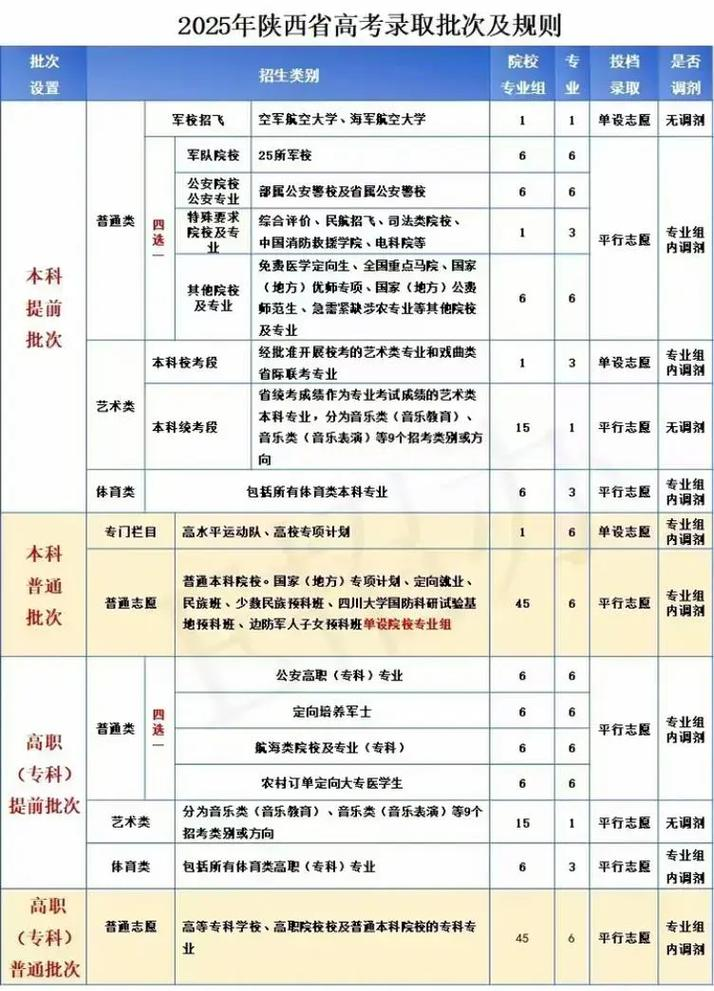
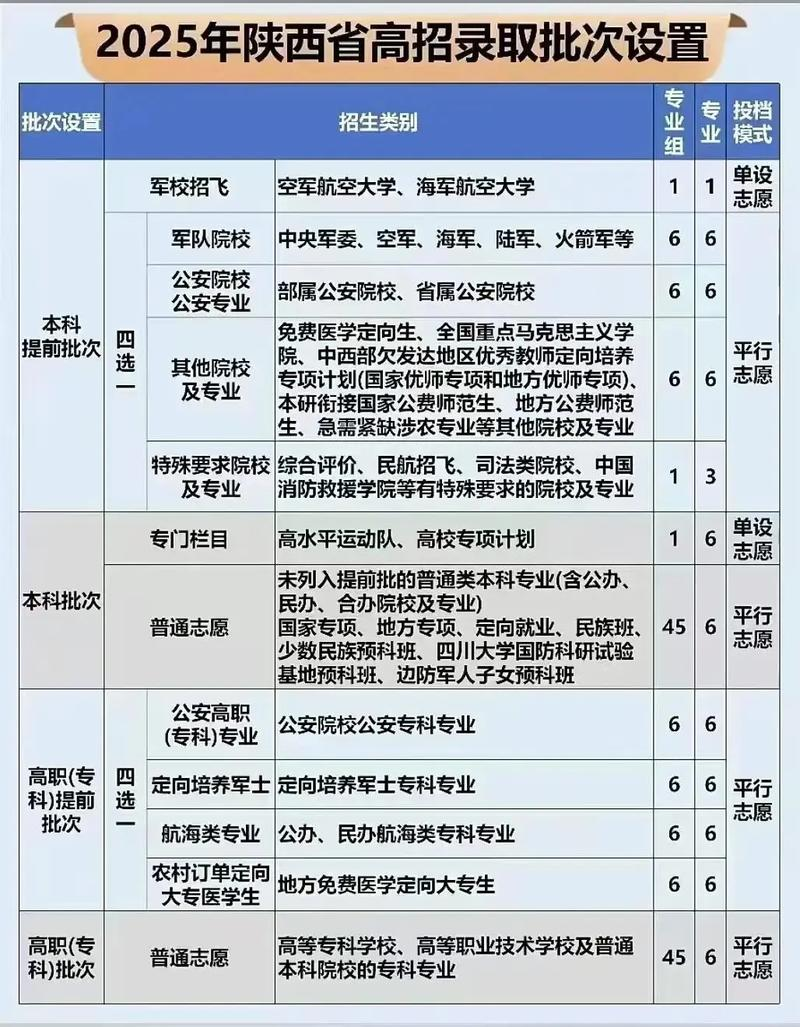
Click on the `voluntary' button on the web page to select the batch to be filled in to the reporting page. For example, if you are going to fill in the first undergraduate volunteer, you are going to click on `first undergraduate' and enter the first undergraduate volunteer field, and you are going to fill in a volunteer column by the school code and professional code on the voluntary list。
After filling out a volunteer, if you have to fill in a second volunteer, click on the second series, and enter the second series of undergraduate volunteers to fill in a second. Colleges in different batches of different serial numbers volunteer and professional volunteers in different serial numbers to fill in the corresponding volunteer field, each of which corresponds to the volunteer field, and do not miss the field。
Step 7: check checks
Once the institution code and the professional code have been entered, click on the next button, the online voluntary system converts the code you have filled in to the corresponding institution and profession, and the name of the institution and the professional name you have filled out will be shown on the screen. And this is the time to read the hints on the screen
Check carefully whether the schools and professions shown are what you want to fill out, or if they are not, or if they appear in red fonts for “invalid institutions” or “invalid professions” indicate that the wrong code has to be corrected by the correct code, or else zhang li has to wear it. If you want to modify or fill a volunteer, you can click the " last step " button and return to the filling interface to modify or fill in。
Step 8: preservation of voluntary information
After checking that volunteer information is correct, click on the save button, and only if you click on the save button will the filled volunteer information be stored in the web-based reporting system; if you do not click, the volunteer information will not be preserved, which is the same as the voluntary one. Once each batch of volunteers has been filled in, click the save button to save the volunteer information for this batch。
Step nine: query volunteering, exit system
Once all batches of volunteers required to be filled in have been completed, click on the “query voluntary” button provides a full view of the batches, checking whether the batches, colleges, professional volunteers are complete and accurate, and whether there are voluntary or non-valid professional volunteers from ineffective institutions. If there is no problem, click the safe exit button, exit the web-based voluntary system and close the volunteer browser page。
Revision of volunteering: candidates can log in the system by the deadline to use the `fill volunteering' and `search volunteering' functions. In particular, candidates are reminded that a change in volunteering must be made by clicking on the word “save”, otherwise the change will not be valid, and several changes in volunteering will be based on the final retention of the candidate. Change passwords and contact details: candidates can log in the system by the deadline using the "change password" and "modify personal information" features。
2022 high examination voluntary notice
At the time of initial entry into the voluntary filing system, the system will require candidates to change their initial password (initially eight after the applicant's id number), otherwise they will not be able to continue the voluntary operation. The system login password is the identification password for the examiner to log in to the filing system. After changing the initial password, the tester will remember the new password. After logging in the system, candidates can fill in according to system tips and requirements. Voluntary filing is completed and candidates are required to submit their volunteers using the voluntary submission code, otherwise they will not be valid。
Voluntary submission codes are the only key for candidates to submit volunteer information. The system login code and the voluntary submission code are important information for candidates themselves to fill in and keep their passwords properly. In 2015, individual candidates informed teachers and classmates of their passwords and submission codes, which led to changes in their own voluntary submission, allowing candidates to enter another school or slide to their ideal university. In order to protect their rights and interests, the examiner must refrain from disclosing the password to others and from allowing them to fill out their voluntary service instead. If candidates fail to remember the password, the password must be changed as soon as possible with the pass, the id card and the entry point designated by the district (district) admission office in which they are enrolled。