This will introduce you to a brand-new tp-lInk wifi settings. Current tp-lAttention is also drawn to the use of tplogin. Cn as a web site for the new generation of ink wireless routers。
The first step was to identify the type of broadband line entry that consisted mainly of telephone, fibre-optic and network lines. The broadband network that brings the operator in is connected to the router's wan mouth and the internet computer is connected to the router's lan mouth。
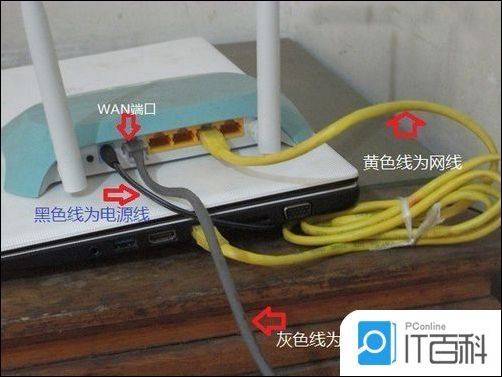
Once the line is connected, both the router's wan gate and the cable-connected computer's lan gate signal will be long or shiny. If the computer's bottom-right network icon shows a red fork, it indicates that the line is connected to a problem. The broadband network connection, which involves the operator directly, is checked to see if the computer network icon has disappeared. Please contact the operator to deal with the failure. Please check if the router's corresponding signal at the wan mouth is lighted, if the light is fixed or the wire is not replaced. It is not the lights that check whether the power is connected or whether the router is malfunctioning。
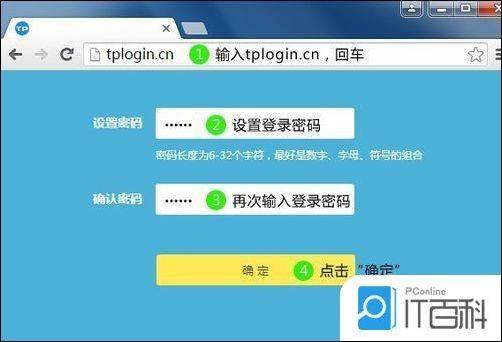
Step two, open the computer browser, enter tplogin. Cn or 192. 168. 1. 1 on the address bar (the router has an address on the back) and set the router login password in the popup window (see box). The initial account password is the admin, which is used to manage the router (entry interface). The following is a chart:
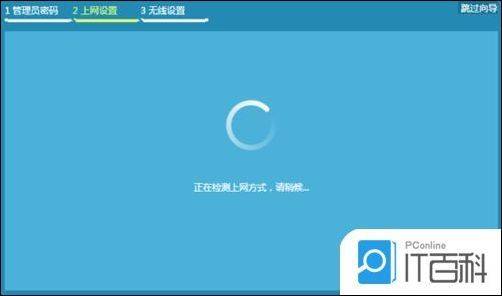
Once the login is successful, the router automatically detects access to the internet, as illustrated below:
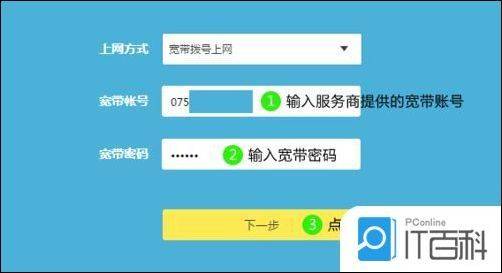
Fill out the corresponding parameters of the internet access method, based on the detected:
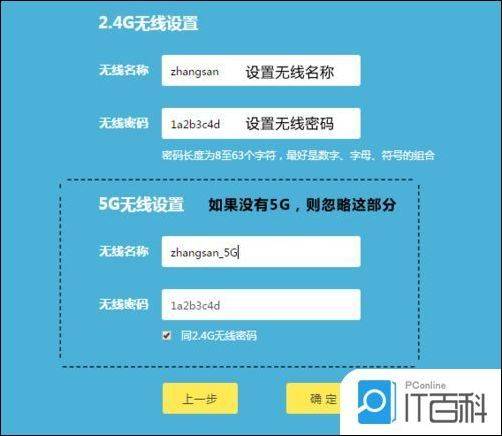
Sets a wireless name and password, as follows:
Wireless names suggest that you set them to letters or numbers, and try not to use chinese, special characters to avoid some wireless clients not supporting chinese or special characters that lead to search or cannot be connected。
Tp-lThe default wireless signal name for ink router is "tp-l"Ink xxxx " (can change your preferred name, oh) and no password。
To ensure your network security, it is recommended to set up a wireless password。
Settings are complete, waiting to save configuration:

The router set-up is complete and the computer can open the web page and try to access it. Computers can access the web site directly, especially through adsl, which no longer uses the "broadband connection" on the computer for dialling。
If you have other cable devices, such as desktops, network televisions, that want to go online, connect the device to any of the free lan outlets of the router 1/2/3/4, you can go online directly, without having to configure the router。