Summary: why large networks
1. Osf is a trigger update
2. Osf has a neighbourhood mechanism, which is fast
3. Vlsm in support of discrete subnets
Support group updates
5. Osf has no jump limit
6. 100% loopless, sspf algorithm, star structure, summary pointing to null0
7. Capable of tracking external route signs
8. Cost changes without bandwidth parameters
9. Support for safer routing certification
Support for multi-load balance
2. Ospf basic characteristics
2. 1. Open minimum path priority
2. 2. Spf algorithm
Select the least expensive available path, increase efficiency and save bandwidth.
2. 3. Support only manual aggregation
Summary of the three categories
Summary of the five categories
2. 4. No type of route agreement, link status route agreement
Can not open message
It's not a single route entry, it's a link status database information lsa
2. 5. Transfer layer, ip protocol number:89
2. 6. Support for simple password authentication, md5 authentication
Type of authentication supported: non-certification, express authentication, confidential authentication
Non-authentication: null express authentication: simple plain password authentication: md5, cipher, hmac-md5 interface authentication: open authentication, configuration password
(a) regional certification: may open the authentication and configure the password
Interfaces and regions enable different types of authentication, and strong interfaces
The interface and area start with the same type of authentication, and the area is strong
2. 7. Trigger updates
224. 0. 0. 5 for detection equipment, all routers are wired
224. 0. 0. 6 for the maintenance of adjacent relationships, with only dr and bdr listening
2. 8. Incremental update: transfer only of changed entries
2. 9. Periodic updates
The neighbors send lsu entries once in 30 minutes, 60 minutes dead
4. Opf region
4. 1. Why divide the area
1. Reduced route watch size
2. Limiting the spread of lsa
3. Accelerating convergence
4. Enhancing stability
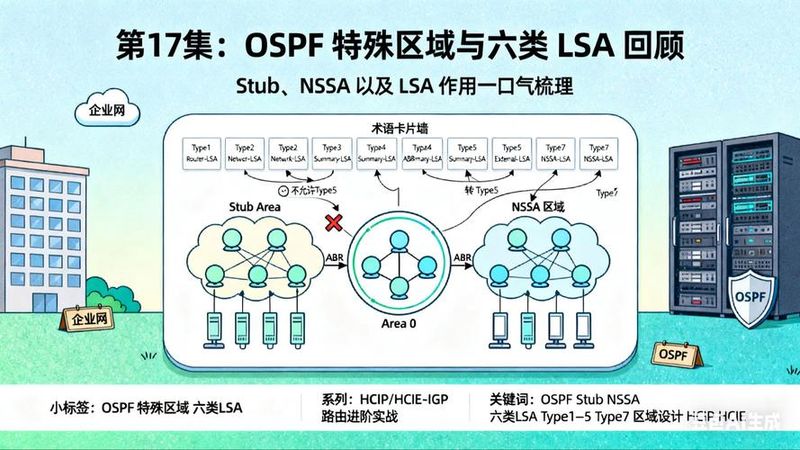
5 in the case of more routers, we divide the area so that the router resources are not too occupied by ospf. This allows specific lsa content to be transmitted only within regions, and lsa aggregations are made when crossing the region. Therefore, aggregations can only be carried out manually across regions and cannot be aggregated within regions。
4. 2. Regional division
Core area
General area
Area-based interface-based division
4. 3. Routers on regional boundaries
Internal router ir (all interfaces of routers in the same area)
Regional boundary router abr (between backbone and conventional areas)
Self-help system boundary route asbr (re-distribution of external routing entries to ospf)
Special area type
Stub area: the end section (filtration of class 4,5, allowing class 3. Abr will automatically send a default route to the area) when an area is configured into the stub area, it will not accept an external lsa of five and four categories, will not see lsa of five and four categories in lsdb and will add a default route to the route chart to reach the external route. Enter the area directly, enter a stub that can be configured into the stub area. At this point, five and four classes of lsdb were found to be non-existent, but there was an additional default route for three types of lsa
Totally stub area: the whole last section (filtration 4,5, detailed 3) does not accept three, four, and five lsa categories. Enter stub no-summary in the same area on the bbr, because the lsa category is created on the bbr, so just go into configuration on the abr, and only one default lsa category in the lsdb can be found
Nssa region: unlike stub region, nssa region does not accept four and five lsa categories, but the region can introduce external routes, there is an asbr, which can be sent to other regions, and the route introduced will be communicated in seven lsa categories
Complete nssa area: no lsa of three categories, four categories, five categories, and no-summary input of the corresponding area on the bra is sufficient. At this point, only one default lsa of three exists in the lsdb
5. Router-id
5. 1. The identity of the osf indicates that the router in the osf is given a name (and only one, which is equivalent to one of our identity cards, with a point-of-decimal representation; router-id is not consistent throughout the osf autonomous system
5. 2. How to determine router-id: 1, the manual designation of a router-id2, the largest of the active loop ip3 and the largest of the active physical interface ip
(may skip the loop, select the physical interface)
5. 3. Experiment: configure router-id: ospf 1 router-id1. 1. 1. 1 reset process: reset opf process
5. 4. Why have rids? Because we have neighbours, we recognize each other, we need to recognize rids
6. Ospf data package
6. 1. Five packages
1. Hello package: used to detect and maintain neighbourly relations/consultations between routers
2. Dbd (data description) package: some of the teaching materials are also called dd packages, which are used to convey to neighbours that they know lsa (confirmation information: serial number, lsa summary)
3. Lsr (link status request) package: used to request adjacent routers to send link information (confirm information: lsu)
4. Lsu (link status update) package: an update package sent in response to a link status request lsr (confirmation information: lsack, exchange of detailed lsa information)
5. Lsack (link status confirmation) package: confirmation package for lsu packages sent to adjacent routers
6. 2. Lsa categories 1, 2, 3, 5, 4, 7
Type 1 (router lsa): each router produces a type 1 circular. The flood spread in their own region, containing interfaces with their immediate neighbours, informing them of the state and direction of their links
Type 2 (network lsa): drs in every multiple-circuit access network will generate two types of circular. Consider dr routers as a "false" node for depicting all routers with multiple access and connections, i. E., all routers with which they are linked, including themselves, in the circulars
Type 3 (sum-net lsa): corresponding to abr routers, convert category 1 in one region, category 2 lsa into category 3 circulars to other regions, where a similar summary is made
Type 5 (lsa external to the autonomous system): extraterritorial route information
Type 4 (asbr summary lsa): also as a node that allows for the flow of information within the region and the exchange of information outside the region, followed by communication
Type 7: (nssa external lsa): refers to lsa circulars from the asbr router in the non-pure end zone, which are also extraterritorial route information
7. Intersection of ospf route information in the network
7. 1. Establishment of neighbourhood and neighbourhood relations
Neighbor
Neighborhood was established and maintained through the hello newspaper, with some parameters of the agreement with routers
Neighbourhood relations can only be established by matching these parameters. No database synchronization in wo-way state。
If the neighbours are not established, the reasons are determined by checking the following parameters。
Regional id consistency
Hello time corresponds to dead time
The type of authentication is consistent with the password
Special area labels are consistent
The mtu is the same. The discrepancy will go to exstart
The cover should be consistent
Network type consistent (neighborship between p2p and broadcast, but no route entry is available)
Router-id to be inconsistent
Next door
Full status, data synchronised, neighbourhood established as a prerequisite
Three tables
Neighbor's watch: keep relevant information about the neighbour
It's not like you're in the middle of something
Table: lsdb, lsa
I'm sorry
Route chart: best route through the spf algorithm (loading of the smallest management distance and the smallest cost route entry to the table)
I don't know what you're talking about
7 states
Down state: no hello package sent by a neighbor router within the lapse time
Attempt: in nbma's environment, you send your own hello bag. You haven't received the hello bag yet
Init status: neighbor's hello package was received but was not found in the holo package, or in the event of a mismatch between the hello parameters
Two-way state: the status of the rid, the hello parameter matched and verified in the hello package sent by the neighbor (election dr/bdr)
Elections dr/bdr
Dr priority is 0-255, default 1
Rid's big priority. Bdr's the top priority
Note: drs and bdrs do not take possession, i. E., when drs and bdrs are selected, even if new routers are added to the multiple route, they will not immediately participate in becoming drs and bdrs, which will ensure the stability of the network. Unless the dr dies, the bdr immediately becomes the dr, whether or not there is a higher presence of bdr parameters in the network at this time, and everyone else is running for bdr。
Electoral environment: broadcast multiple-road access networks and non-broadcast multiple-road access networks
Why vote in this state
To determine which are neighbours, which are neighbours
'cause it's a multi-road visit, which leads to the prevention of a flood of lsa
Exstart state: the first dbd package was sent to the state until the higher rd router became the main router
Note: not to drop the package. It's an empty dbd package. It's just a lsa summary. It creates a serial number to confirm the package, and then decides whose serial number is to be used by the rid height
Exchange state: election is complete, two routers continue to exchange dbd packages until both parties are informed of the same lsdb database information
Organisation: start sending lsr/lsu packages for detailed lsa exchange
Remarks: lsr is sent when it is discovered that there is no lsa information on the other side, and lsu is not used when requested; and the two devices may not synchronize because of the different size of the package sent
Full state: the router lsa is identical to the router lsa and the neighbour is established after transmission of all lsa received and confirmed
Note: these seven states are not all in existence, and if the packages received are matched, they can be directly from down to two-way status
7. 3. Redistribution
Haawei-ospf-1
IPort-route direct set area 1 to nssa area
Haawei-ospf-1-area-0. 0. 1
Nsa set area 1 to full nssa area
Haawei-ospf-1-area-0. 0. 1
This post is part of our special coverage syria protests 2011
8. Optimizing route entries
8. 1. Summary (a summary of internal and external entries)
1. Experiment: 3 type lsa aggregation configuration:
Haawei-ospf-1-area-0. 0. 1
Abr-summary 10. 1. 0. 0 255. 255. 252. 0
Category 5 lsa summary, asbr summary configuration:
Haawei-ospf-1
Asbr-summary10. 1. 0. 0 255. 255. 252. 0
8. 2. Special areas (self) that make routers more effective and reduce the number of lsas in this area will make spf algorithms faster
In the current network, not every router is as powerful as the core router, and as the router is replaced, there are always some weak routers that are present in the current network, so the end zone of the ospf is created, which, given their poor performance, assigns them to the end zone and reduces their pressure by reducing lsas in these routes。
Condition: one, core area cannot be set to special area two, all routers in the area must be equipped with end-of-sect commands, three, no-go transmission areas cannot be configured to special area
Special area type
8. 3. Fake links
Breaking through non-breeding areas and establishing a logical link to make inter-routings faster
R2:
Haawei-ospf-1-area-0. 0. 1
VlInk-peer3. 3. 3. 3
R3:
Haawei-ospf-1-area-0. 0. 1
VlInk-peer2. 2. 2. 2
As a pure-spectrum network, white and blue, my greatest dream is to become communism and an ar, and there will be many more insinuations