Way to go
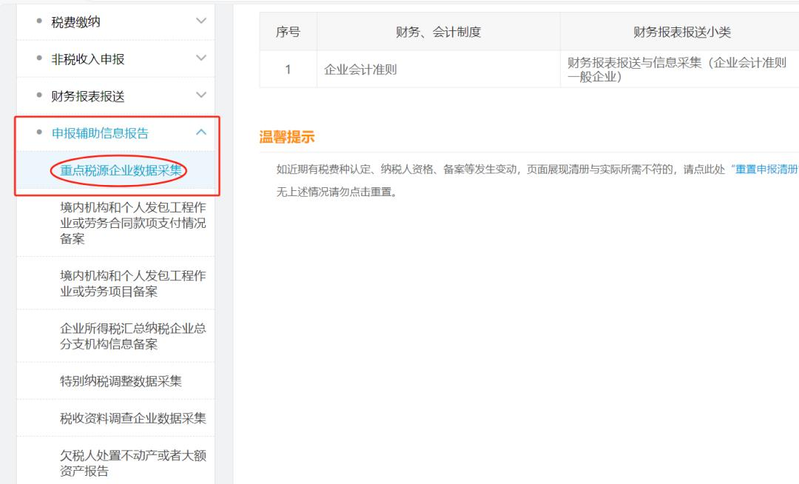
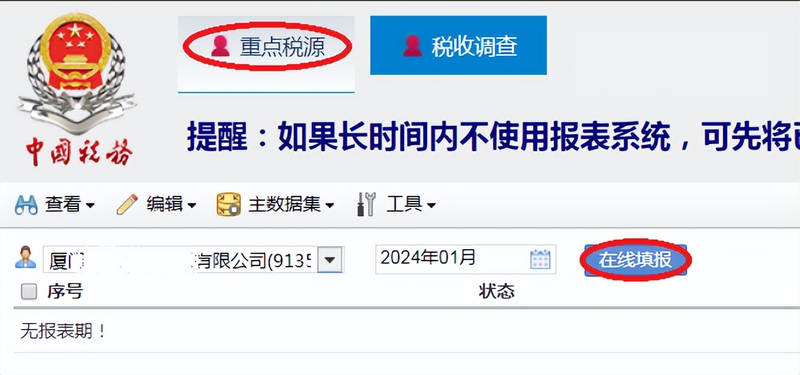
Access to the city of xiamen electronic taxation authority, click on "i'm going to pay taxes" -- "tax and fees declarations" -- "report on declaring supported information" -- "prior tax source data collection" -- select "prior tax source" -- click on "online filling."。
Mode 2
The department of electronic taxation of the city of xiamen -- searching for business data collection for key tax sources -- selecting focus tax sources -- clicking on “online filling”。
Ii. Filling points
[info form] fill in points
1. The form is filled out every february and may not be changed at will without special reasons。
2. The manner in which vat, excise tax, and enterprise income tax are paid will affect the presentation of subsequent statements, with due care to be taken。
Fill in the key points
1. The form is required to be completed monthly。
2. The units of measure in this table are tens of thousands of yuan, tens of kilowatt-hours, tons and tens of cubic metres, bearing in mind the units and orders of magnitude。
3. [category paid in the current period] is the amount of taxes actually paid by the enterprise during the current period; [category paid in the current period] is the amount of taxes due from the current production activity of the enterprise, which is normally reported in the next period. For example, when an enterprise filed its january 2024 statement in february 2024, [the current period] referred to january 2024, [the current period has been paid] to the actual payment of taxes in january 2024, and [the current period has been due] to the tax due in january 2024。
4. In this table, [other indicators] and [financial indicators], as well as [the same period of the previous year], need to be focused and to avoid leakage。
5. Most indicators are automatically available from the tax administration system and do not need to be completed by the enterprise。
[financial table] fill in points
1. The table is generally declared on a quarterly basis and is completed in the march, june, september and december reporting periods。
2. Sufficiently based on profit statement, balance sheet endings。
3. The opening of the balance sheet in march of the annual statement period will affect the subsequent quarterly financial statements, which cannot be changed at the end of the error, and it is important that they are completed correctly。
4. The annual statements for the months of 6, 9 and december need to be sensitive to the availability of data from system extraction errors at the beginning of the year and, if any, to be deleted。
Fill out the points
1. The table is submitted on a monthly basis according to the type of business sector。
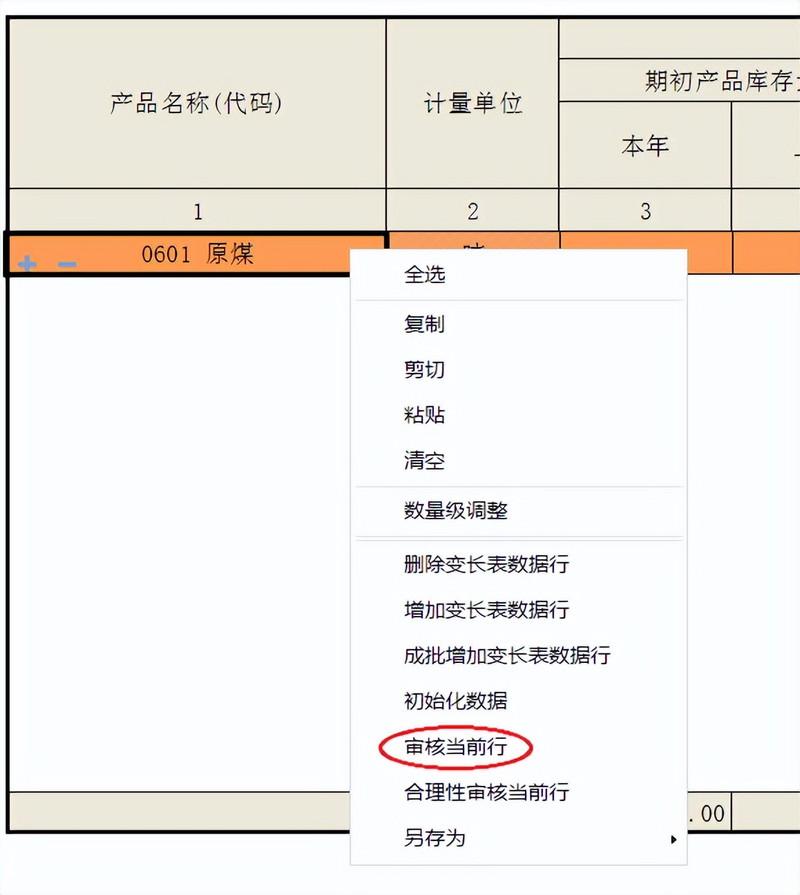
If the approval fails, the line should be selected, followed by a right click on " audit of the current line " , with a detailed description of the error data or a description of the audit。
"enterprise environment survey"
1. The form is monthly。
2. The weather indicator is selected on a case-by-case basis, and if the selection is wrong, you can click to select the option and press the right button to empty。
Note that the month of this table refers to the month of the date of filing. As at the time of reporting for january in february, the statement is for the month of 02 and for the month of 03 next。
Q&a fill in "hot question"
Q1: on login, hint "institution code: null does not exist!" and "502 bad gate way your request was not completed because the upstream service response was invalid or the request was illegal"
Answer: do not click the return button on the page and try to refresh the page. If there are any further questions, check with the administrator whether the filing is required, and any attempts to re-enter or replace the browser that are required to do so are still subject to error。
Q2: does the key tax sources reporting system have a self-help numbering function
Response: the system uses the "t+1" automatic take-up feature, which allows access to declared data on the next day of the tax returns (by clicking on "read entry data", which can also be used for the same period last year). The extracted data need to be carefully checked, and the unexploded data should be completed as they are。
Q3: what if a system problem report cannot be loaded when filling in
The following are two main scenarios:
(a) first: if the system is normal, the browser can be restarted or replaced
Second: if there is a problem with the system, contact the administrator, we will maintain it through the counter and ask you to try again later。
Q4: during the review process, it was suggested that “the relevant indicator in the other indicators should be greater than the previous period” and that “monthly financial indicators should be greater than the previous period”。
Response: please first compare the red-marked indicator for the current period with the reported data. Under normal circumstances, the cumulative amount for the current year of the month should be incremental over the cumulative amount for the current year of the previous period. If there are individual prior-period data errors leading to cumulative errors, contact the administrator and do not use negative offsets; financial costs are negative or other exceptional circumstances may be filled in。
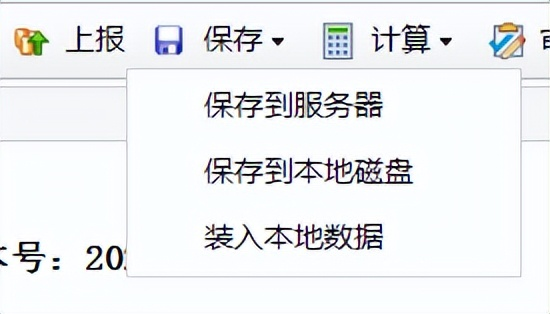
Q5: when the click saves is completed, there are “no specified account number or password error or no access to the report”。
Response: network instability or a longer page stay. If this occurs, select the [saving] button [to the local disk], exit the system, and when the network is connected, choose [to load local data] to be saved to the disk and report。
If the call is suspended in the interim, you can click [to the server] and the subsequent login can continue。
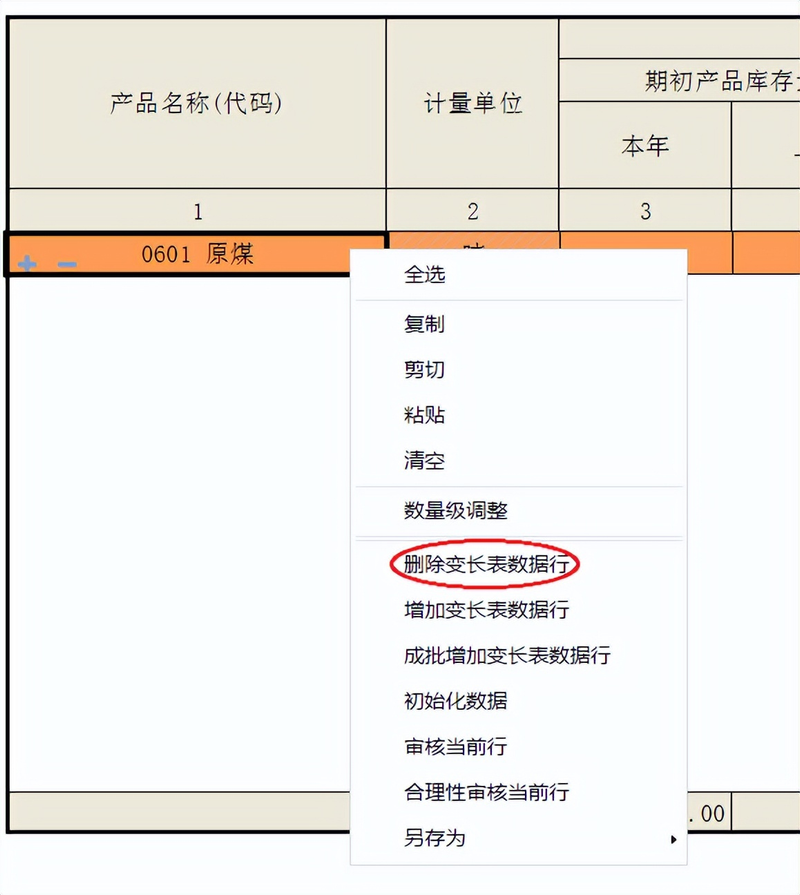
Q6: when filling out the product forms, the window will not be able to proceed with the next operation after ejecting "unqualified code group values"。
Answer: select a product in the column [product name (corption)], select any form of this line, click on the right, and click on [delete the long table data row]。
Q7: when will the priority tax source report be completed
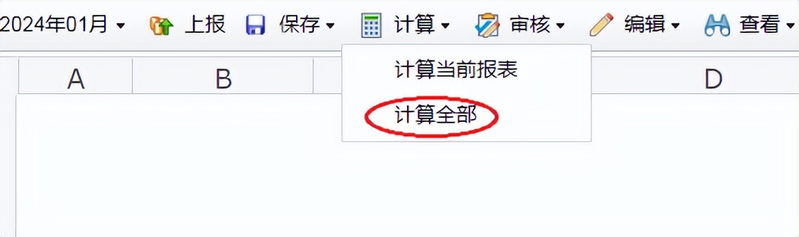
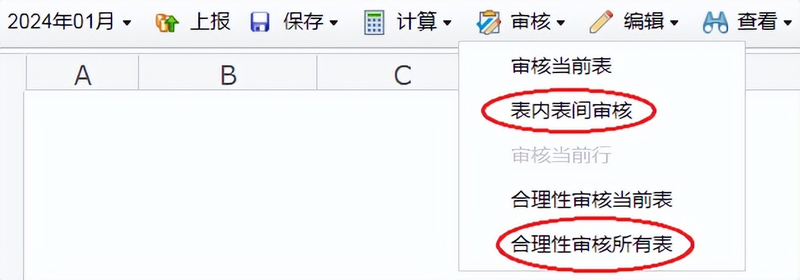
Please note that before reporting on key tax sources, you must click on " calculator " , then " audit " , " inter-stab audit " and " reasonable review all forms " , which will be reported only after all audits have been completed. Where exceptional circumstances lead to non-admission, double-click error information and complete the audit statement in full。
Q8: what if the report is locked and unable to be filled in and modified
Response: when an enterprise submits a report, the administrator typically saves and locks in the table data. If there is a need to change the current table before the filing deadline, contact the administrator to unlock and the prior period data does not allow changes in principle。
Q9: what if the company has restrictions such as firewalls, network management strategies, etc. To access
1. Contact the company network and add the key tax sources to the white list:
Https://zdsy. Xiamen. Chinatax. Gov. Cn:89/esmain/login. Do
2. Change the network environment, for example by using mobile phone hotspots。