1. The initial password, if available, should be amended as soon as possible。
A password of not less than eight characters。
3. Do not use a single character type, such as lowercase letters, or numbers only。
4. Do not use the same characters as the password。
Common weak passwords avoid being set to passwords as much as possible。
6. The names of oneself, family, friends, relatives and pets are not set as passwords。
Personal information such as birthdays, anniversarys, telephone numbers and so on avoid being set to passwords。
8. Professional terms and occupational characteristics used at work avoid being set as passwords。
9. Password dictionaries should not contain words or insert other characters in words。
10. As far as possible, all systems use different passwords。
11. Prevention of automatic memory of account passwords on web pages。
12. When registering an account online, the username password should not be the same or associated with an internal unit username。
13. While maintaining passwords through password management software, password management software should provide for high-intensity security measures。
14. Passwords should be periodically replaced。
Ii. Virus risk prevention
15. Installation of virus protection procedures and timely updating of virus profiles。
16. When downloading e-mail attachments, note the suffix of the file name and do not open the attachments of unknown senders。
17. Documents downloaded by the network need to verify the digital signature of the document and manually scan the document。
18. When a mobile storage medium is used, the virus is detected and opened。
19. Manually detecting viruses when installing software from unknown sources。
20. When viewing web pages, the computer was used to detect anomalies and to disrupt the network。
Iii. Internet security attention
21. Use well-known security browsers (e. G. Edge, chrome, firefox, webkit, 360 security browsers, 360 fast browsers)。
22. The collection of frequently visited websites does not easily click on the web sites that are transmitted to you。
23. There is a need to be more vigilant against temptations such as overprices, over-low discounts and awards。
24. Avoid access to illegal websites such as pornography, gambling and reaction。
25. Important documents are encrypted when transmitted through networks, mail, etc。
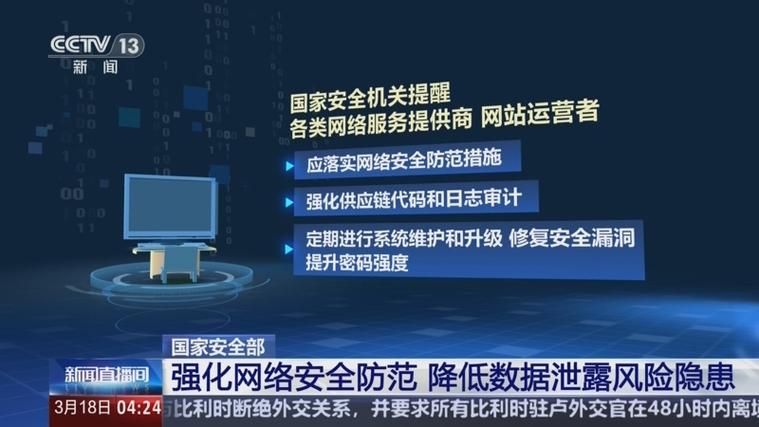
26. Protect sensitive information using security and privacy settings on social networking sites。
27. Avoid uploading work information, documents to online storage spaces such as webpads, cloud-sharing folders, etc。
28. Prudent personal information is posted on social networking sites。
29. Register the website according to its needs and do not blindly fill in information。
30. The dns online should have an ip address assigned to the operator or internal dns service to avoid the risk of hijacking using unsafe dns。
Security of online transactions
31. The site visited was matched to the official address to confirm accuracy。
Avoid the use of online trading systems through public computers。
Financial operations are not performed on computers shared by many people, such as internet cafes。
34. Transactions are not entered through the search engine's web site or links to an unknown site。
35. Before network transactions, complete knowledge of the trading website and the qualifications of the counterparty。
36. The authenticity of the website can be verified, for example, through searching for web-filed information。
Care should be taken to check whether the transaction website is the http protocol and to ensure that data transfers are not tampered with by wiretaps。
38. Access to websites involving money transactions uses, to the extent possible, virtual keyboard entry and trade passwords available on official websites。
39. The voucher is available for personal details and is carefully completed。
40. Care is taken to protect the privacy of individuals and caution is exercised in the use of sensitive information such as individual bank accounts, passwords and document numbers。
41. Plugin for security precautions is installed on mobile phones, as required, before mobile phone payments are made。
42. Whatever the reasons for requiring you to transfer funds into a stranger's account, security accounts are fraud offences and must not be deceived。
Be vigilant when receiving mail related to personal information and money (e. G. Winning, collecting funds, etc.)。
V. Email security
44. Do not open, respond to suspicious mail, spam, unknown source mail。
45. The business data of the company must be processed using the company's internal mailbox, which is separated from the private mailbox。
46. Staff members are responsible for the security of their e-mail account numbers and passwords and are not allowed to borrow their account numbers from others。
47. Should any security gaps in the mailbox be detected, the corporate mail system manager should be informed in a timely manner。
48. The content of mail, links to web sites, photographs, etc. Should be monitored。
49. The working mail of agency staff recommended the use of government-built postboxes and the use of offshore mailboxes was strictly prohibited。
50. High-intensity passwords are set for e-mails and account passwords are required for each login。
51. Provide real-time monitoring of anti-virus software to detect the presence of viruses in incoming and outgoing e-mails。
Check if the mail forwarding function is closed。
53. No unidentified e-mails or attachments are forwarded。
54. Upon receipt of a message involving sensitive information, the content of the message and the sender are repeatedly confirmed and, to the extent possible, communication is made online。
Vi. Computer security
55. The operating system login account requires a login password and is not weak。
56. The operating system should update the security patch in a timely manner。
57. The opening of unauthorised document-sharing services is prohibited and safer document-sharing is used。
58. Security patches are upgraded for intermediates, databases, platform components, etc。
59. Close remote access to office computers。
60. Regular backup of critical data。
61. Services not required for closure of the system。
When computer systems change operators, the password of the system is changed while essential information is handed over。
63. Timely removal of garbage mailboxes。
64. Staff members should leave their seats with a computer for exit status or lock state and it is recommended that an automatic lock screen be set。
Vii. Office security
65. It is prohibited to place or discard paper documents containing sensitive information, which need to be shredded with shredders。
66. Demagnetic processing by management should take place when a waste or magnetic medium is transferred to another person。
67. Upon leaving the seat, valuable items, information containing confidential information, shall be locked in the cabinet。
68. Information on photocopying or printers should be removed in a timely manner。
69. Obsolete compact discs, disks, computers, etc., need to be neutralized or completely destroyed。
70. It is prohibited to write account numbers, passwords, etc. On plain signs。
71. When ukey is not in use, it should be removed and kept in good time。
72. Key content telephones in the office have been located in a safe and quiet location to answer and avoid leaking information。
73. Ucds and mobile hard drives are kept in safe places at all times and are not freely borrowed or placed。
Viii. Mobile phone security
74. Mobile phones are equipped with automatic screens, and it is recommended that they be set for one to five minutes to avoid being used in bad faith by others after leaving the cell phone。
75. Mobile phone upgrades should be carried out through self-carried updates, avoiding downloads from the website。
76. To the extent possible, mobile phone applications are downloaded through the application market with mobile phones。
77. Installation of poison-killing software for mobile phones。
78. Data are frequently synchronized back-up for mobile phones。
79. Mobile phone access to web site should be vigilant。
80. Establishing access codes for mobile phones is the first line of defence to protect mobile phones from the loss of information。
81. When bluetooth is not used, it should be closed。
82. The data should be fully backed up prior to the disposal of the mobile phone and the exit setting should be restored to remove residual information。
83. Mobile phone task managers are regularly checked for malicious programs operating in the back and mobile security system software is regularly used to scan mobile phone systems。
84. Restrictions have been placed on the authority to execute procedures and non-essential procedures prohibit access to sensitive data such as mailing lists。
85. Do not attempt to decipher your mobile phone to ensure the security of the application。
Wireless network security
86. The private development of wi-fi hot spots through office networks is prohibited in the office environment。
87. Open wi-fi, which does not visit any of its non-local units, is found to be uncoded and open in the vicinity of the units, and should be notified to the it department。
88. Apart from testing, safety and movement, other sectors require wi-fi, which requires notification to the it sector, and do not open their own hot spots。
89. The use of wi-fi shared aps is prohibited to avoid leaking wireless network account codes。
Wireless network equipment is updated to the latest solids in a timely manner。
91. Observe the fishing traps set for outlaws by free wireless signals in public places。
92. High-intensity wireless passwords are in place, and the certification mechanism for each unit recommends a real name approach。
X. Sensitive information security
Sensitive and intranet computers do not allow internet or other public networks to be connected。
94. Equipment such as computers, fax machines and photocopying machines that handle sensitive information should be repaired within the unit and monitored by specialized personnel on site。
95. Maintenance personnel are prohibited from reading or copying classified information and determining that, in the event of out-of-service maintenance, the storage parts of the classified information should be removed。
96. When sensitive information equipment is converted to non-confidential information equipment for use or phase-out, the storage component of the classified information should be removed。
97. Sensitive and intranet computers are not allowed to use wireless keyboards, wireless mouse, wireless net cards。
Sensitive documents are not allowed to be processed on non-confidential computers。
99. The internal and external network data exchange requires the use of a dedicated and confidential disk or cd-rom。
100. Avoid disclosure of work content outside the work environment。