Now believe that most of our friends are using the win7 system, which is much more stable than any other version of the windows system, but which is subject to various start-up failures due to the installation of some special software or error. This is followed by an analysis of the causes of the frequent start-up failure at win7 and how to address the associated start-up failure。
Bad 1: mbr malfunction
Malfunction performance: a similar "press f11 start to system condition" error hint after startup
Reason analysis: many software such as ghost, which is installed to achieve priority start-up, tends to modify the hard disk mbr, so that the corresponding start-up menu information occurs on the start-up, although if such software is defective or incompatible with win7, it is very easy for win7 to start normally。
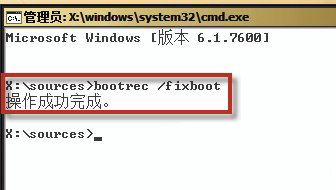
Solutions: for the repair of the hard drive master guide record (i. E. Mbr), this failure can be easily resolved by installing a cd-based repair tool - bootrec. Exe - with win7. Its operational steps are to start the computer with a win7 installation, press shift+f10 when the cd starts, pull out the command hint window and enter the dos command "bootrec/fixmbr" as shown in figure 1 below, press the return key and rewrite the hard drive master guide record as indicated。
Bad 2: oxc000000e
Fault performance: the system cannot be logged in normally when it is on board, but rather the oxc000000e fail-over alert shown in figure 2。
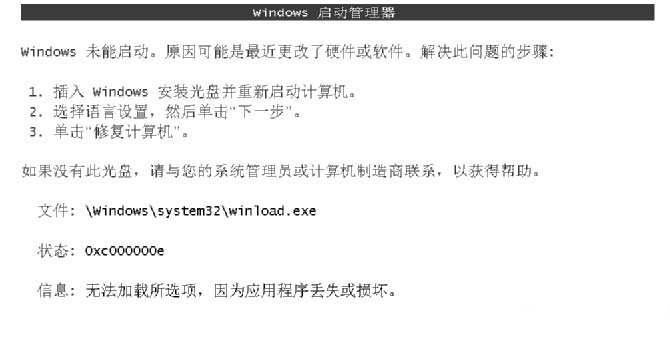
Reason analysis: the installation or unloading of some of the more special software tends to cause very serious damage to win7's lead program, which results in an oxc000000e error at start-up, thereby rendering the system unable to start properly. In this case, the f8 shortcut cannot be removed from win7's advanced start-up menu, nor can repair operations be performed in safe mode。
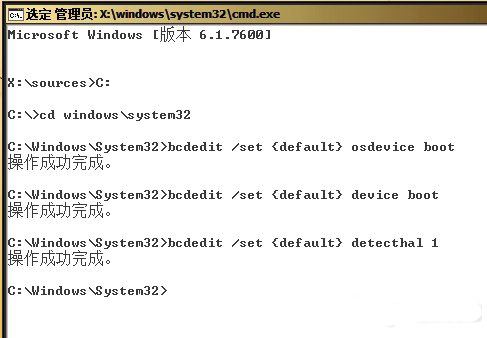
Solutions: execute the following five dos commands in turn at the cursor position of the window shown in figure 1 (as figure 3, drive c is the system disk installed by win7, down:
C:
I don't know, cd windows\system32
Bcdedit / set
Bcdedit/set
Bcdedit /set {default}decthal1
Failed 3: bootmgr ismissing
Fault performance: every time you turn on, there will be information on the error alerts shown in figure 4 and the system will also be irregularly logged in. The error hint, translated into chinese, is bootmgr missing, restarting by ctrl+alt+del。
Reason analysis: this trigger failure is most common either because the bootmgr file was actually lost, or possibly because of a disk error。
Solutions: if the bootmgr document is lost, the solution can be done by rebuilding the win7 guide。
The operational step is to execute the following two dos commands at the cursor position of the window shown in figure 1:
C:
Bcdboot c:\windows /sc:
Then you can restart the system, and you can see win7's familiar start-up menu, and then you can choose the first win7 menu option, and then we can start with the win7 system。
If, after the above steps, the problem is still not resolved, the failure is likely to be caused by a disk error, at which point the failure can be resolved well by trying to run a chkdsk/f command in the winpe environment。
Failed 4: bootmr is compromised
Fault performance: the malfunction is similar to the “botmr is missing”, as is the failure to log-in the system and the mere occurrence of a “botmr is compromised” error (as figure 5)。
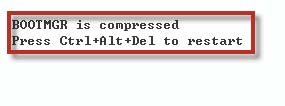
Reason analysis: this failure was due to the compression of the system disk。
Solutions: activate the system with winpe, run its own command prompt tool and execute the following dos commands in order:
C:
I don't know, cd windows\system32
Compact /u /a /f /i /s c:*
After the above-mentioned dos command is executed, the command prompt tool will start the complete decompression of the c-disk file and then restart the system, which will allow normal login to the win7 system。