01excel importance of basic knowledge
Excel, a tabular-processing software that is widely used, has a foundational knowledge that is essential to improving efficiency. From the creation of simple tables to complex data analysis, excel's base operation will not only help us better manage the data, but will also make our work easier. Thus, in-depth learning and basic knowledge of excel is undoubtedly the goal that every one of us should pursue in our work。
Excel improves efficiency
Excel, a popular table-processing software, is not only a tool for data management, but also an essential tool for improving efficiency. The extent to which the underlying knowledge is available directly determines whether we can efficiently process and analyse data. To help you better understand and apply excel, we will continuously share and explore its basic knowledge and practical applications。
Based on 1 per cent excel, 99 per cent of day-to-day work challenges are easily met. Excel is not just a trade, but an area where courage and wisdom are needed. We are committed to making excel's basic knowledge universal and to helping you to gain better access to this office hallowed device and to improving its efficiency。
• the benefits of learning excel
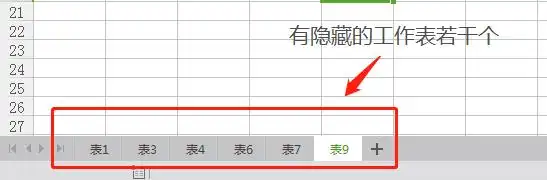
In exploring excel's journey, let us learn, progress and meet the challenges at work together. In the face of such a problem, we may feel helpless or even insane. After all, it is indeed a cumbersome and error-prone task to remove 100 hidden sheets in one book。
A mastery of the excel base can meet 99 per cent of the challenges of daily work. First, you might want to remove the hidden sheets one by one, and then select and delete them one by one. However, this method is inefficient and, if it is inadvertently deleted, it has to start from scratch, which is a real problem。
02excel practical techniques
Now, let me share a hidden feature in excel: document checker. It is in the options button under the file menu, which helps you manage excel sheets efficiently。
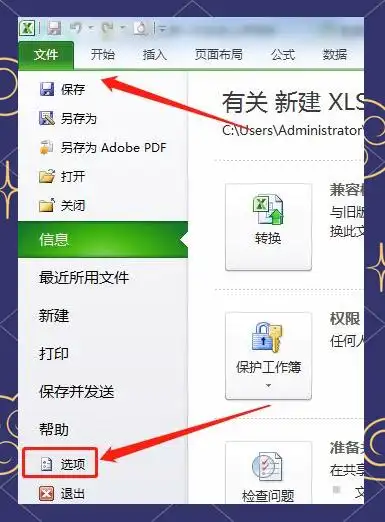
In excel, find and click on the trust centre option, and then select the trust centre settings button to enter the relevant settings interface。
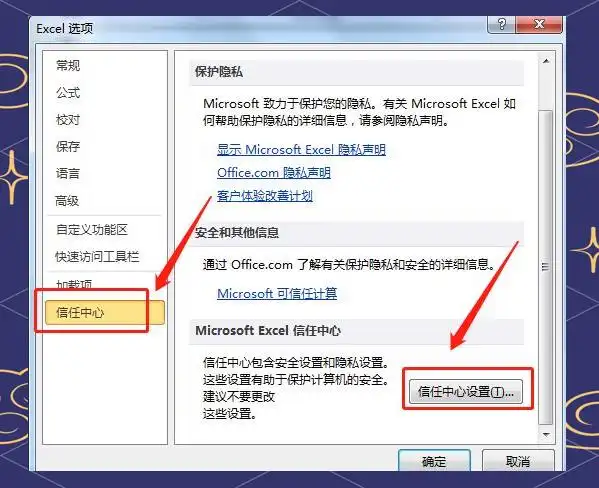
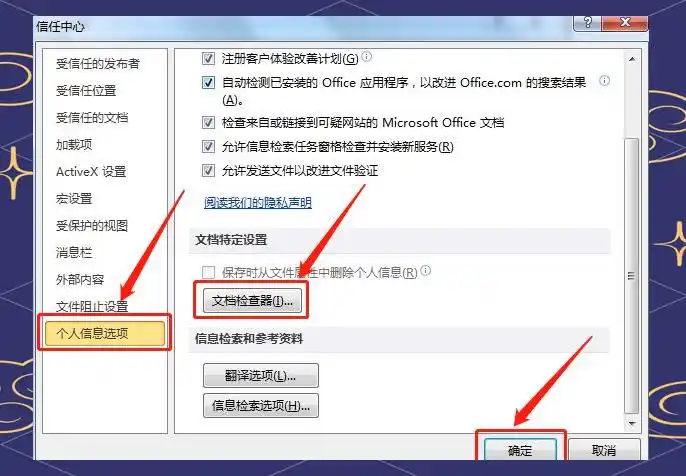
Finds and clicks on the personal information options button in excel trust center settings, and then selects the document checker for associated operations。
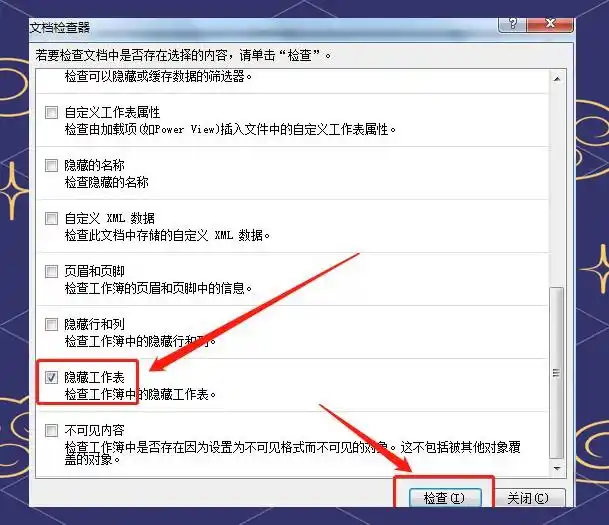
In personal information options, tick hide sheets and click the check button to perform the associated operation。
After the ticking and clicking operation, the system automatically detects and displays 100 hidden sheets. Then we just have to lightly remove all the hidden sheets quickly and easily。
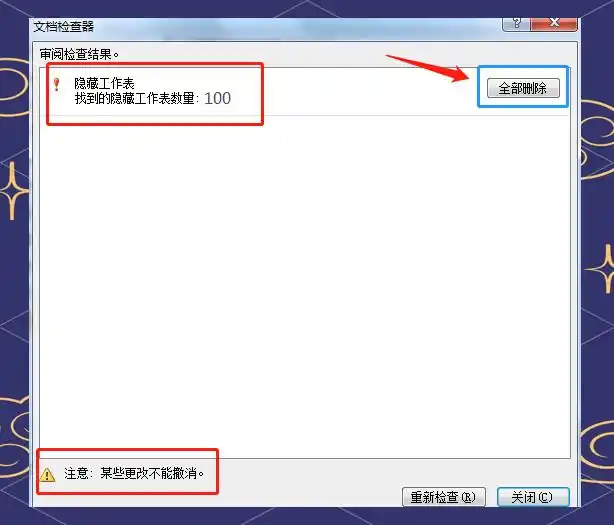
Excel's document checker can remove the hidden sheet in bulk. This method applies not only to the mass removal of hidden sheets, but also to the removal of hidden columns, comments, etc. However, careful pre-operation confirmation is essential, as these deletions will not be resumed once implemented. Loss of data can be avoided if the error is not considered, only if the functionality interface is closed and excel exited。
Okay, focus
In our busy work and life, we often find it difficult to concentrate. However, it is at this very moment that we need to learn to focus on the most important things. By focusing, we are better able to seize the opportunity to achieve a mixed harvest of personal growth and career development. Let us stay busy and stay focused and achieve a better future。
It's a good review
On the journey to explore focus, we may recall the good moments of the past. By focusing, we have not only seized the key opportunities at work, but also left a deep mark on the path to professional growth. Let us remain focused and constantly pursue a better tomorrow。